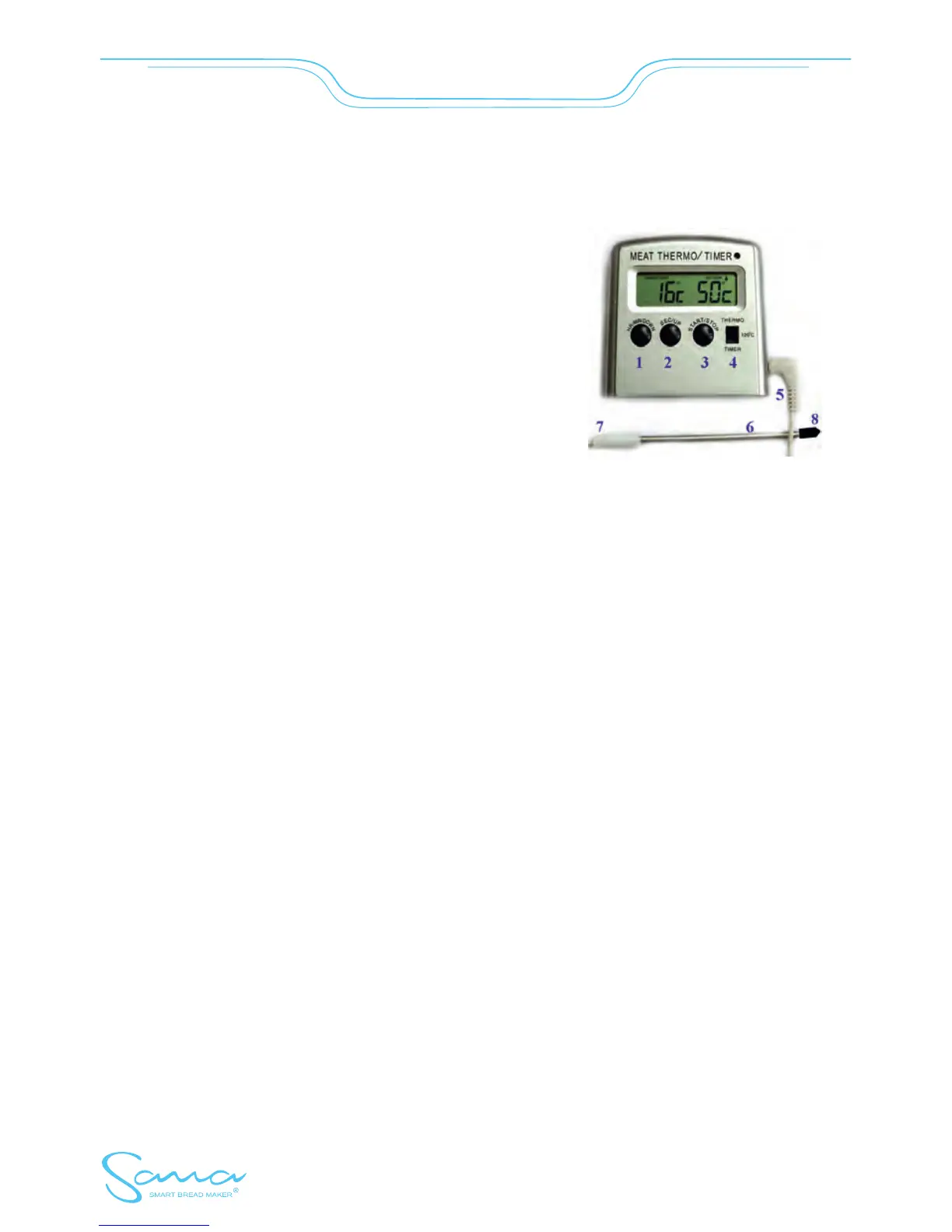
THERMOMETER WITH TIMER FUNCTION
with alarm temperature set to 150°C + wide timer range from 1 sec. to 99 hours.
This thermometer equipped with timer function is designed for
use in the kitchen and for „do-it-yourselfers” as well.
Temperatures out of the measurement range are viewed on the
display as follows: „--“.
Temperature measurement range: –20 °C to + 150 °C
For temperature measurement, a stainless measuring
sensor with cable (5) is used.
When the temperature exceeds 70 °C expose the metal
end only, not the plastic parts or cables!
Attention! Always remove the sensor end cover before starting the measurement (8). Please note, the
thermometer case is not waterproof and neither is the needle opening (7). Always keep in mind that it
must not be immersed into liquid. You can use a clip or a peg to secure the needle in a container in
avertical position, so the water level does not reach the plastic slider on the other end of the needle (7).
Positioning and assembly
This thermometer with timer function is possible to stand on a table in a vertical position or a slope using
a stand or it may be secured to a metal surface using a magnetic holder.
Measurement and temperature control up to 150 °C
Insert the sensor (needle 6) into the socket on the right side of the case (connector 5).
Switch the button 4 into position THERMO
Use buttons 1+2 to set the temperature to be signalized (this value must be always higher than actual
temperature)
Use button 3 to switch over the sound alarm (symbol "waveline" is viewed instead of "bell" symbol)
Touch buttons 1+2 at the same time to switch off the alarm (symbol „waveline“ changes back into
„bell“ symbol)
Timer function - downward time counting
Switch button 4 to the TIMER position.
Use buttons 1+2 to set the required time period (within the range 99 hours to 59 seconds
Use button 3 to switch off the activated alarm after the period set elapsed, but please note, the previous
time setting on the display remains unchanged
Touch buttons 1+2 at the same time to switch off the function and clear the display.
smartbreadmaker.com
- 25 -
SmartBreadMaker


 To Next Page