Setting the language
You can choose from three different
languages (English, French and
Spanish) for the on=screen displays.
On-screen language selection
(step 3) will automatically appear on
the screen when you press MENU
initially. Select the language you
prefer first, then proceed with the
other menu options.
1
2
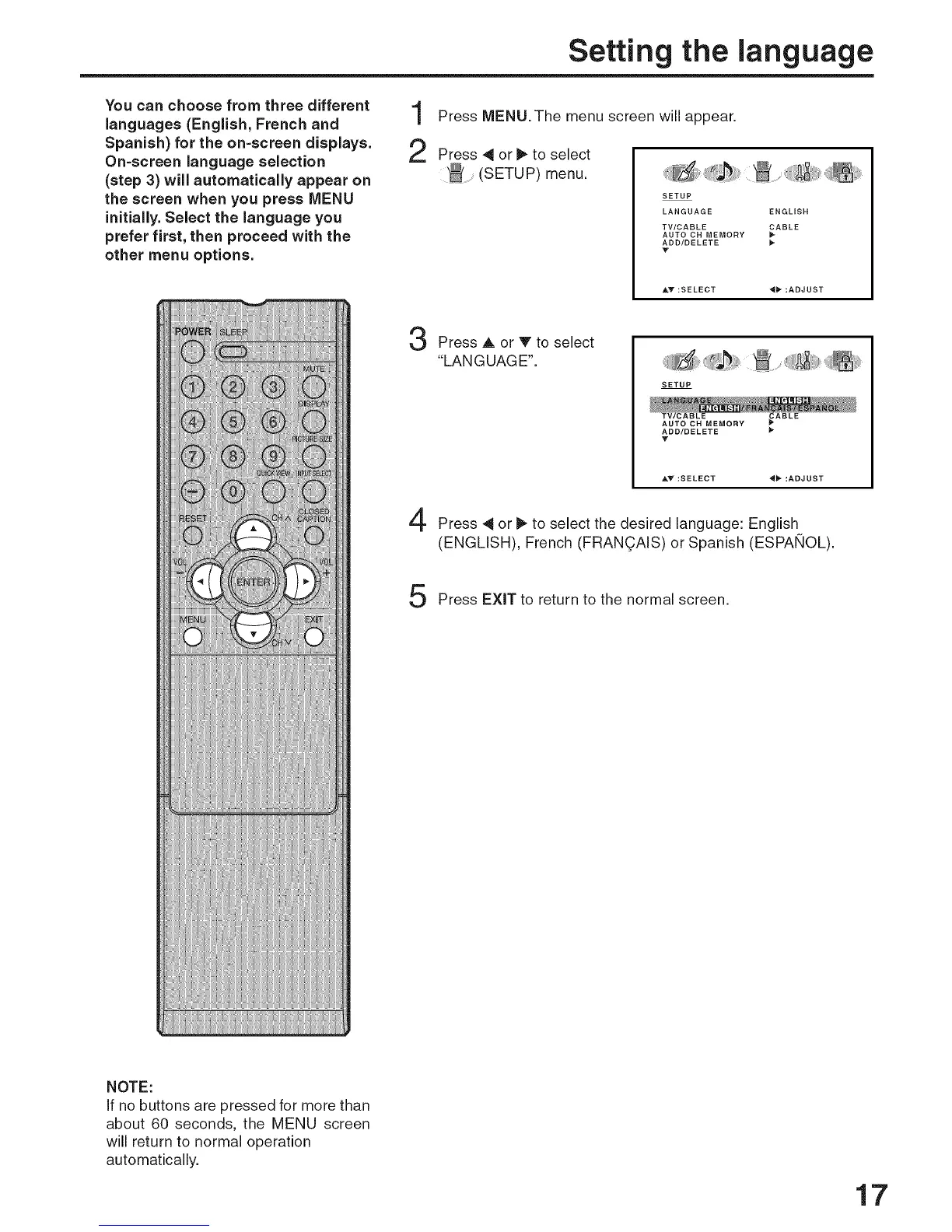
Press MENU. The menu screen will appear.
Press 4 or _ to select
(SETUP) menu.
SETUP
LANGUAGE ENGLISH
TV/CABLE _ABLE
AUTO CH MEMORY
ADD/DELETE
V
_kV :SELECT _" :ADJUST
Press A or V to select
"LANGUAGE".
SETUP
AUTO CH MEMORY _ABLE
ADD/DELETE
V
&V :SELECT "_ :ADJUST
Press _ or I_ to select the desired language: English
(ENGLISH), French (FRAN(_AIS) or Spanish (ESPAKIOL).
Press EXiT to return to the normal screen.
NOTE:
If no buttons are pressed for more than
about 60 seconds, the MENU screen
will return to normal operation
automatically.
17



 To Next Page