Parts and functions
Top
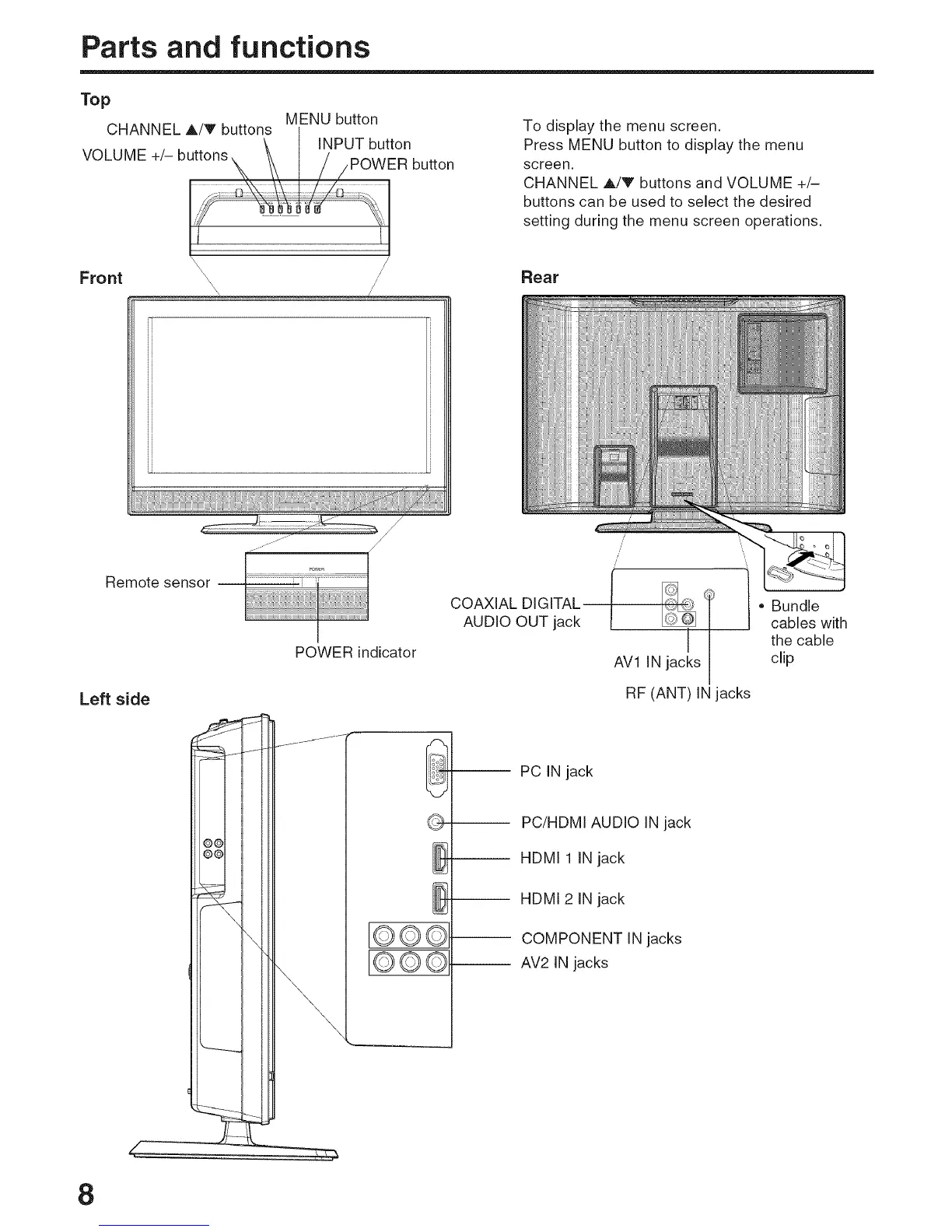
MENU button
CHANNEL A/V buttons
\ I INPUT button
VOLUME +/- butt°nsx _ / / /POWER button
To display the menu screen.
Press MENU button to display the menu
screen.
CHANNEL A!V buttons and VOLUME +/-
buttons can be used to select the desired
setting during the menu screen operations.
Rear
Remote sensor
Left side
POWER indicator
O©©--
O©©--
COAXIAL DIGITAL
AUDIO OUT jack
/'
= Bundle
cables with
I the cable
AV1 IN jacks clip
RF (ANT) IN jacks
PC IN jack
PC/HDMI AUDIO IN jack
-- HDMI 1 IN jack
-- HDMI 2 IN jack
COMPONENT IN jacks
AV2 IN jacks
8



 To Next Page