Resetting your picture adjustments
The RESET function returns your
picture quality adjustments to the
following factory settings:
PICTUREPREFERENCE...... SPORTS
BRIGHTNESS......................center (25)
CONTRAST............................max (50)
COLOR ................................center (25)
TINT ..............................center (0)
SHARPNESS..............center (25)
COLORTEMPERATURE...COOL
1
2
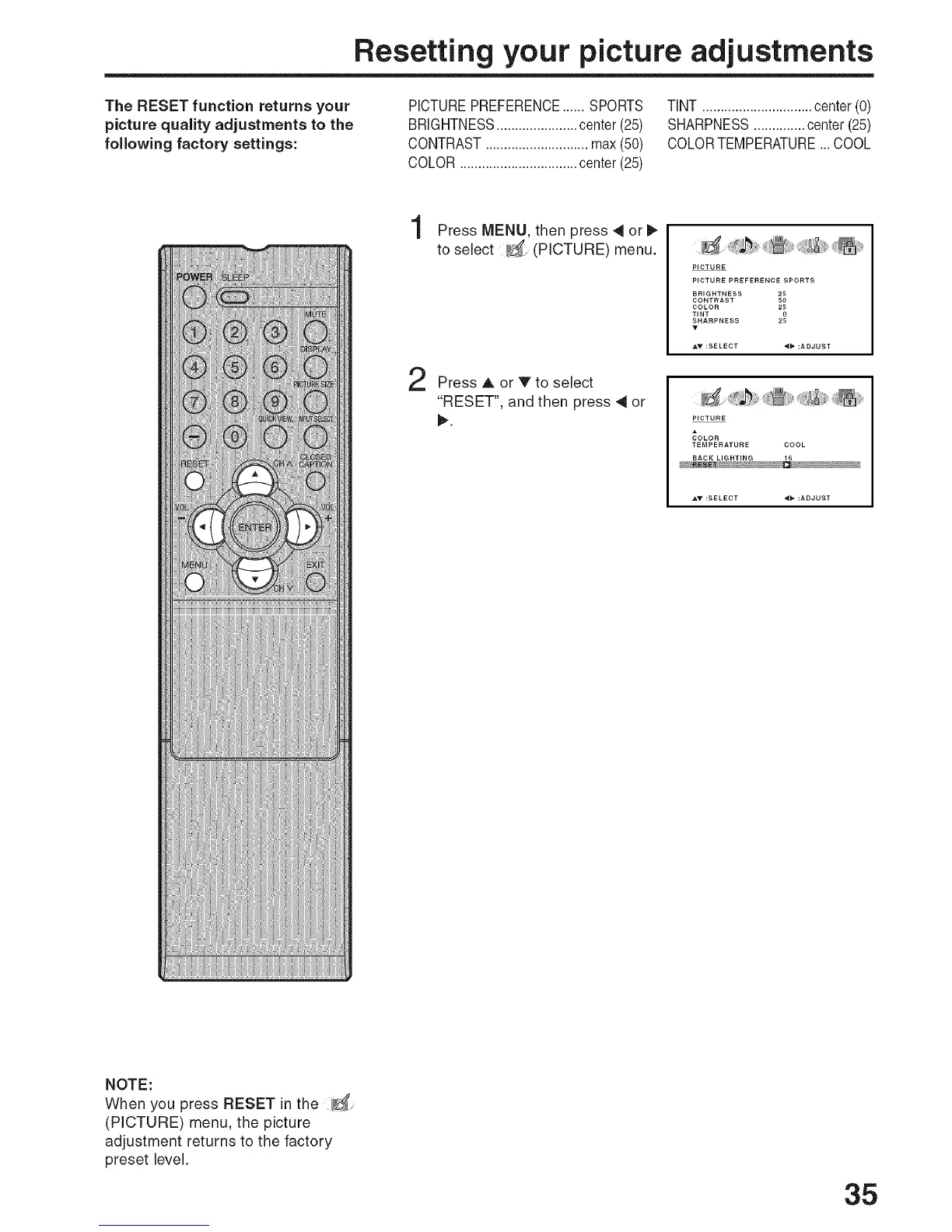
Press MENU, then press 4 or
to select (PICTURE) menu.
Press A or V to select
"RESET", and then press 41or
I_.
PICTURE
PICTURE PREFERENCE SPORTS
BRIGHTNESS 25
CONTRAST 50
COLOR 25
TINT 0
SHARPNESS 2
AT :SELECT 4_ :ADJUST
PICTURE
_OLOR
TEMPERATURE COOL
BACK LIGHTING 16
NOTE:
When you press RESET in the _
(PICTURE) menu, the picture
adjustment returns to the factory
preset level.
35



 To Next Page