Selecting the digital output/
Resetting your audio adjustments
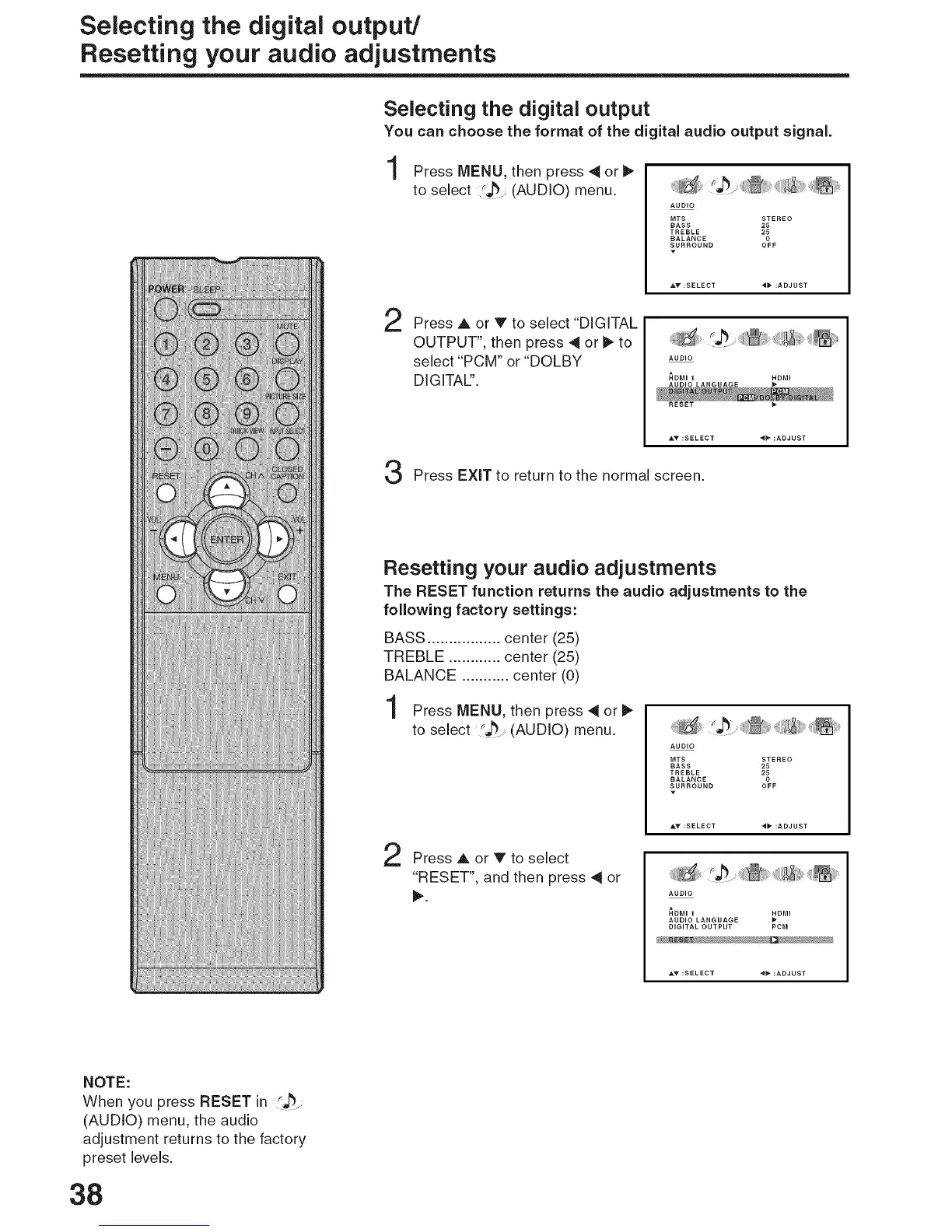
Selecting the digital output
You can choose the format of the digital audio output signal.
Press MENU, then press 4 or
to select (AUDIO) menu.
'_ii_i_,_• ......._i/i_i_;!_,,_iiii!_:_iiii!_,_ii_¸
AUDIO
MTS STEREO
BASS 25
TREBLE 25
BALANCE 0
SURROUND OFF
2
Press A or V to select "DIGITAL
OUTPUT", then press 4 or _ to
select "PCM" or "DOLBY
DIGITALS'.
AUDIO
_,,o'........ ;DO,
Press EXiT to return to the normal screen.
Resetting your audio adjustments
The RESET function returns the audio adjustments to the
following factory settings:
BASS ................. center (25)
TREBLE ............ center (25)
BALANCE ........... center (0)
Press MENU, then press 4 or
to select (AUDIO) menu.
Press A or V to select
"RESET", and then press 4 or
AUDIO
MTS STEREO
BASS 25
TREBLE 25
BALANCE 0
SURROUND OFF
AUDIO
_D_ _D_
AUDIO LANGUAGE
DIGITAL OUTPUT PCM
NOTE:
When you press RESET in
(AUDIO) menu, the audio
adjustment returns to the factory
preset levels.
38



 To Next Page