Selecting the cinema mode/Using the aspect feature
Selecting the cinema mode
A smoother motion may be obtained by setting the Picture
Mode to Film when you view a DVD from the DVD player
connected with the component input.
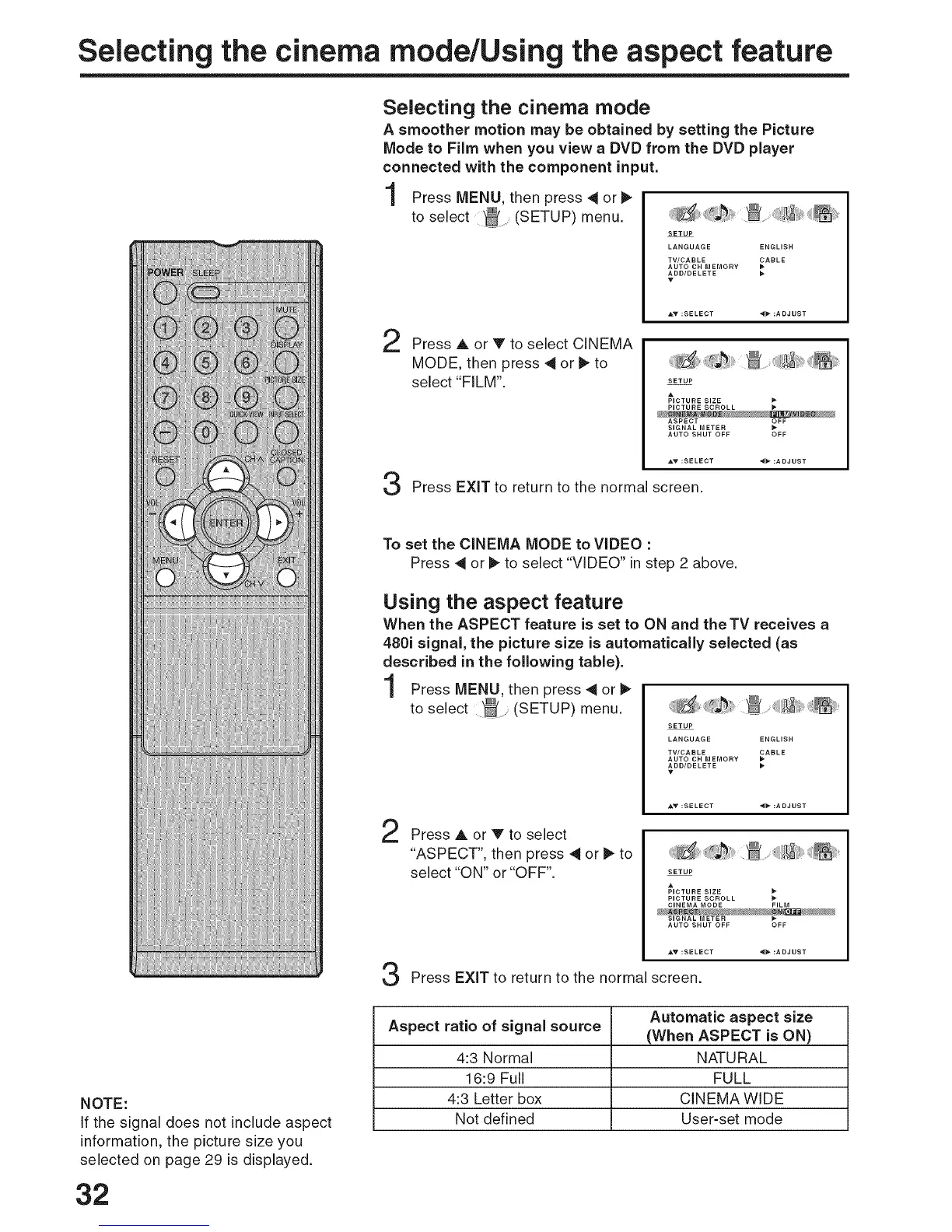
Press MENU, then press 4 or I_
to select _ (SETUP) menu.
2
3
SETUP
LANGUAGE ENGLISH
TV/CABLE _ABLE
AUTO CH MEMORY
ADD/DELETE
Press A or V to select CINEMA
MODE, then press 4 or t_ to
select "FILM".
SETUP
A
PICTURE SIZE
PICTU RE SCROLL
ASPECT OFF
SIGNAL METER
AUTO SHUT OFF OFF
Press EXIT to return to the normal screen.
NOTE:
If the signal does not include aspect
information, the picture size you
selected on page 29 is displayed.
32
To set the CINEMA MODE to VIDEO :
Press 4 or _ to select "VIDEO" in step 2 above.
Using the aspect feature
When the ASPECT feature is set to ON and the TV receives a
480i signal, the picture size is automatically selected (as
described in the following table).
Press MENU, then press _ or
to select (SETUP) menu.
Press A or V to select
"ASPECT", then press 4 or _ to
select "ON" or "OFF".
...... _
SETUP
LANGUAGE ENGLISH
TV/CABLE _ABLE
AUTO CH MEMORY
ADD/DELETE
SETUP
PICTURE SCROLL
CINEMA MODE FILM
SIGNAL METER
AUTO SHUT OFF OFF
_:SELECT
Press EXIT to return to the normal screen.
Automatic aspect size
Aspect ratio of signal source (When ASPECT is ON)
4:3 Normal NATURAL
16:9 Full FULL
4:3 Letter box CINEMA WIDE
Not defined User-set mode



 To Next Page