Selecting the color temperature/
Adjusting the back lighting
Selecting the color temperature
Change the picture quality by selecting from three preset color
temperatures=COOL, MEDIUM, and WARM:
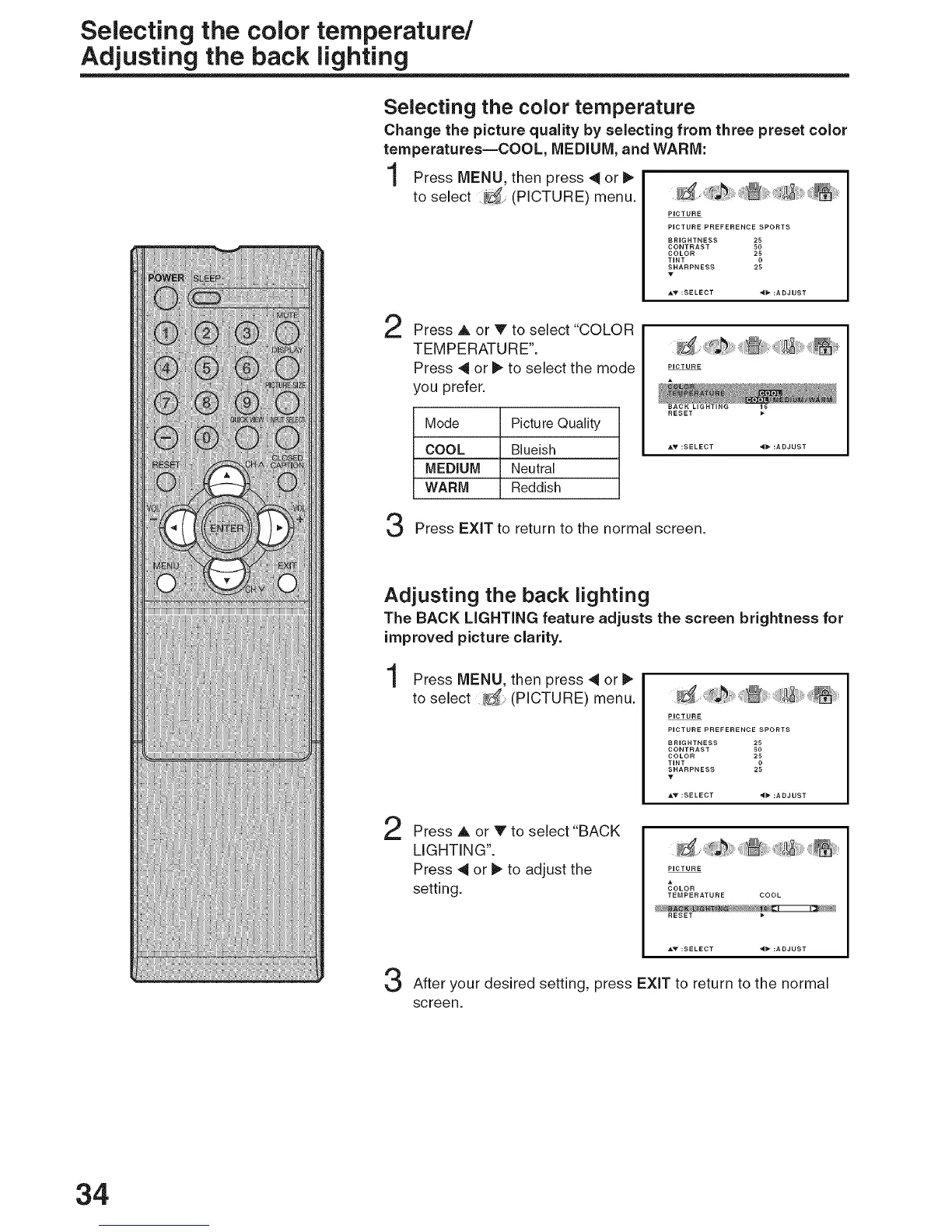
Press MENU, then press 4 or
to select (PICTURE) menu.
PICTURE
PICTURE PREFERENCE SPORTS
BRIGHTNESS 25
CONTRAST 50
COLOR 25
TINT 0
SHARPNESS 25
A_" :SELECT _b- :ADJUST
2 Press A or V to select "COLOR
TEMPERATURE".
Press 4 or _ to select the mode
you prefer.
Mode Picture Quality
COOL Blueish
MEDIUM Neutral
WARM Reddish
RESET
AY :SELECT _* :ADJUST
Press EXiT to return to the normal screen.
Adjusting the back lighting
The BACK LiGHTiNG feature adjusts the screen brightness for
improved picture clarity.
Press MENU, then press 4 or
to select (PICTURE) menu.
PICTURE
PICTURE PREFERENCE SPORTS
BRIGHTNESS 25
CONTRAST 50
COLOR 25
TINT 0
SHARPNESS 25
T
2
Press A or V to select "BACK
LIGHTING".
Press 4 or l_ to adjust the
setting.
PICTURE
COLOR
TEMPERATURE COOL
RESET
After your desired setting, press EXiT to return to the normal
screen.
34



 To Next Page