Labeling channels
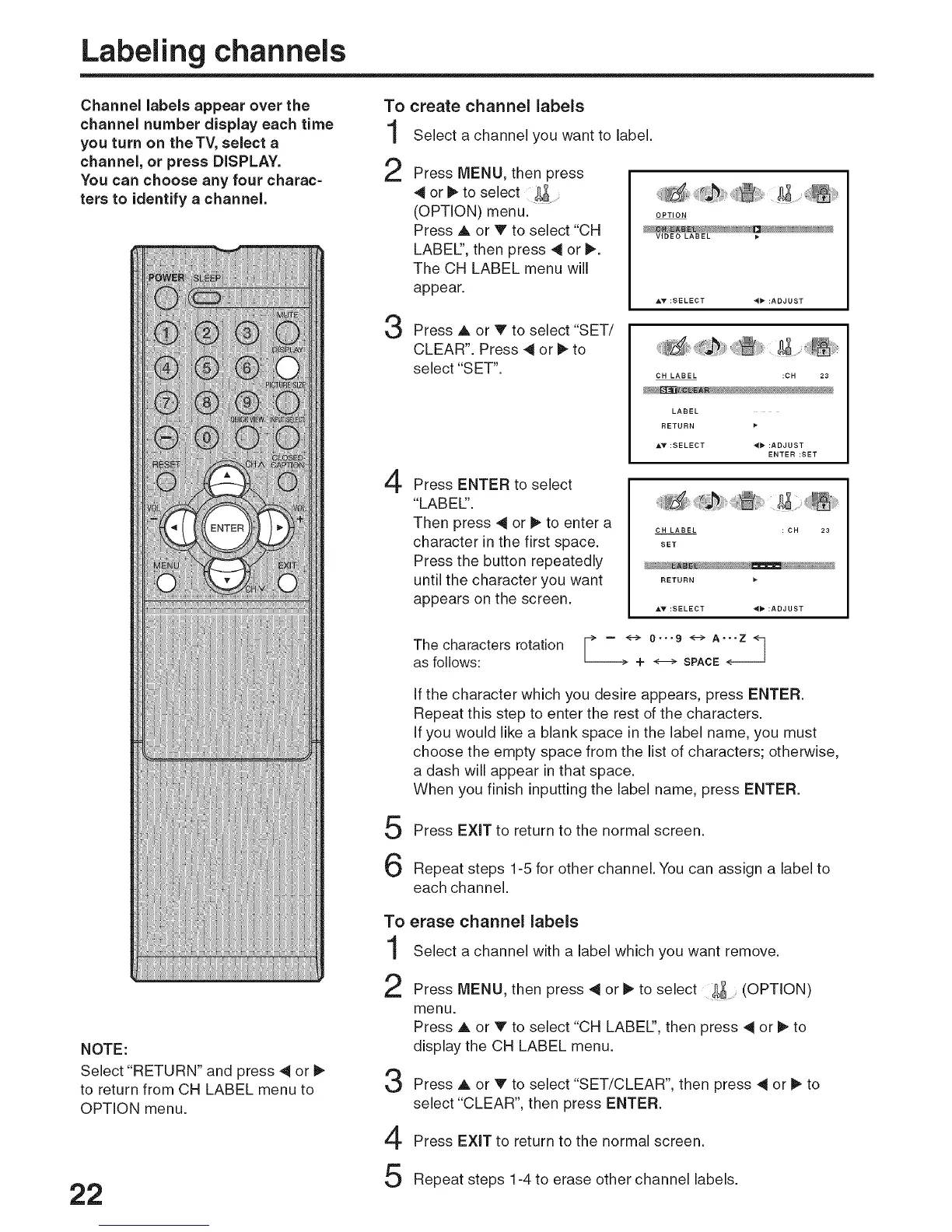
Channel labels appear over the To
channel number display each time "t
you turn on theTV, select a
!
channel, or press DISPLAY. O
You can choose any four charac=
,K_
ters to identify a channel.
3
4
create channel labels
Select a channel you want to label.
Press MENU, then press
4 or _, to select
(OPTION) menu.
Press A or V to select "CH
LABEL:', then press _ or _.
The CH LABEL menu will
appear.
OPTION
VIDEO LABEL )*
Press A or V to select "SET/
CLEAR". Press 4 or _ to
select "SET".
CH LABEL :CH 23
LABEL
RETURN
AV :SELECT d_ :ADJUST
ENTER:SET
Press ENTER to select
"LABEl".
Then press 4 or _ to enter a
character in the first space.
Press the button repeatedly
until the character you want
appears on the screen.
CH LABEL :CH 23
SET
RETURN
The characters rotation _> - <-> 0-..9 <-->A..-Z <-7
/ J
as follows: --_- 4- _ SPACE ._--
5
6
If the character which you desire appears, press ENTER.
Repeat this step to enter the rest of the characters.
If you would like a blank space in the label name, you must
choose the empty space from the list of characters; otherwise,
a dash will appear in that space.
When you finish inputting the label name, press ENTER.
Press EXiT to return to the normal screen.
Repeat steps 1-5 for other channel. You can assign a label to
each channel.
NOTE:
Select "RETURN" and press 41or _"
to return from CH LABEL menu to
OPTION menu.
22
To
1
2
3
4
5
erase channel labels
Select a channel with a label which you want remove.
Press MENU, then press 4 or II_to select &_ (OPTION)
menu.
Press A or V to select "CH LABEl", then press 4 or I_ to
display the CH LABEL menu.
Press A or V to select "SET/CLEAR", then press ,_ or I_ to
select "CLEAR", then press ENTER.
Press EXiT to return to the normal screen.
Repeat steps 1-4 to erase other channel labels.



 To Next Page