26
A B C D E F G - - - - - - - - - - - - - - - -
A B C D E F G - - - - - - - - - - - - - - - -
A B C D E F G - - - - - - - - - - - - - - - - - - - - - - - - - -
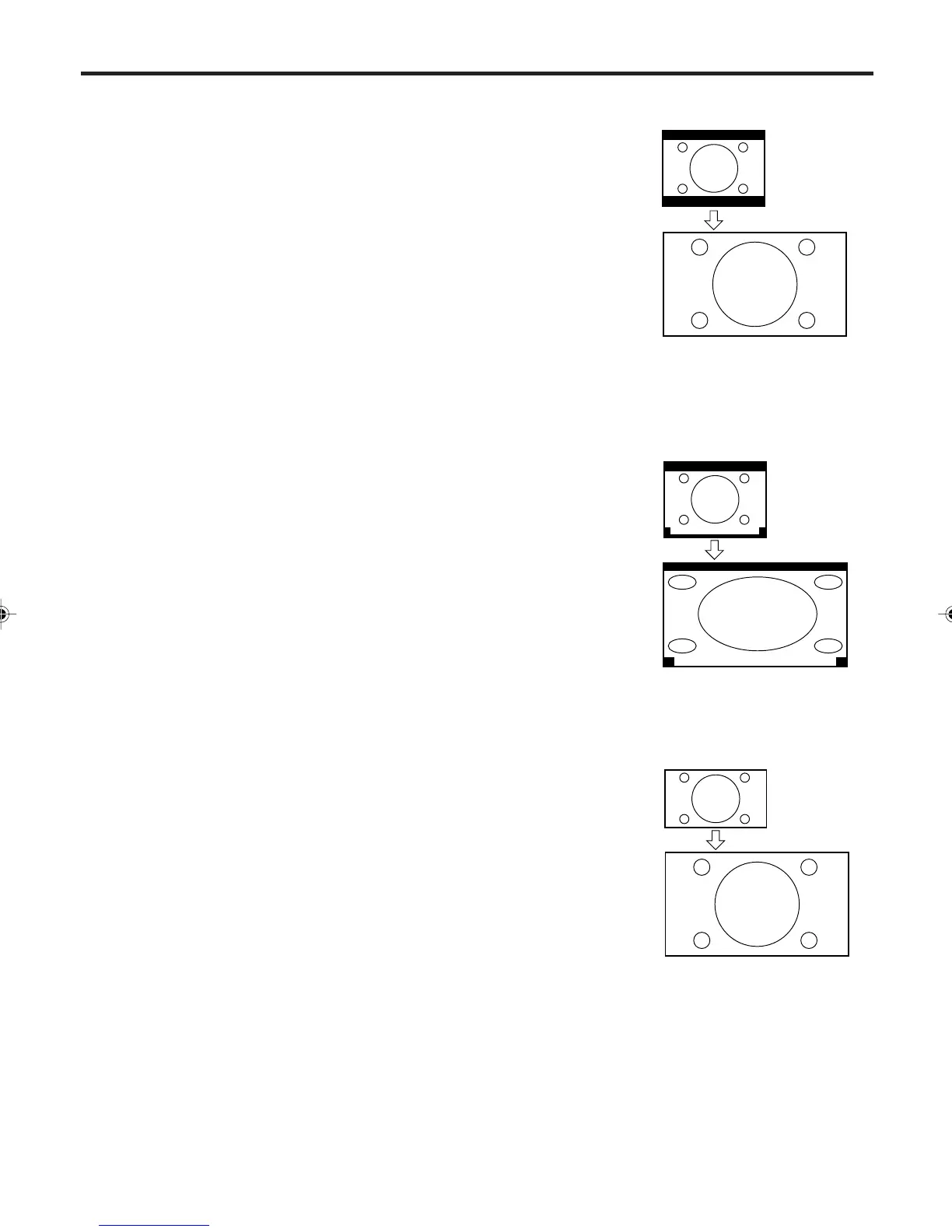
CINEMA WIDE2 picture size (for letter box programs)
The entire picture is uniformly
enlarged—it is stretched the same
amount both wider and taller
(retains its original proportion).
The top and bottom edges of the
picture may be hidden. To view the
hidden areas, it is possible to make
the picture scroll (see the next
page).
CINEMA WIDE3 picture size (for letter box programs
with subtitles)
To fill the width of the screen, it is
extended horizontally. However; it is
only slightly extended at the top and
the bottom.
The top and bottom edges of the
picture may be hidden. To view the
hidden areas (such as subtitles or
captions), it is possible to make the
picture scroll (see the next page).
FULL picture size (for 16:9 source programs)
FULL will display the picture at the
maximum size.
NOTES:
• The PICTURE SIZE feature is not
available for some program
formats (such as 1080i or 720p).
Such formats will display in FULL.
• The PICTURE SIZE feature is not
available in the PC mode.
Setting the picture size
CINEMA WIDE2 picture
size example
CINEMA WIDE3 picture
size example
FULL picture size example
3V03001A_En_p24-26 8/23/05, 16:3326



 To Next Page