10
WARNING: Before starting assembly, verify this part is
undamaged. If damaged, do not return the damaged item to your dealer;
contact Customer Service. Never use damaged parts!
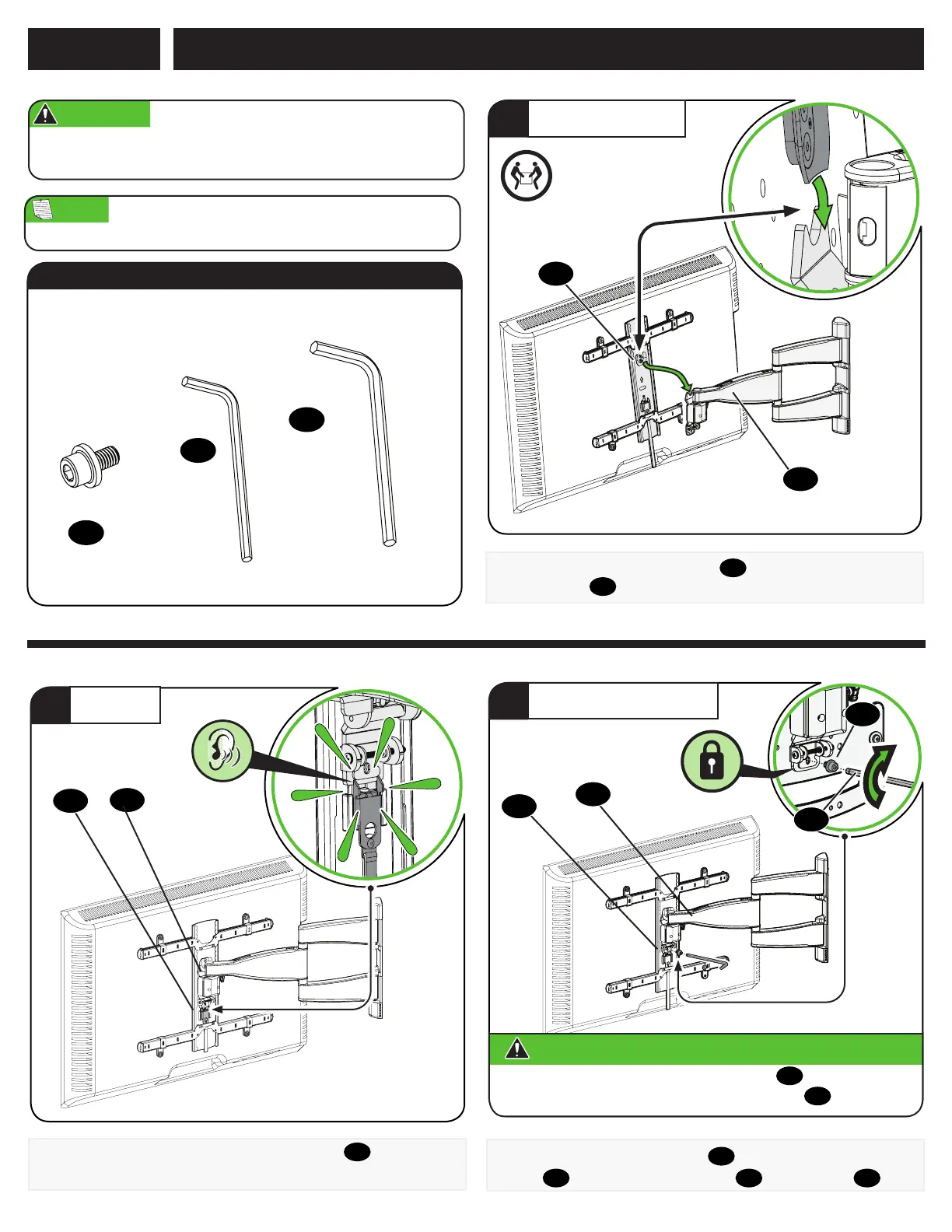
Attach TV to Wall Plate
STEP 3
Hang the TV onto the arm assembly
08
by hooking the top support
on TV bracket
04
as shown.
1
HANG YOUR TV
HEAVY! You may
need assistance
with this step.
04
08
12
To lock the TV onto arm assembly
08
, install the securement
screw
12
on the vertical TV bracket
04
using hex key
14
.
Always make sure your securement screw
12
is tightened, so
the TV is securely fastened to the arm assembly
08
.
CAUTION:
Avoid potential personal injury or property damage!
3
SECURELY TIGHTEN
04
08
14
08
Press the bottom of the TV into the arm assembly
08
until you hear
the lock click, securing the TV in place.
2
ATTACH
04
3/32 in.
5/32 in.
10-32 x 1/4 in.
Parts and Hardware for STEP 3
Hex Key
Hex Key
12
x1
13
x1
14
x1
Securement
Screw
NOTE: TV shifts 2.4 in. (6.2 cm) to the right or left when in the home
position. Consider this when selecting the location of your wall mount.


 To Next Page