11
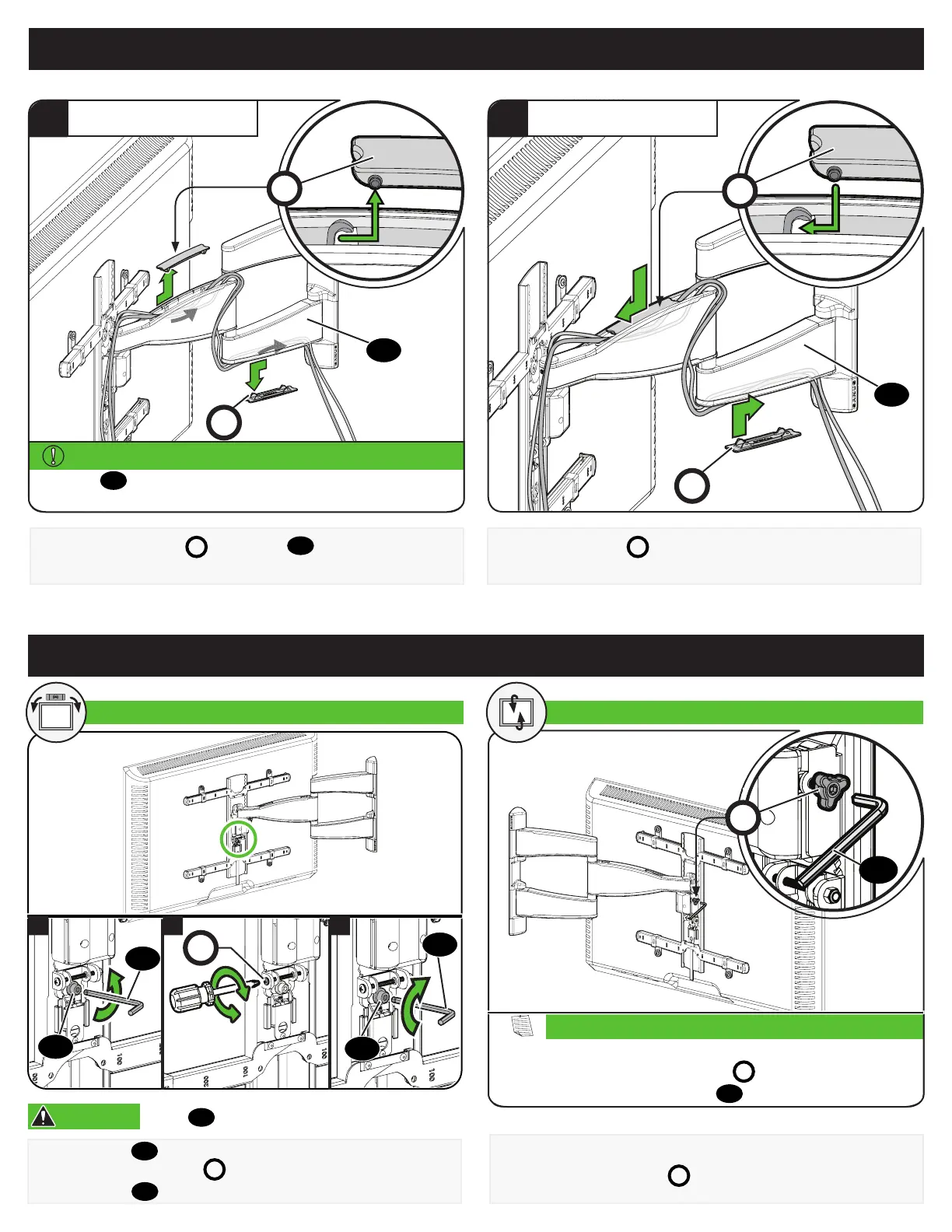
Manage Cables
Remove the cable covers
C
from the arm
08
by sliding to unlock.
Route the cables along the arm.
Reattach cable covers
C
to capture the cables.
1
ROUTE CABLES
2
ATTACH COVERS
C
C
C
C
Pull arm
08
to its full extension, to leave enough slack
and prevent stretching the cables when the arms are moved.
IMPORTANT:
08
08
Your TV should adjust easily when moved, then stay in place.
Adjust the tilt tension knobs
T
if your TV naturally tilts up or down.
T
If you do not intend to adjust the tilt for different viewing locations,
you can tighten the tilt tension knobs
T
, to prevent unwanted
movement. If needed, use hex key
14
to tighten more firmly.
NOTE:
TILT
Adjustments
1. Loosen screw
12
.
2. Level your TV with screw
L
.
3. Tighten screw
12
.
12
14
12
14
L
1 2 3
LEVEL ADJUSTMENT TILT ADJUSTMENT
14
CAUTION:
Screw
12
MUST be loosened before STEP 2.


 To Next Page