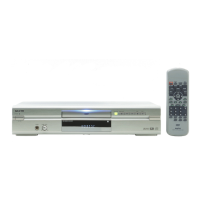
REMOTE CONTROLLER RB-SL50
REPEAT A - B ANGLE
TOP MENU RETURN
SETUP M E N U
AUD IO SUBTITLE RANDOM ZOOM
PROGRAM
REV P LAY FWD
NEXTPREV
SLOW
ON OPEN/CLOSE
123
6
98
5
4
7
0
+10
ENT
z
q
a
f
e
cd
k
STOP
n
-E28-
Important Note:
“ ” may appear on the TV screen during operation. This
icon means that the function is not available on the disc
now.
Need help? Call
1-800-813-3435
Pause
Press [k PAUSE/STEP] during playback.
•“k” appears on the TV screen.
• The PLAY indicator blinks on the unit.
Note:
The sound is muted.
The [a PLAY] to return to normal playback.
File Skip
Skipping forward
Press [NEXT e] during playback to skip to the next file.
“e” appears briefly on the TV screen.
Skipping backward
Press [PREV f] during playback to skip back to the begin-
ning of the previous file.
“f” appears briefly on the TV screen.
Repeat Playback
Press [REPEAT] during playback.
Each time the button is pressed, the repeat mode will be
changed as follows:
T: Repeat of the file being played
FOLDER: Repeat all files in the folder
ALL: Repeat all files (and all JPEG)
OFF: Normal playback mode
To Check the Elapsed Playing Time
Press [ON SCREEN] during playback.
• The current file elapsed playing time appears.
Press the button again to turn if off.
STOP
PREV
PAUSE
/STEP
REPEAT
ON SCREEN
NEXT
PLAY
DWM-450-US - English 3/16/05, 3:58 PM29


 To Next Page
 Loading...