9
Part Names and Functions
Rear Terminal
② ③①
④
⑥
⑦
⑤
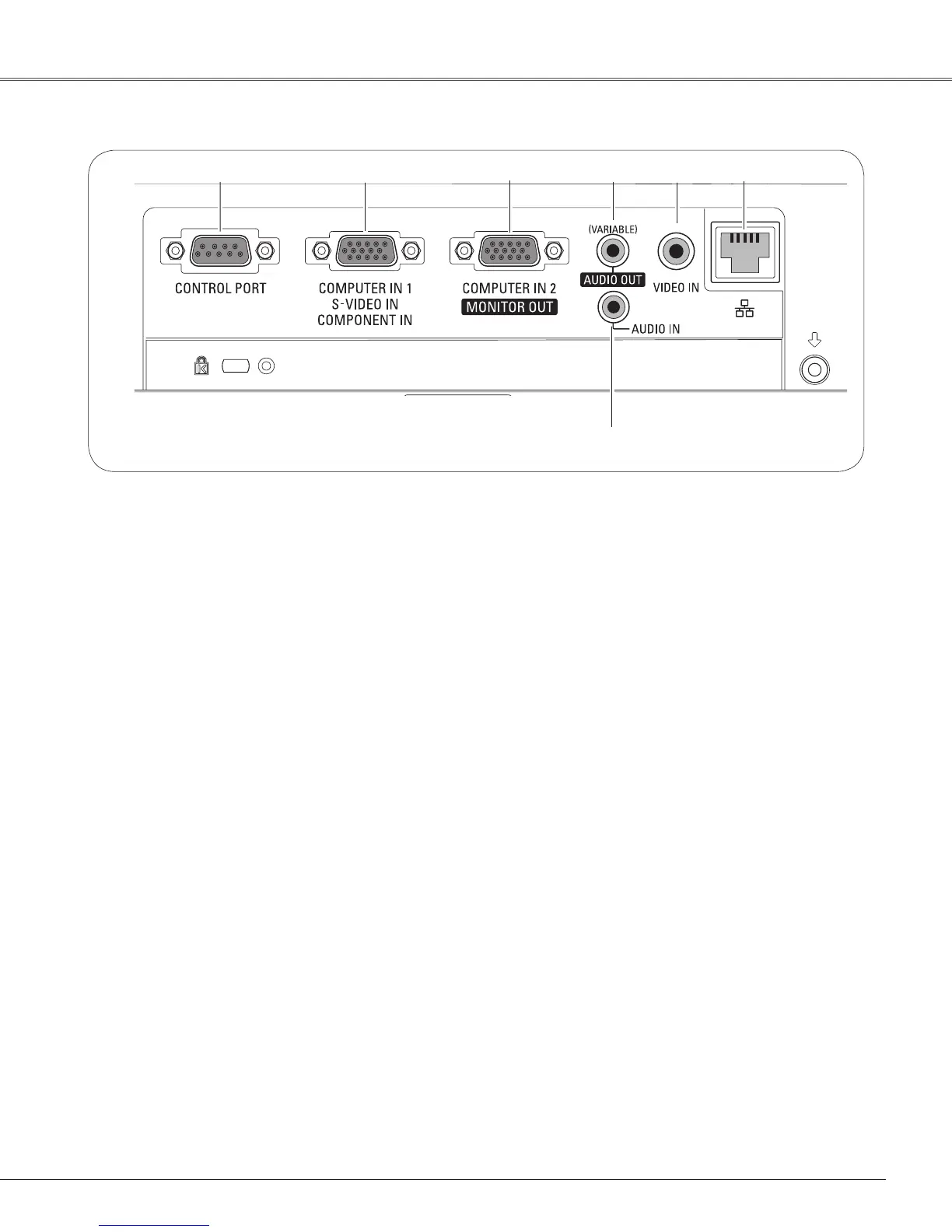
⑦ AUDIO IN
Connect the audio output signal from computer or
video equipment to this jack (pp.14-16).
⑤ VIDEO IN
Connect the composite video output signal to this
jack (p.15).
② COMPUTER IN 1 /S-VIDEO IN / COMPONENT IN
Connect analog RGB output signal from a
computer, S-VIDEO output signal from video
equipment, or RGB scart 21-pin video output or
component video output to this terminal (pp.14-16).
④ AUDIO OUT (VARIABLE)
Connect an external audio amplifier to this jack
(pp.14-16).
This terminal outputs sound from AUDIO IN
terminal.
⑥ LAN Connection Terminal
Connect the LAN cable (refer to the owner’s
manual of “Network Set-up and Operation”).
① CONTROL PORT
When the projector is controlled by a computer,
connect to this jack with serial control cable.
③ COMPUTER IN 2 / MONITOR OUT
– Connect analog RGB output signal from a
computer to this terminal (p.14).
– This terminal can be used to output the incoming
analog RGB and Component signal from
COMPUTER IN 1 /S-VIDEO IN /COMPONENT IN
terminal to the other monitor (pp.14,16).


 To Next Page
 Loading...