10
The Sapling Company, Inc.
1633 Republic Road
Huntingdon Valley, PA 19006
USA
P. (+1) 215.322.6063
F. (+1) 215.322.8498
www.sapling-inc.com
Before Installation - Static IP (ctd.)
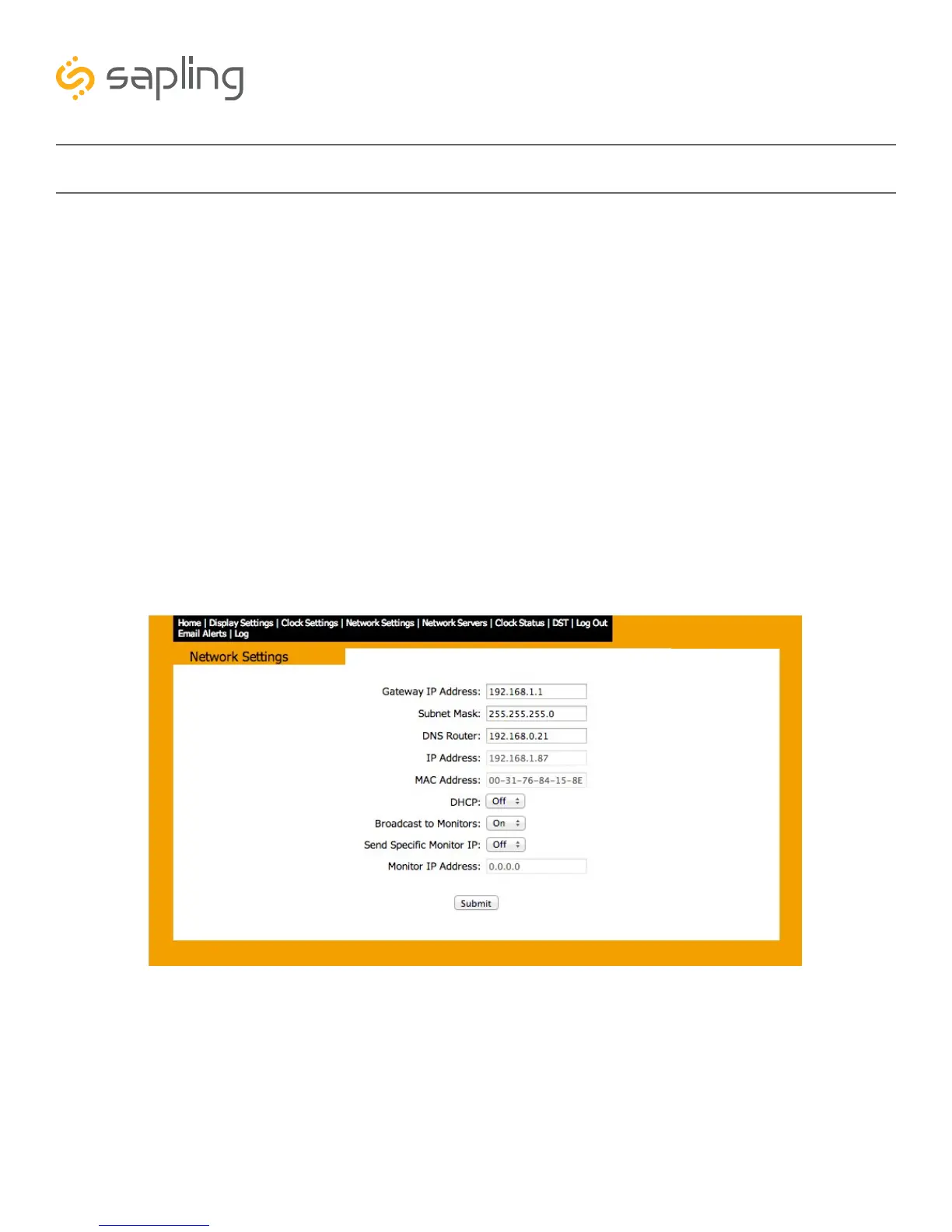
5. Next to “Gateway IP Address”, set an appropriate IP address. The address you enter should be
supplied by your network administrator.
6. Next to “Subnet Mask”, enter appropriate information. . The numbers you enter should be supplied
by your network administrator.
7. Next to “DNS Router”, set an appropriate IP address. The address you enter should be supplied by
your network administrator.
8. Next to “IP Address”, set an appropriate IP address. The address you enter should be supplied by your
network administrator. Do NOT use 192.168.0.123.
9. Write the Clock Number, IP Address, and intended installation location in your personal record.
10. Press Submit.
11. Exit the Web interface.
12. Detach the data cable.
13. Move the jumper back to SHIPPING POSITION.
14. Reattach the data cable and log in to the clock by using the new Static IP.
5
6
7
8
10



 To Next Page