39
The Sapling Company, Inc.
1633 Republic Road
Huntingdon Valley, PA 19006
USA
P. (+1) 215.322.6063
F. (+1) 215.322.8498
www.sapling-inc.com
User Input Installation (3300 Only)
(IMPORTANT: Detach clock from power source before installing new circuitry. DO NOT add new circuitry
while the clock is operating)
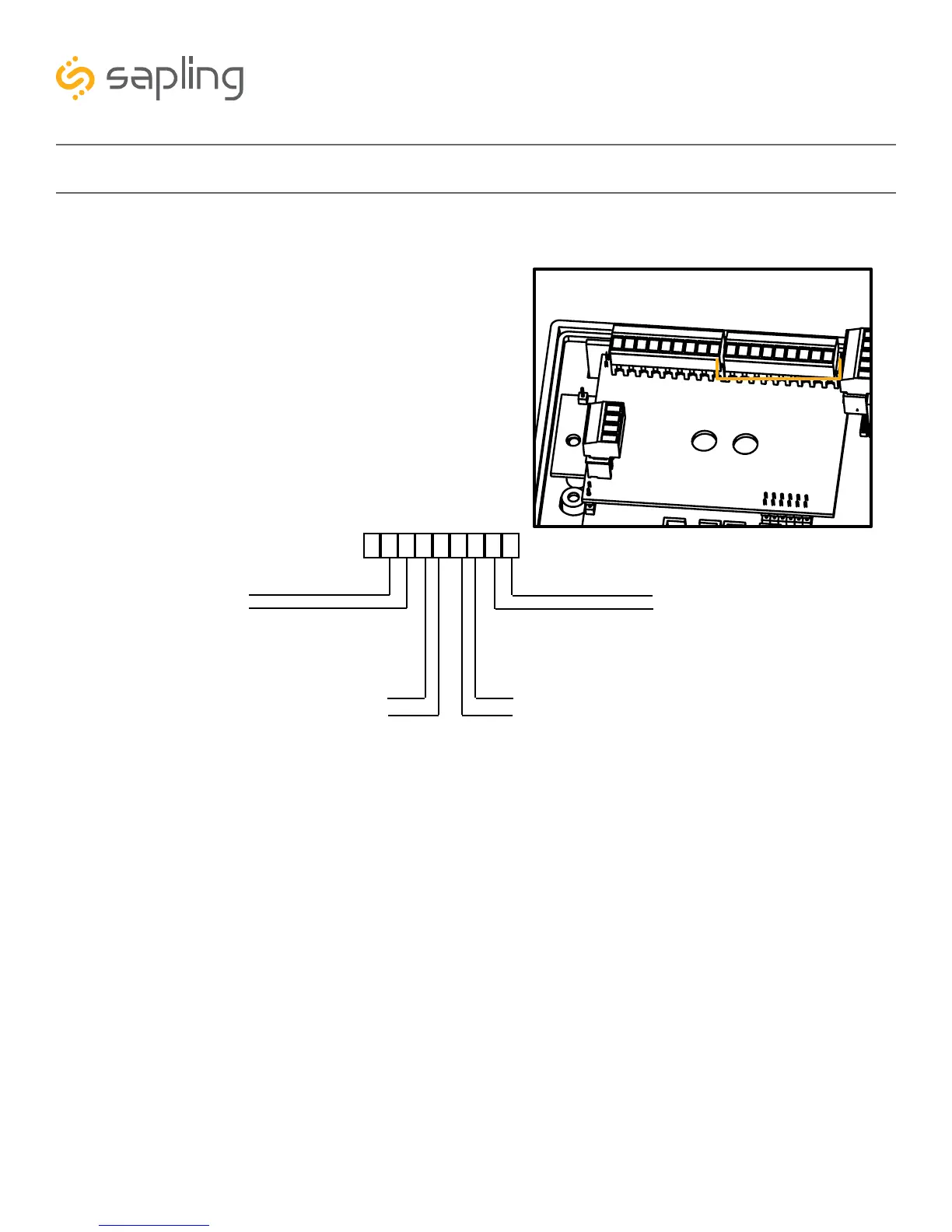
Applying a dry contact closure to any input activates
that input. To configure what a given input does to the
clock when activated, refer to the section of this manual
labeled “Web Interface - Inputs.”
During installation, there is one port blocks mentioned.
The block on the upper-right will be called J2. Refer to
the diagram on the right for details. The four available
inputs are assigned per the diagram below.
1
9
J2
J2-
1
2
3
4
5
6
7 8
9
Input 1
Input 2
Input 4
Input 3



 To Next Page