15 16
17
18
28
The Sapling Company, Inc.
1633 Republic Road
Huntingdon Valley, PA 19006
USA
P. (+1) 215.322.6063
F. (+1) 215.322.8498
www.sapling-inc.com
Flag Mount Installation
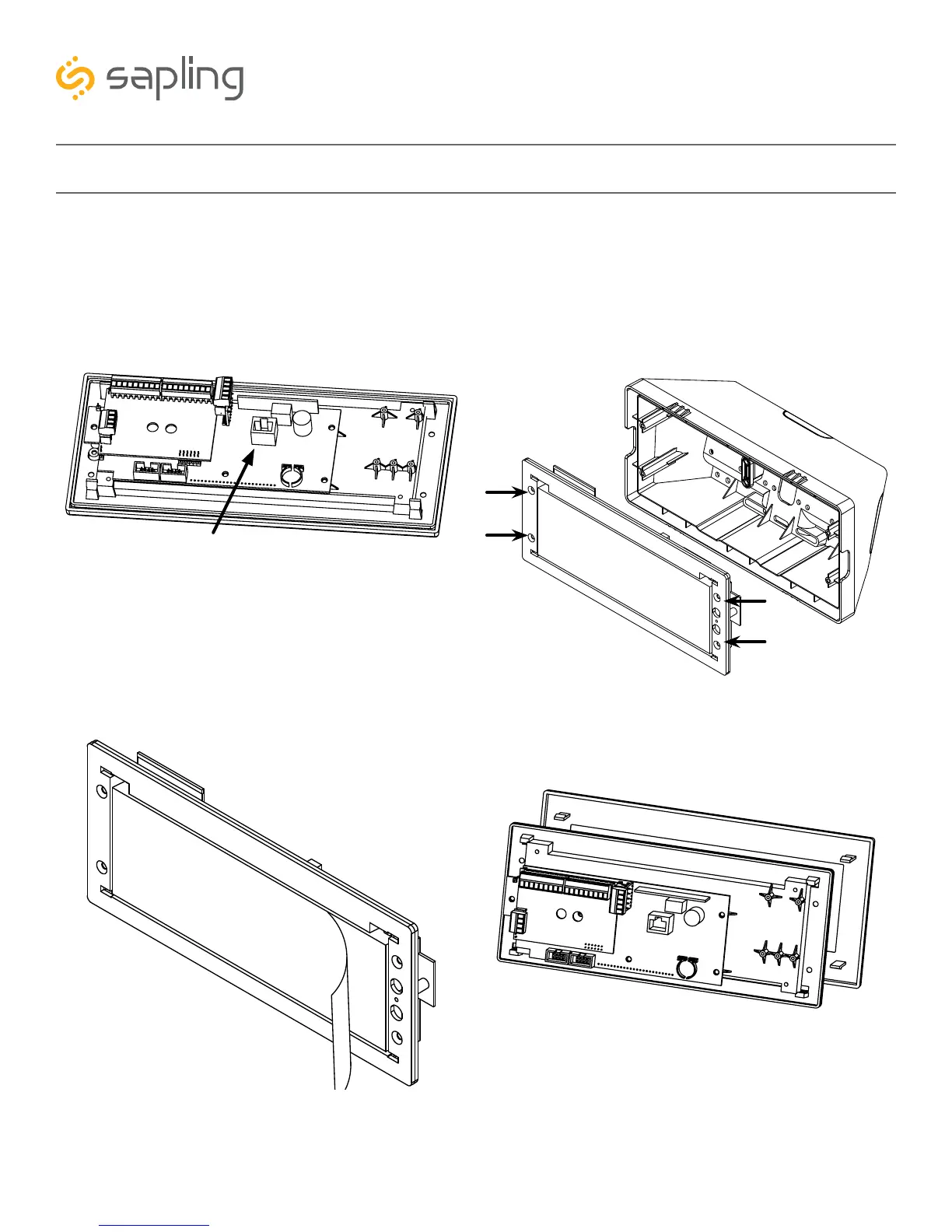
16) Use the 6-19x1/2 screws to attach the display
board to the housing.
NOTE: For 2.5” Digit clocks, the holes for the
screws will be on the left and right inner surfaces of
the housing. For 4.0” Digit Clocks, the holes will be
on the top and bottom surfaces.
15) Attach a data cable to the port on the right side
of the circuit board. If the clock is able to access the
Internet, it will begin to correct itself. Make a note
of the clock’s Serial Number, which should be on a
white sticker above the port. Add this information
to your tracking chart.
17) Remove the plastic cover from the display board.
18) Place the filter over the display board. You
should hear a snapping noise as the latches drop
into place.



 To Next Page