47
The Sapling Company, Inc.
1633 Republic Road
Huntingdon Valley, PA 19006
USA
P. (+1) 215.322.6063
F. (+1) 215.322.8498
www.sapling-inc.com
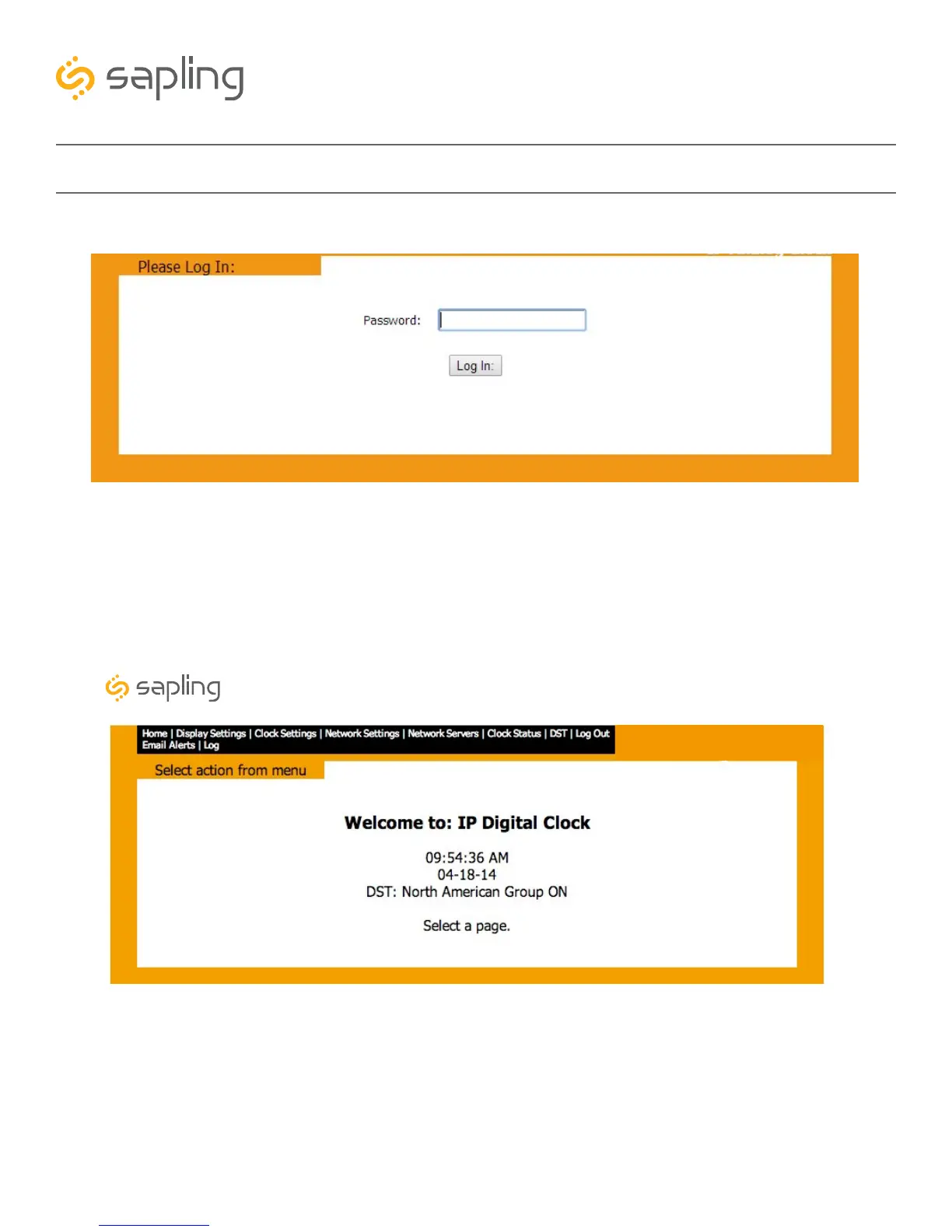
Web Interface - Log In
Web Interface - Date and Time
1. Password - Location where the password is entered. The default password is 6063, but this can be
changed within the settings.
2. Log In - When pressed, the program will check the password. If the password is correct, it will grant
the user access to the Web Interface.
1. Welcome Sign - Displays the Clock name.
2. Time - Displays the clock’s time at the moment the web page was loaded. This information does not
update unless the page is refreshed.
3. Date - Displays the clock’s date at the moment the web page was loaded. This information does not
update unless the page is refreshed.
4. DST - Displays the current Daylight Saving Time setting.
1
2
3
1
4
2
Synchronized Clock Systems



 To Next Page