Section 1 - Introduction
Page 5
1.2.1. Installing the CCDOps and the Driver Checker
The first thing you should do in all cases is to install CCDOps version 5 and the Driver Checker
utility. This is relatively simple:
1. Make sure the camera is not connected to the computer. You will do this later.
2. Run the CCDOps Installer. It can be found in the CCDOps directory of the CD-ROM that
came with your camera. Follow the onscreen instructions to complete the installation.
3. First make sure you are the Administrator or have Administrator privileges if you’re
running under Windows 2000, or Windows XP. On Windows XP Home edition you are the
administrator so you don’t have to worry about that. Next run the Driver Checker Installer.
It can be found in the Driver Checker folder of the CD-ROM.
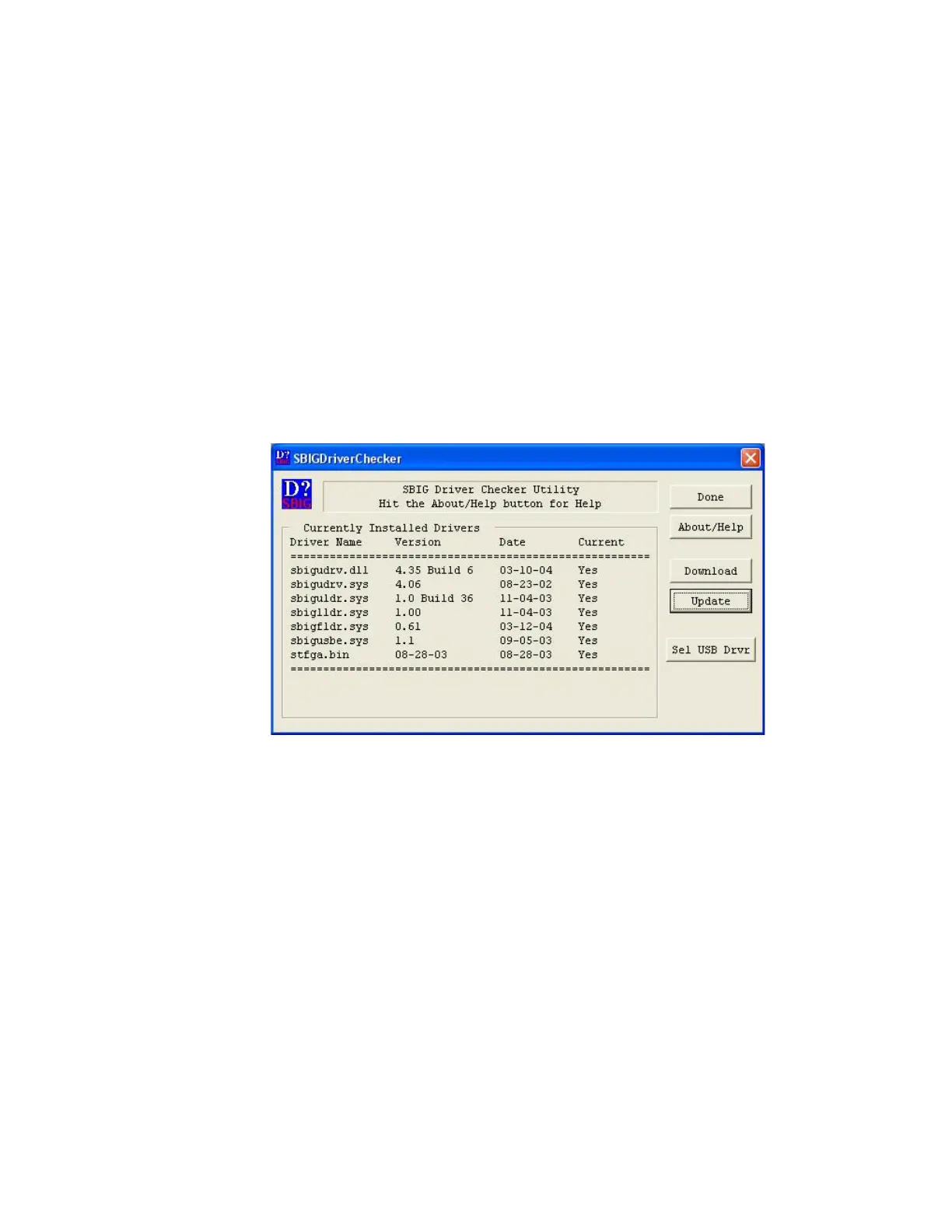
4. Towards the end of the Driver Checker installation the installer will run the utility. This
utility checks to make sure you have the latest version of the SBIG camera drivers installed
on your system. When the SBIGDriverChecker utility is run you’ll see a dialog like:
If you have previously installed CCDOPS you’ll see some entries in the table. Most likely
one or more drivers is not installed or is not up to date. Also if this is the first time you’ve
run the Driver Checker you may get a warning something like “The sbigudrv service can
not be found”. Just ignore this error.


 To Next Page