18
8 K-FRAME PROTOCOL METER SUPPORT
K-Frame Protocol support applies to certain meters manufactured by Elster-AMCO, Kent, and
ABB. Compatible registers include the InVISION (Elster-AMCO), ScanCoder (Elster-AMCO,
ABB, Kent), and the AquaMaster mag-meter (ABB).
Important Notes:
(1) The instructions in this chapter do not
apply to Sensus-protocol registers that are
manufactured by Elster-AMCO (See Ch. 6, Sensus Protocol Meter Support).
(2) See the Meter Compatibility Matrix for meter register configuration details.
(3) Wire color-coding for K-Frame-compatibles differs from that used in Sensus-compatibles and
Neptune compatibles.
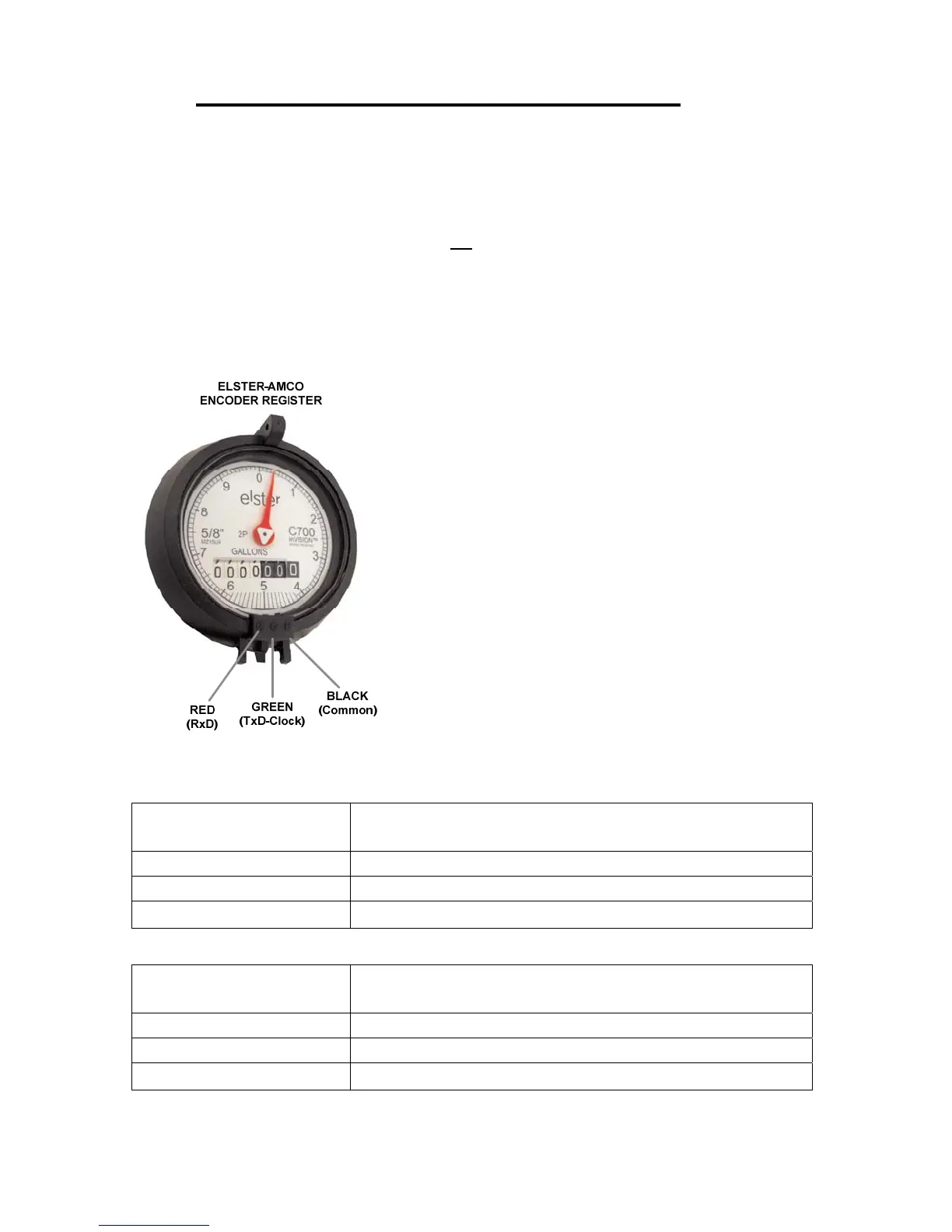
Elster-AMCO InVISION – Register Diagram.
To connect a K-Frame Protocol Register to Meter Channel 1:
EtherMeter Terminal
K-Frame Compatible Wire Color*
*Note: Color codes may vary by meter brand.
See Meter Compatibility Matrix for details.
14 Green
15 Red
16 Black
To connect a K-Frame Protocol Register to Meter Channel 2:
EtherMeter Terminal
K-Frame Compatible Wire Color*
*Note: Color codes may vary by meter brand.
See Meter Compatibility Matrix for details.
17 Green
18 Red
19 Black


 To Next Page