Micro Centrifuge, mini – Service manual
6
2. Installation
2.1 Unpacking
1) Check if the box contains such parts as;
① Power cable, 1ea
② User’s manual, 1ea
③ Rotor, 1ea
④ Lid, 1ea
⑤ Rotor coupling nut, 1ea
⑥ Adaptor 0.2ml, 12ea
⑦ Adaptor 0.5ml, 12ea
2) Open the box and lift out the device carefully together with the safety padding.
3) Remove the safety padding and vinyl wrap.
4) Place the device on the flat surface.
2.2 Location
1) Install the device at the solid and flat floor or table. If you place the centrifuge at
the slope, the axis of rotation is possibly changed because of the rotor weight.
2) Install the device keeping a distance of 30cm at least from the wall.
The distance is needed for the air circulation around the device.
3) Install the device at the place with appropriate temperature and humidity.
These conditions have to be maintained constantly as soon as possible.
4) Install the device at the place without any kinds of corrosive gases.
2.3 Supply the power
1) mini model uses 110V or 220V.
Check proper voltage of the device and connect to adequate power outlet.
2) If the power input is more than +/- 10% of the recommended voltage or
fluctuating frequently, it may affect some functions of the device.
In that case it is recommended to use AVR (Automatic Voltage Regulator).
3) If you want to use the device under the other voltage range, please contact us for
safe usage.
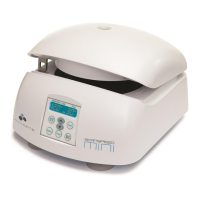
2.4 Power On and opening front door
1) Turn on the device by the switch on the back side of the device.
2) The door opens automatically at the time of power on.
3) The door opens automatically also when the test ends.
4) To open the door in other cases, press the ‘Door’ button.


 To Next Page