Schaerer Coffee Art C - Generic 24mo Preventative Maintenance SOP
7. ►
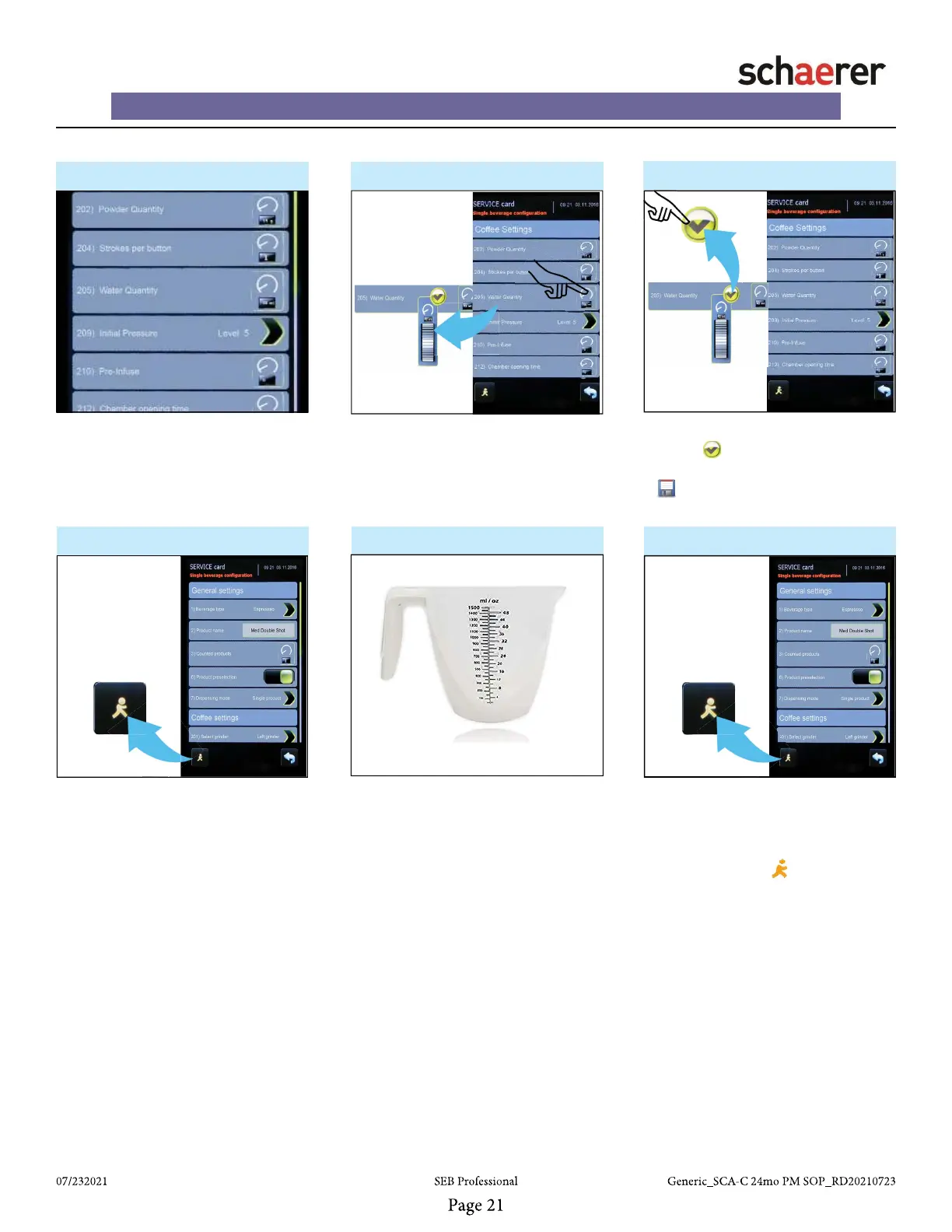
8. - Adjust Water quantity ►
• Place empty Measuring Cup under
dispensing spout.
• While still in “Single beverage con-
fi guration” screen, press “Walking
Man” button on screen.
9. ►
• From “Single beverage confi gura-
tion” screen, fi nd “Water quantity”.
• NOTE: See customer recipes for
water quantity specifi cations
• Empty Measuring Cup and repeat 2
more times.
• Note quantity on measuring cup
• Make sure the volume falls
within customer specifi cations!
10. ► 11. ►
• If adjustment is required, press
“Water quantity” button to display
graphical thumb wheel and adjust
accordingly.
12.
• Adjust if the volume or weight does
not match the customer specifi ca-
tions.
• Re-Check volume after each adjust-
ment by pressing “Walking Man”
button in lower left side of display to
dispense drink.
• Adjust “Water Quantity”.
• Press “Green Check” button to
verify change.
• will appear at bottom of display.
Press to save menu changes.
If you have any technical questions or need assistance, please call our
Technical Support Team @ 888.989.3004 - Select option 1, option 2, then option 2














 To Next Page