Schaerer Coffee Art C - Generic 24mo Preventative Maintenance SOP
7F. Pump Pressure and Drink Volume Check
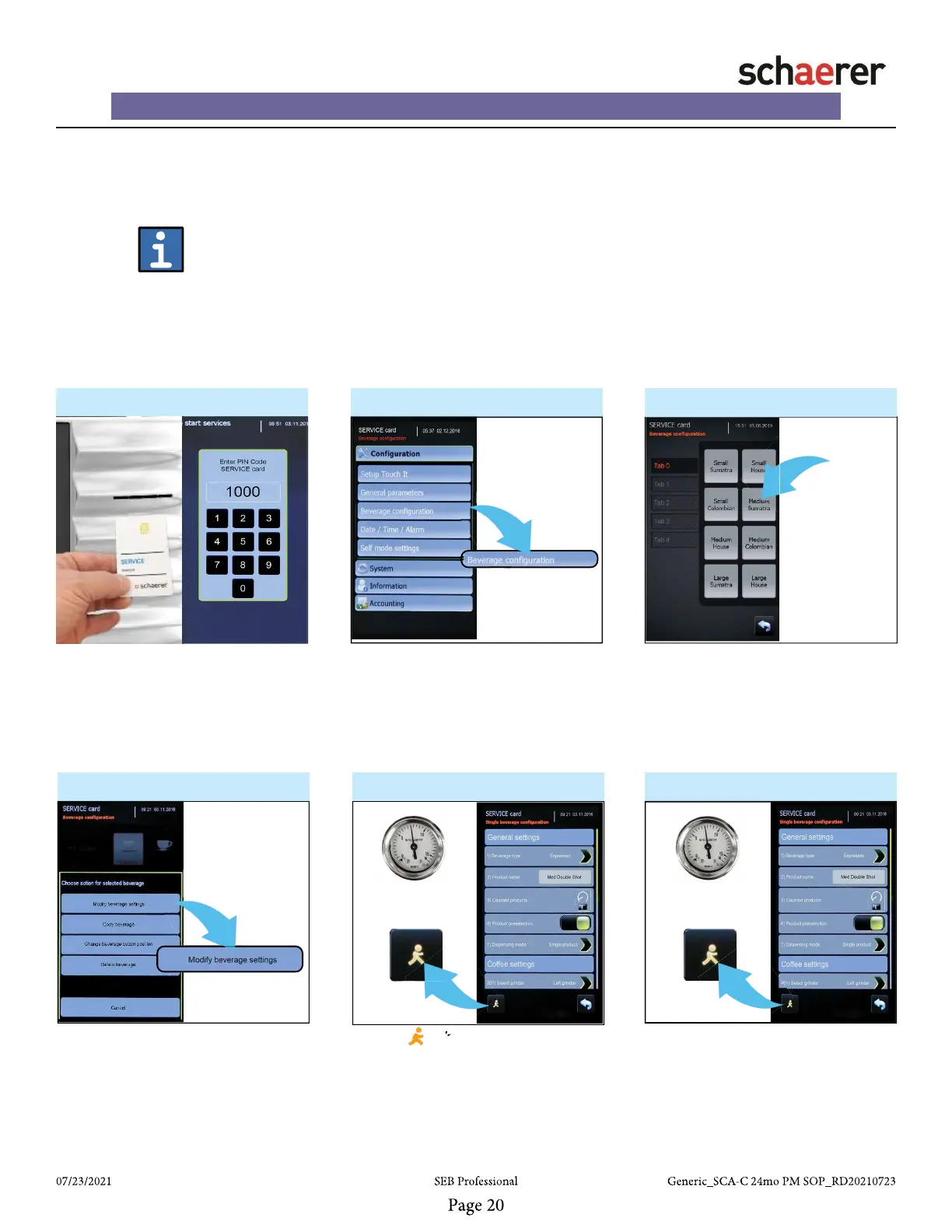
1. ► 2. - Programming Menu ► 3. ►
4. ► 5. - Check Water Pump Pressure ►
• Insert “SERVICE” card into card
reader and enter “PIN CODE” to en-
ter the programming menu.
• After entering programming menu,
press “Beverage confi guration” button
to continue.
• After selecting drink button, press
“Modify beverage settings” button to
enter the “Single beverage confi gu-
ration” screen.
Items Needed:
1. Service Card
2. Digital Gram Scale
3. Measuring Cup
6. - Check Water Pump Pressure ►
• NOTE: Removal of right side cover
is required if adjustments are neces-
sary.
• Repeat step 5 and adjust water
pump pressure as necessary.
• After pressing “Beverage confi gu-
ration” button, select Medium sized
drink in single mode in a single cycle
for calibration
• Press “Walking Man” button and
and note pressure gauge.
• NOTE: the Save icon may appear
instead, press it and continue
• Pressure should read 4.75 - 5.25
BAR
while drink is dispensing.
• Press OK when shot is complete.
Medium
20oz














 To Next Page