Schaerer Coffee Art C - Generic 24mo Preventative Maintenance SOP
7E. Drink Time Calibration
Items Needed:
1. Service Card
2. Digital Gram Scale
3. Grinder adjustment knob
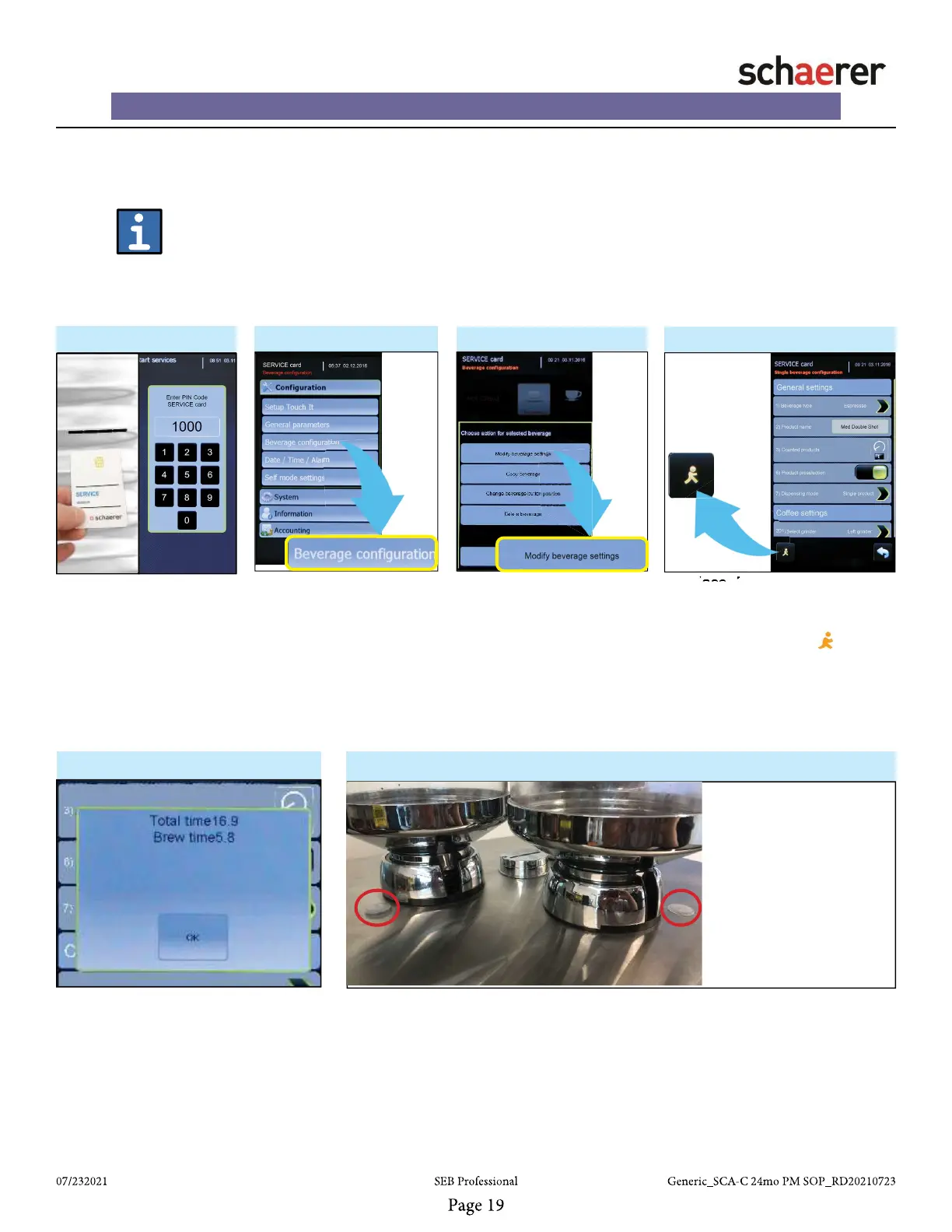
1.
• Insert “SERVICE” card
into card reader and enter
‘PIN CODE” to enter pro-
gramming menu.
2. - Programming Menu ►
• After entering program-
ming menu, press “Bever-
age confi guration” button
on screen to enter Bever-
age confi guration screen.
• Select MEDIUM 20oz
drink in single cycle to test.
3. - Beverage Confi g. Menu ►
• From “Beverage Confi gu-
ration” screen, press “Modi-
fy beverage settings” button.
Refer to the recipe settings
on the following page for
customer specifi cations.
4. ►
• Place Measuring Cup under
dispensing spout.
• From “Single Beverage Confi g-
uration” screen, press “Walking
Man” icon in lower left to dispense
drink.
• Check drink volume and brew
time. Dispensing time will be dis-
played as shown in step 5.
5.
• If Brew Time and volume do not meet
customer specifi cations, adjust the
grinder in step 6.
•See customer specs (sec. 5B)
for dispensing time information
(Medium drinks needed only)
• Re-check Brew Time after
adjustments
6.
• If needed, directly adjust the grinder coarser/fi ner. Remove the black plug on
the side you are adjusting.
• Turn the grinder knob clockwise to adjust FINER, and counter-clockwise to
adjust COARSER. Re-check brew times after adjustments.
• NOTE: Listen for the clicks. If you adjust 10 or more clicks in a single
direction (total), please repeat the calibration process for the grinder you
are calibrating starting from step 2 of fl ow chart (see section 5a)
Brew Time too high?
Adjust COARSER
counter-clockwise
Brew Time too low?
Adjust FINER
clockwise














 To Next Page