Page 1.31
Chapter 1
Operating Elements
SCHILLER AT-2plus 6-Channel ECG Unit
SERVICE HANDBOOK Issue d May 2002
Replacing the Recording Paper
The recording paper must be replaced as soon as the end of the paper is indicated by a red stripe
on the lower edge. After the indication first appears, there are about 8 pages left. However, we
recommend that the paper be replaced immediately. If no paper is left, the printing process is
interrupted and a warning is given on the screen. To replace the paper proceed as follows:
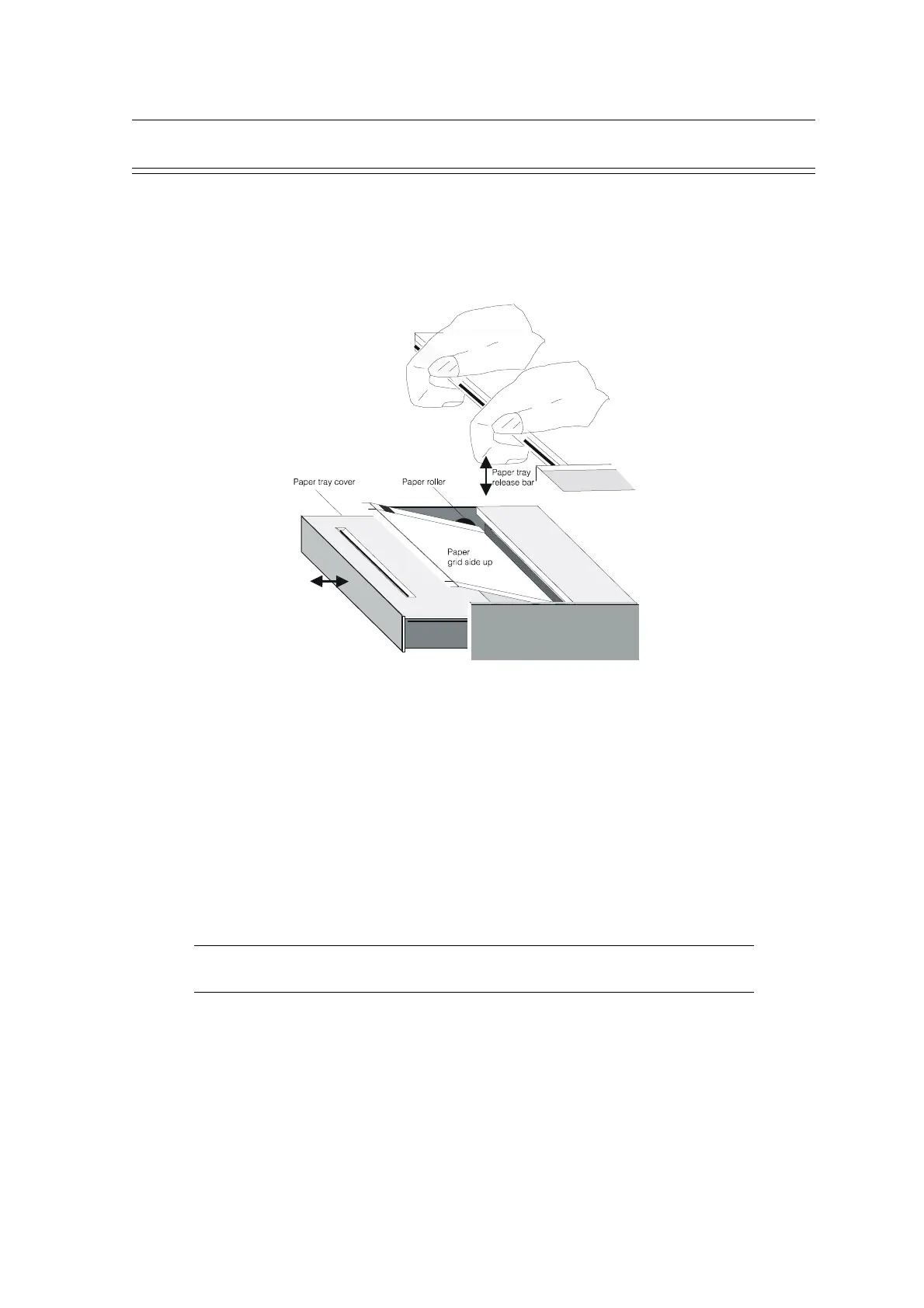
• Use both hands and place fingers under the retaining bar. Pull directly upwards. The paper
tray cover releases.
• Withdraw the cover from the unit. DO NOT FORCE, THE PAPER TRAY COVER RUNS
FREELY OVER THE DEDICATED RUNNERS.
• Remove any remaining paper from the paper tray.
• Place a new paper pack into the paper tray with the printed (grid) side facing upwards.
• Place the beginning of the paper over the black paper roller on the paper tray cover.
• Return the paper tray cover in position and press firmly until secure.
• Press the STOP key to transport the paper to the start position.
Note: SCHILLER can only guarantee perfect printouts when SCHILLER original chart paper
or chart paper of the same quality is used.













 To Next Page