7 • Schlage • AD-200 user guide
Manual programming instructions
Important notes:
L Wait for the Schlage button LEDs to stop ashing before continuing to the next step.
L Programming mode will time out if no entry is made in 20-25 seconds. Time out is
indicated by three left and nine right red blinks of the Schlage button.
L An incorrect entry is indicated by a solid red left and blinking green right LED
on the Schlage button. Refer to Error codes on page 12 to interpret error code
patterns.
L A unique credential must be used for each credential type (for example, a single
credential may not be used for both normal use and toggle functions).
PROGRAMMING credentials
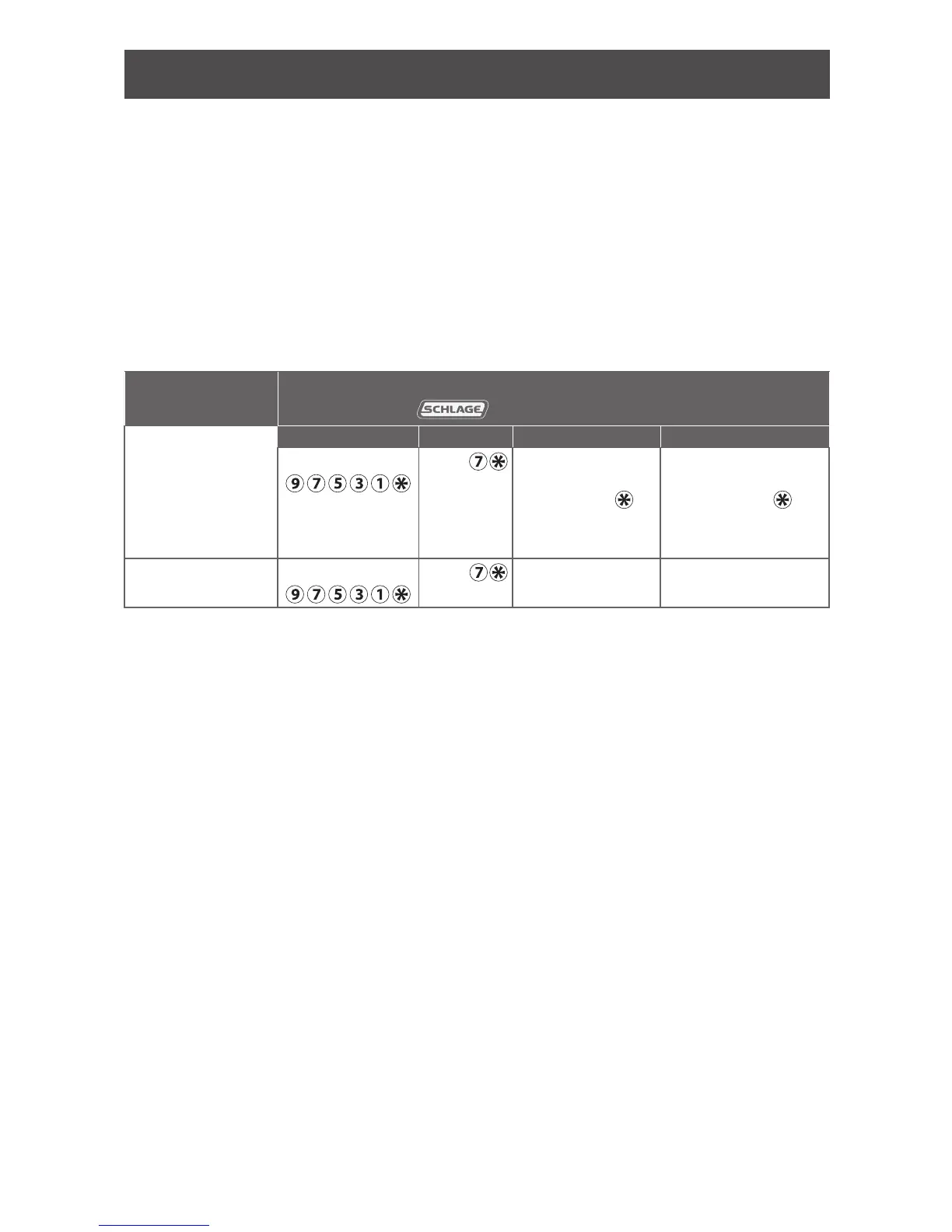
To complete this
action:
Perform the following steps:
Wait for
to stop ashing between each step!
1
2 3 4
Create new
Programming
Code (PIN)
Enter
(This is the default
programming PIN)
Enter
Enter new 5 digit
Programming
code and
Wait for right
green light.
Reenter the new 5
digit Programming
code and
Wait for confirmation:
2 right green blinks.
Create new
Programming Card
Enter
Enter
Present new
programming card.
Wait for confirmation:
2 right green blinks.


 To Next Page