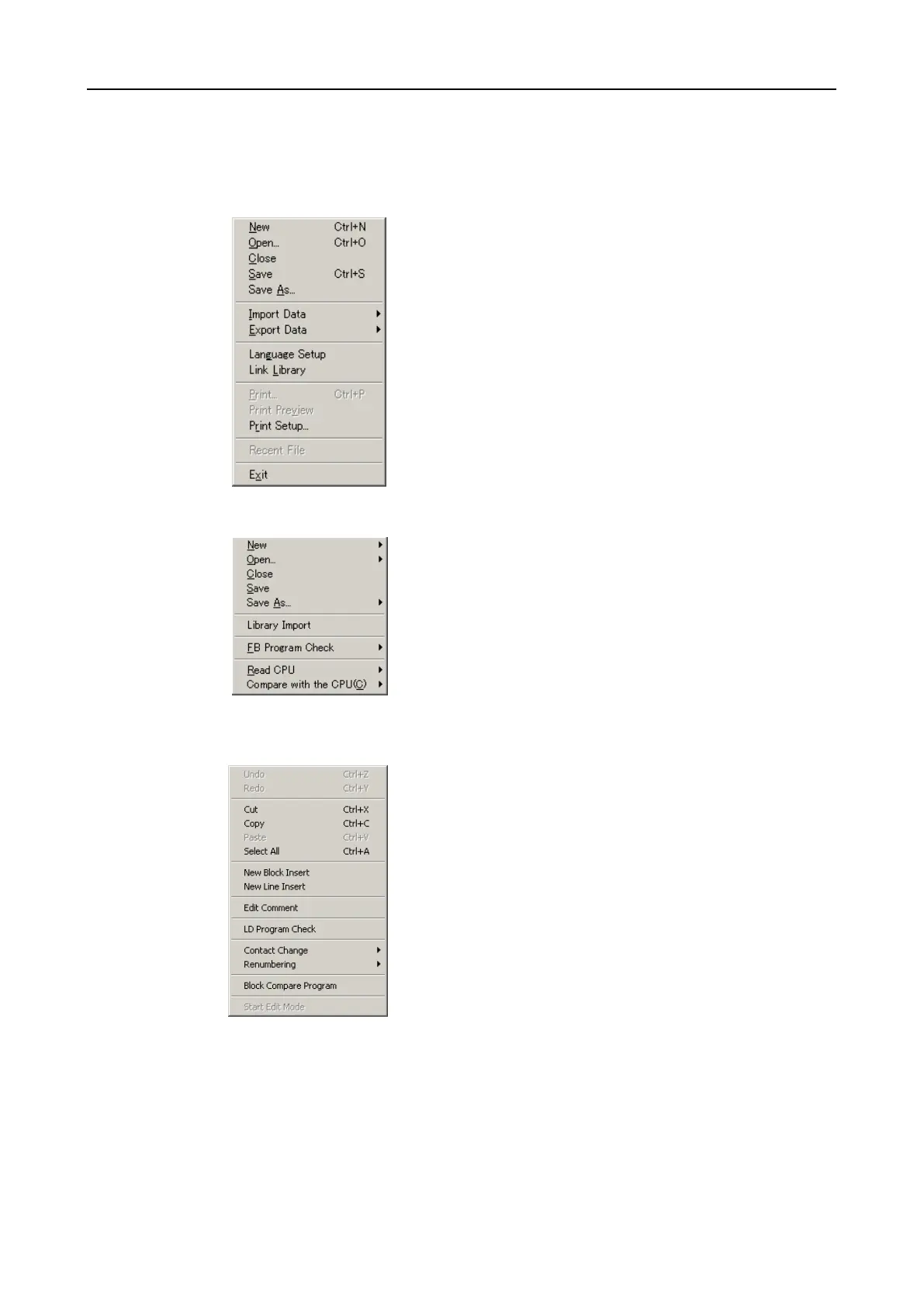
6.8.2 Main menu
File
➔Creates a new project
➔Opens an existing project
➔Closes an opened project
➔Saves an opened project under current name
➔Saves an opened project under a new name
➔Imports programs/comments/register data
➔Exports comments/register data
➔Setup languages for comments
➔Integrates a library
➔Prints (draft)
➔Prints (documentation)
➔Selects and sets-up printer
➔Shows the last opened projects (max. 4)
➔Exits the program
Library
➔Creates a new library
➔Opens an existing library
➔Closes an opened library
➔Saves an opened library under the current name
➔Saves an opened library under a new name
➔Imports library
➔FB Program Check
➔Reads library from CPU
➔Compares a library with the library saved in the CPU
Edit
➔Undoes the last action performed
➔Restores an undone action
➔Cuts out a selected object
➔Copies a selected object
➔Inserts a copied or cut-out object
➔Selects all objects
➔Inserts a new block
➔Inserts a new line
➔Edits comments
➔Checks the program (ladder diagram)
➔Changes the type of contact
➔Renumbers the edge address (P)
➔Compares two programs block for block
➔Enters the password for the edit mode


 To Next Page