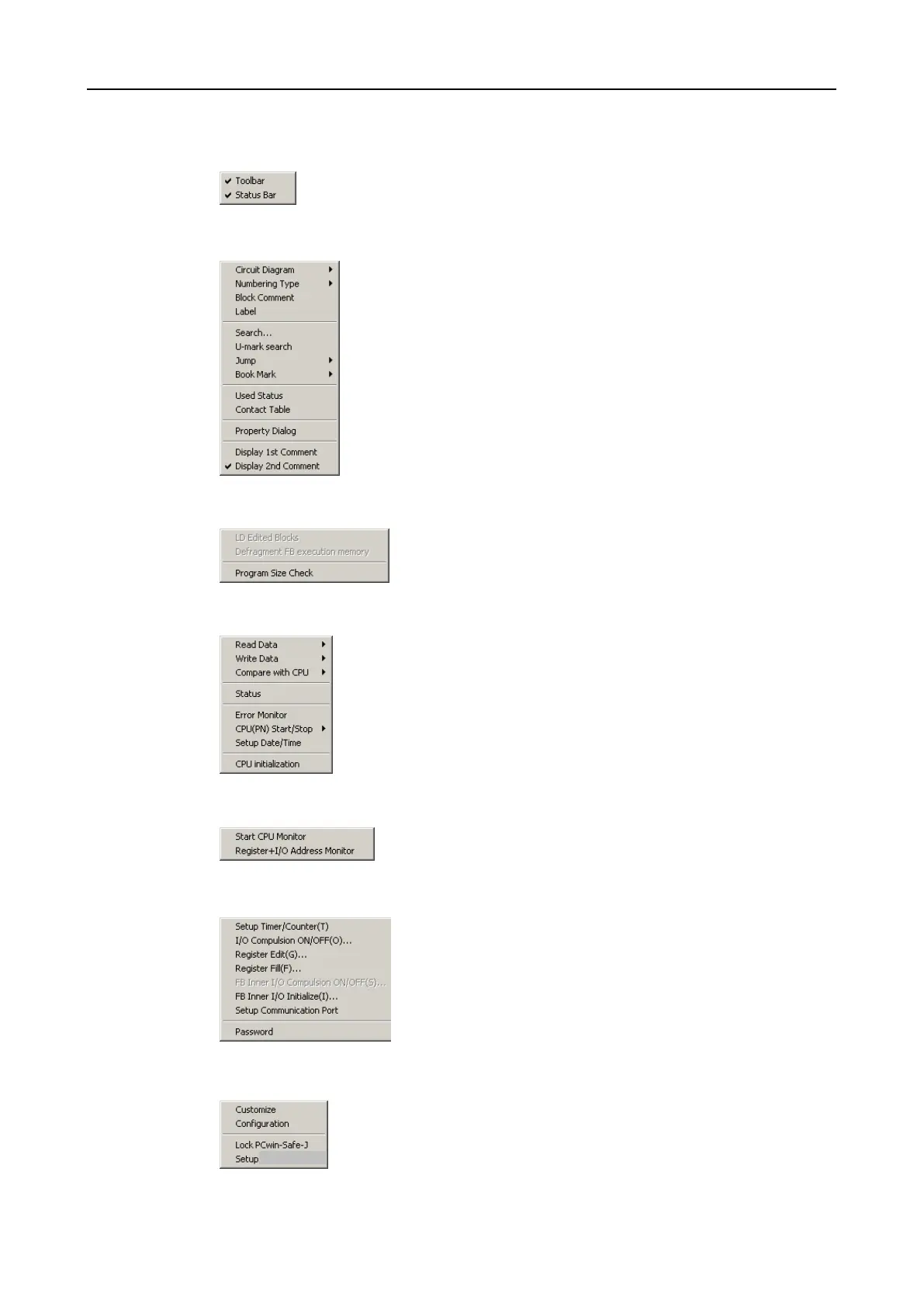
View (LD window inactive)
➔Displays/conceals tool bar
➔Displays/conceals status bar
View (LD window active)
➔View of the ladder diagram with / without comments
➔Selects type of block numbering
➔Displays block comments
➔Displays identifier
➔Searches for contacts/functions and comments
➔Searches for U marks
➔Jumps to specific position in ladder diagram
➔Edits bookmark
➔Displays use status of the memory
➔Displays the links of the contacts in tabular form
➔Displays the property dialogue for contacts and functions
➔Displays comment 1 (language 1)
➔Displays comment 2 (language 2)
Converting
➔Converts modified blocks into machine code
➔Defragments the FB execution memory (Chapter 6.12.8).
➔Checks program size (Chapter 6.13.3)
CPU
➔Reads data from the CPU module.
➔Transfers data to the CPU module
➔Compares data of the CPU module
➔Displays current operating status of the CPU module
➔Reads out the error memory of the CPU module
➔Starts/stops the CPU module (PN Program only)
➔Sets the real time clock of the CPU module
➔Initialises the CPU module
Monitor
➔Starts/stops monitoring of the program (Chapter 6.16)
➔Start/stops monitoring of the register (memory area)
Setup
➔Not available
➔Sets memory areas of the PN program (Chapter 6.10.3)
➔Edits memory areas of the PN program
➔Not available
➔Not available
➔Resets all flags in the FB
➔Selects communication module (Chapter 6.7.4).
➔Changes password (Chapter 6.5.2).
Options
➔Modifies the presentation of the program user interface (Chapter
6.18.1).
➔Modifies program settings (Chapter 6.18.2).
➔Locks programs for editing (Chapter 6.5.4).
➔Sets program protection (Chapter 6.5.5).


 To Next Page