Contacts
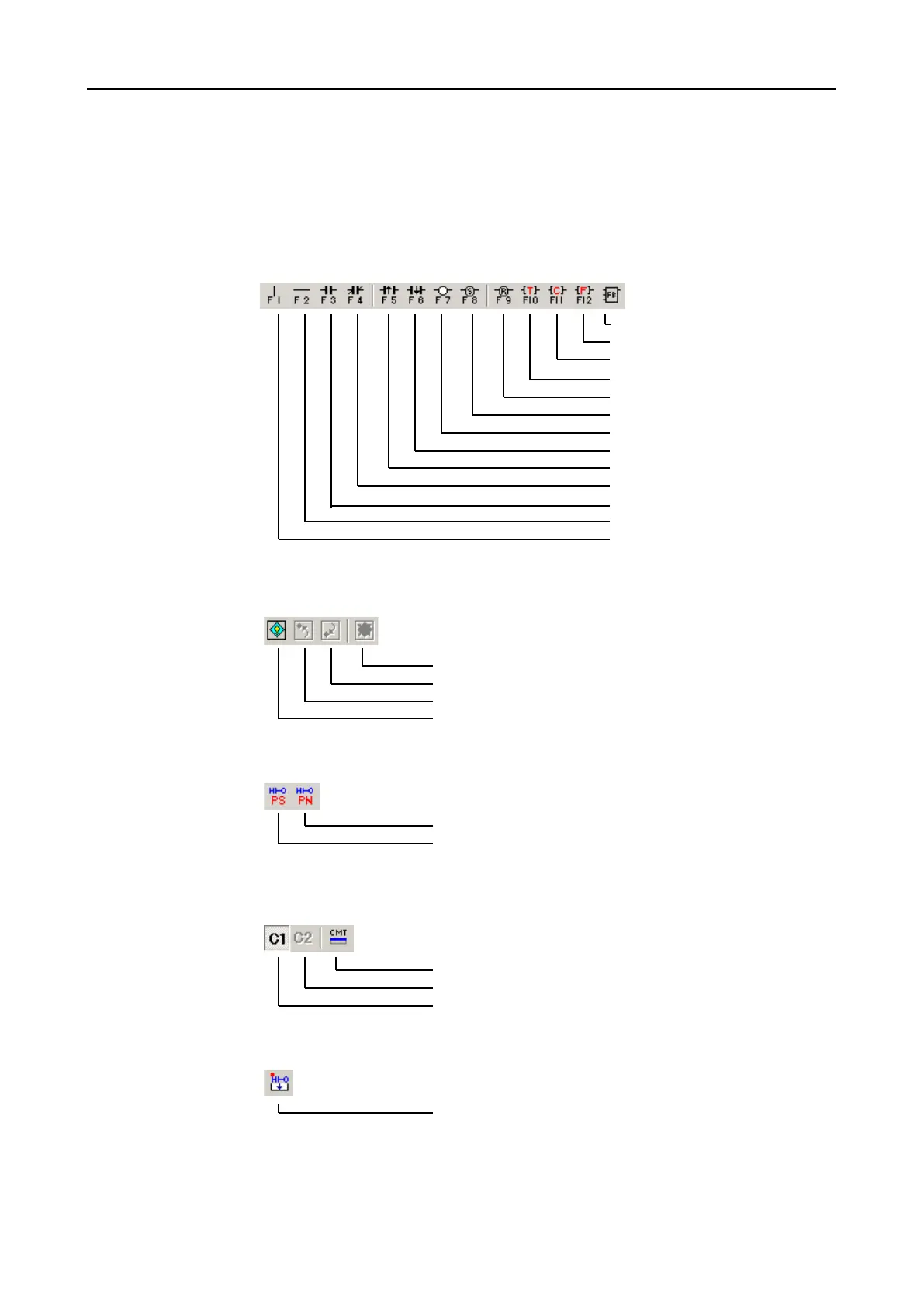
The symbols cannot be accessed via a menu entry. To select a contact, you can
also use the function buttons in addition to the left mouse button. The parameters
of the selected contact can be set in the property dialogue (Chapter 6.10.12). This
is opened by double clicking on the appropriate contact (already marked) or via the
pop-up menu (right mouse button). A detailed description of the individual contacts
is provided in 6.10.12.
Function Block
Function
Counter
Timer
Coil (Reset)
Coil (Set)
Coil
Trailing edge
Rising edge
NC (B-Contact)
NO (A-Contact)
Connection
Or
Book Mark
Menu entry
[View]-[Book Mark]-[Clear all Mark]
[View]-[Book Mark]-[Goto Next Mark]
[View]-[Book Mark]-[Goto Prev Mark]
[View]-[Book Mark]-[Mark Set/Reset]
PS/PN
Menu entry
PN Program
PS Program
Comments
Menu entry
Display window with contact comment
[View]-[Display 2nd Comment]
[View]-[Display 1st Comment]
Xchange
Menu entry
[Xchange]-[LD Edited Blocks]


 To Next Page