Programming / parameter assignment
Instruction Manual PROTECT-PSC
V 2.6R01 / 04.19
6.16.2 Memory area
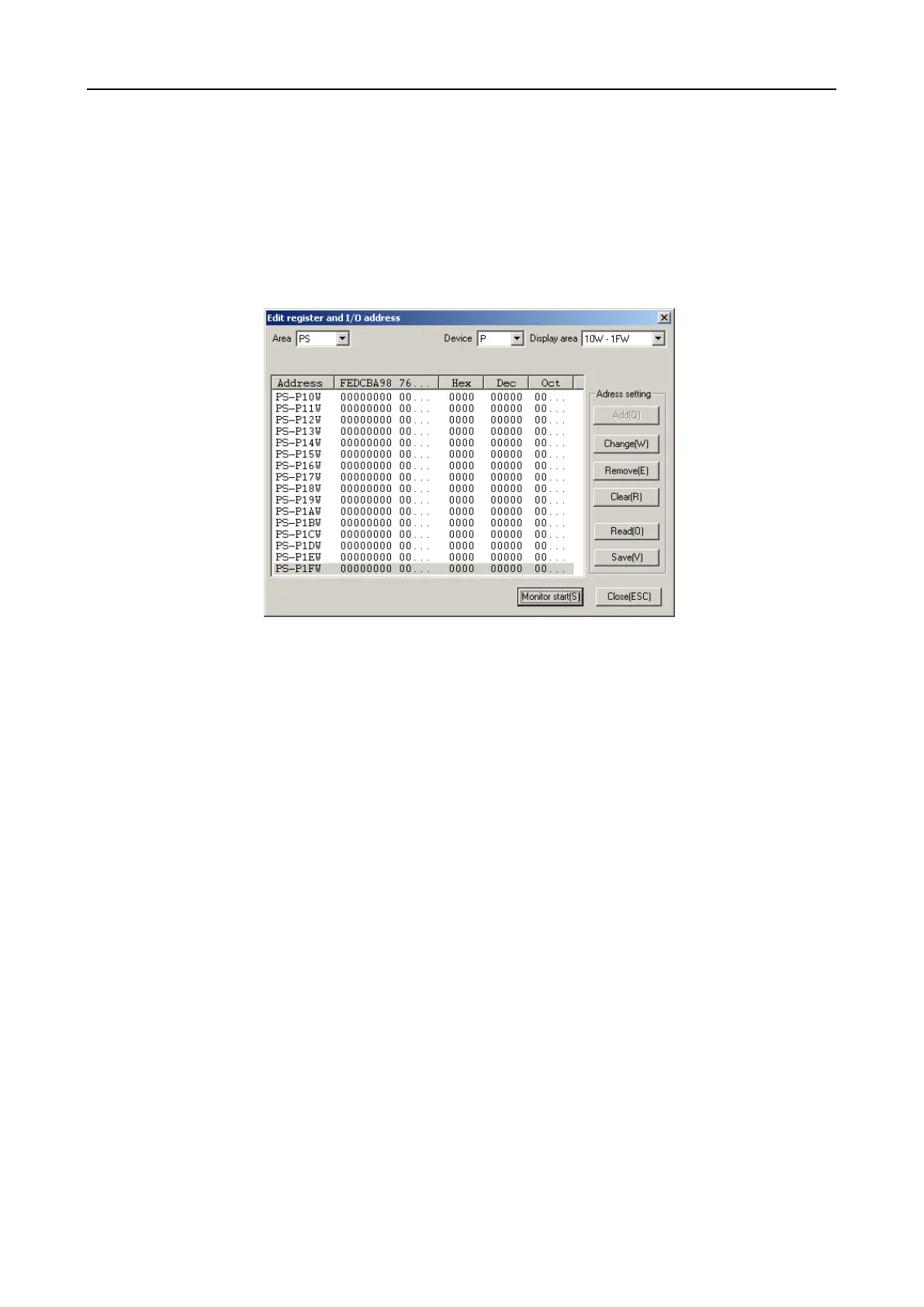
The memory area is monitored in its own dialogue which you can reach in the main
menu under [Monitor]-[Register+I/O Address Monitor] or alternatively in the project
window under the entry [DataFiles]-[Register]. You can compile the memory areas
to be monitored randomly and save them for later use. An entry in this list will al-
ways consist of a WORD (16 BIT) and will contain a maximum of 16 entries (256
bits).
F
F
i
i
g
g
u
u
r
r
e
e
6
6
-
-
1
1
0
0
9
9
M
M
o
o
n
n
i
i
t
t
o
o
r
r
r
r
e
e
g
g
i
i
s
s
t
t
e
e
r
r
d
d
i
i
a
a
l
l
o
o
g
g
u
u
e
e
Selection of the memory area
PS = Memory of the PS program
PN = Memory of the PN program
Common = Common area of the PS/PN memory
Selection of the memory type
Selection of the address area within the memory type
Start of monitoring
List of the addresses to be monitored


 To Next Page