Programming / parameter assignment
Instruction Manual PROTECT-PSC
V 2.6R01 / 04.19
Compilation
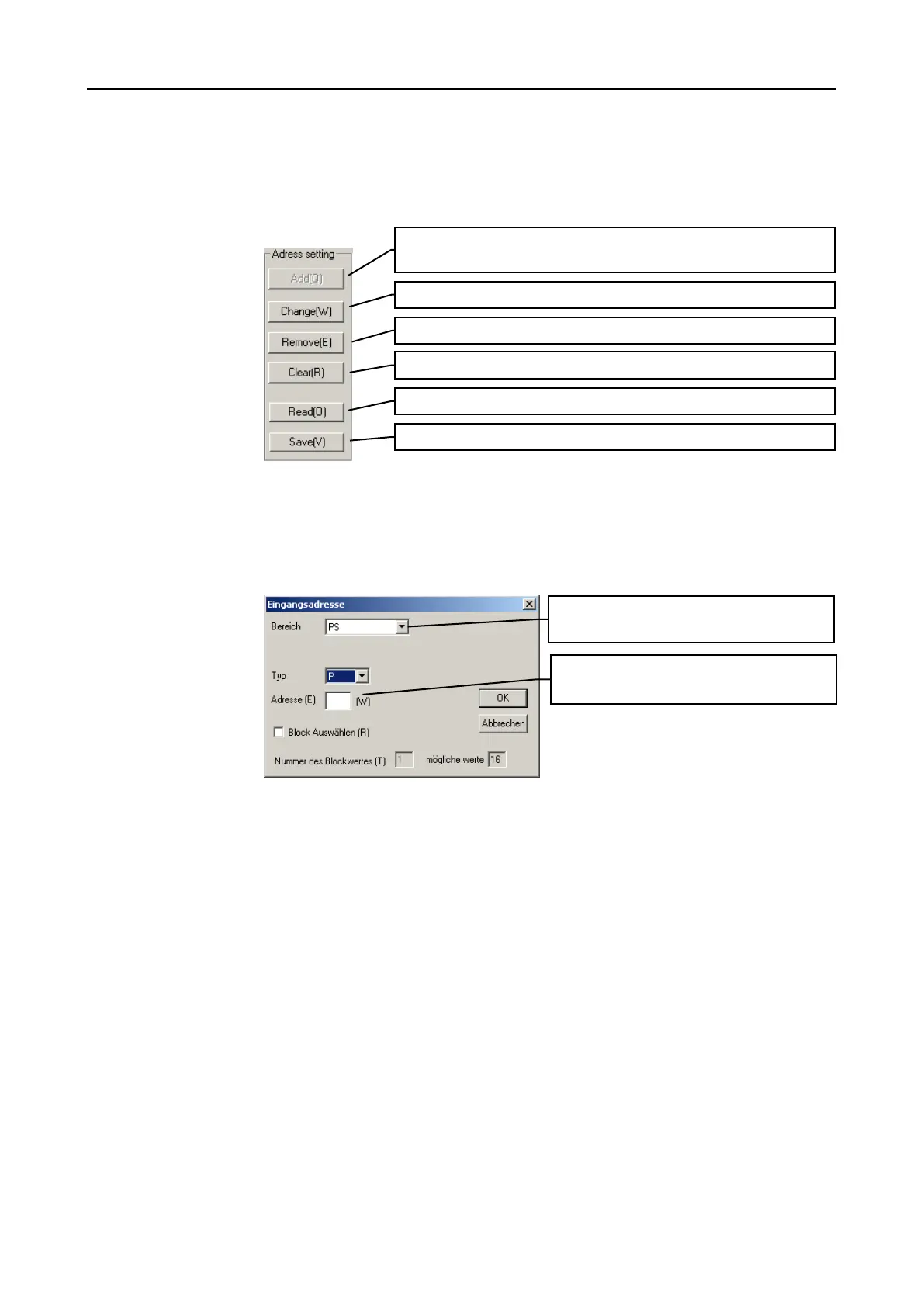
If you select a display area directly a maximum of 16 entries is automatically
compiled. You can alter this compilation randomly and save it on the fixed disk for
later use.
F
F
i
i
g
g
u
u
r
r
e
e
6
6
-
-
1
1
1
1
0
0
A
A
d
d
d
d
r
r
e
e
s
s
s
s
s
s
e
e
l
l
e
e
c
c
t
t
i
i
o
o
n
n
i
i
n
n
m
m
o
o
n
n
i
i
t
t
o
o
r
r
r
r
e
e
g
g
i
i
s
s
t
t
e
e
r
r
d
d
i
i
a
a
l
l
o
o
g
g
u
u
e
e
Adding/Changing
This dialogue can be reached via the „Add“ button (fewer than 16 entries) or via the
„Change“ button (if an entry is selected). You have the possibility here to add one
or several entries to the compilation.
F
F
i
i
g
g
u
u
r
r
e
e
6
6
-
-
1
1
1
1
1
1
A
A
d
d
d
d
/
/
c
c
h
h
a
a
n
n
g
g
e
e
e
e
n
n
t
t
r
r
y
y
i
i
n
n
t
t
h
h
e
e
m
m
o
o
n
n
i
i
t
t
o
o
r
r
(
(
r
r
e
e
g
g
i
i
s
s
t
t
e
e
r
r
)
)
d
d
i
i
a
a
l
l
o
o
g
g
u
u
e
e
If you select the box „Block Auswählen“ as many WORD blocks as specified in
will be added automatically starting from the entered address. The number of
WORD blocks which can be automatically added is restricted to a maximum of 16
and is displayed in .
Add a new entry (only possible if fewer than 16 entries exist).
Remove a selected entry from the compilation.
Delete entire compilation.
Read saved compilation from the hard disk.
Write compilation on hard disc.
Selects the memory area (the ‘EL’ ar-
ea is not currently available).
Selects memory type and address
(number only).


 To Next Page