SC1M
12
4.3.2 RC3
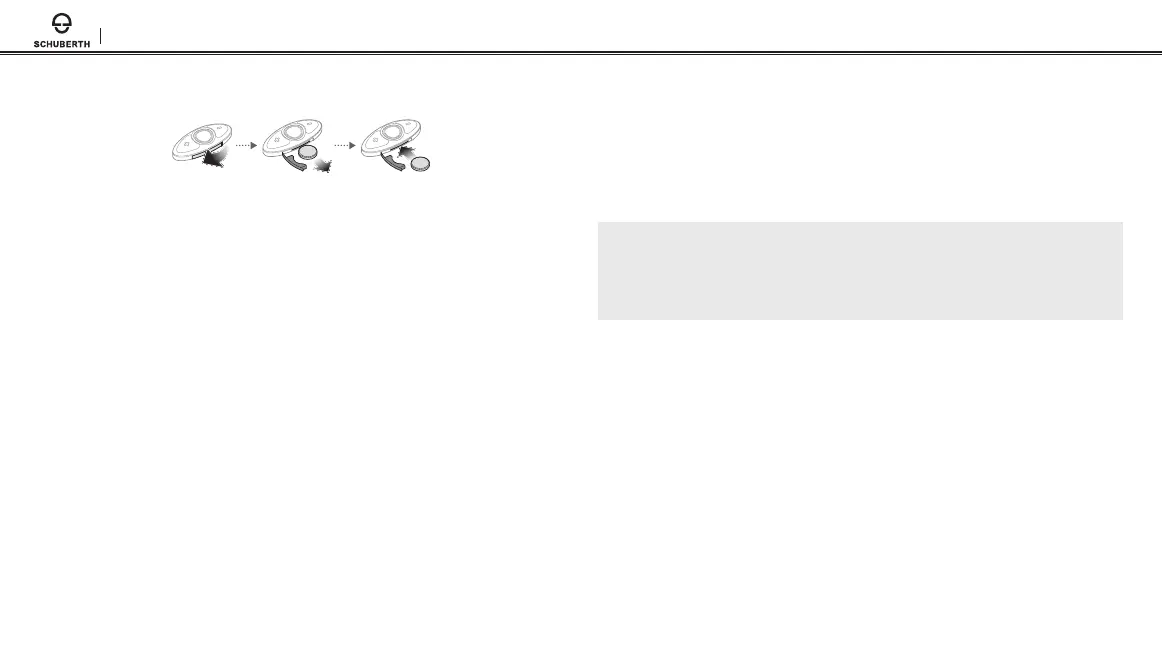
The RC3 uses a CR2016 Lithium 3V coin battery. If the RC3 is
discharged, you can replace the battery with a new one. When closing
the battery slot, insert both ends of the rubber rst. To remove the
battery, insert a paper clip through the Battery Release Hole.
4.4 Remote Control Pairing
The SC1M and the Remote Control come paired together.
They will automatically connect to each other when the SC1M and the
remote control are powered on.
If you are using a remote control other than the one included in the package,
follow the procedure below to pair the SC1M and the Remote Control.
1. On the SC1M, press and hold the Multi-function Button for 5 seconds
and you will hear a voice prompt, “Remote control pairing”.
2. On your Remote Control, enter Bluetooth pairing mode.
3. The SC1M will automatically perform pairing with the Remote Control
in pairing mode. When they are successfully connected, you will hear a
voice prompt, “Remote control connected”.
4.5 Checking the Battery Level
When the SC1M or the Remote Control is powering on, their red LED
ashes rapidly indicating the battery level.
4 ashes = High, 70 ~ 100%
3 ashes = Medium, 30 ~ 70%
2 ashes = Low, 0 ~ 30%
Note:
1.
The battery performance may be reduced over time with usage.
2.
Battery life may vary depending on conditions, environmental factors,
functions of the product in use, and devices used with it.
4.6 Volume Adjustment
You can easily adjust the volume by tapping the (–) Button or the (+)
Button. You will hear a beep when the volume reaches the maximum or
minimum level. The volume is set and maintained independently at
dierent levels for each audio source even when you reboot the
headset.


 To Next Page