SC1M
19
English
8 INTERCOM
The “Intercom Pairing” procedures described in the
section 5.4
. Please
refer to
section 5.4, “Intercom Pairing”
for more details.
8.1 Two-way Intercom
8.1.1 Starting Two-way Intercom
You can start an intercom conversation with one of any intercom
friends by tapping the Center Button: single tap to intercom with the
rst intercom friend
, double tap to intercom with the
second
intercom friend
, and triple tap to intercom with the
third intercom
friend
.
8.1.2 Ending Two-way Intercom
You can end an intercom conversation with one of any intercom friends
by tapping the Center Button: single tap to intercom with the
rst
intercom friend
, double tap to intercom with the
second intercom
friend
, and triple tap to intercom with the
third intercom friend
.
8.2 Multi-way Intercom
Multi-way Intercom enables conference-call-style conversations with
up to three intercom friends at the same time. While multi-way intercom
is in progress, mobile phone connection is temporarily disconnected.
However, as soon as multi-way intercom terminates, the mobile phone
connection will be reestablished.
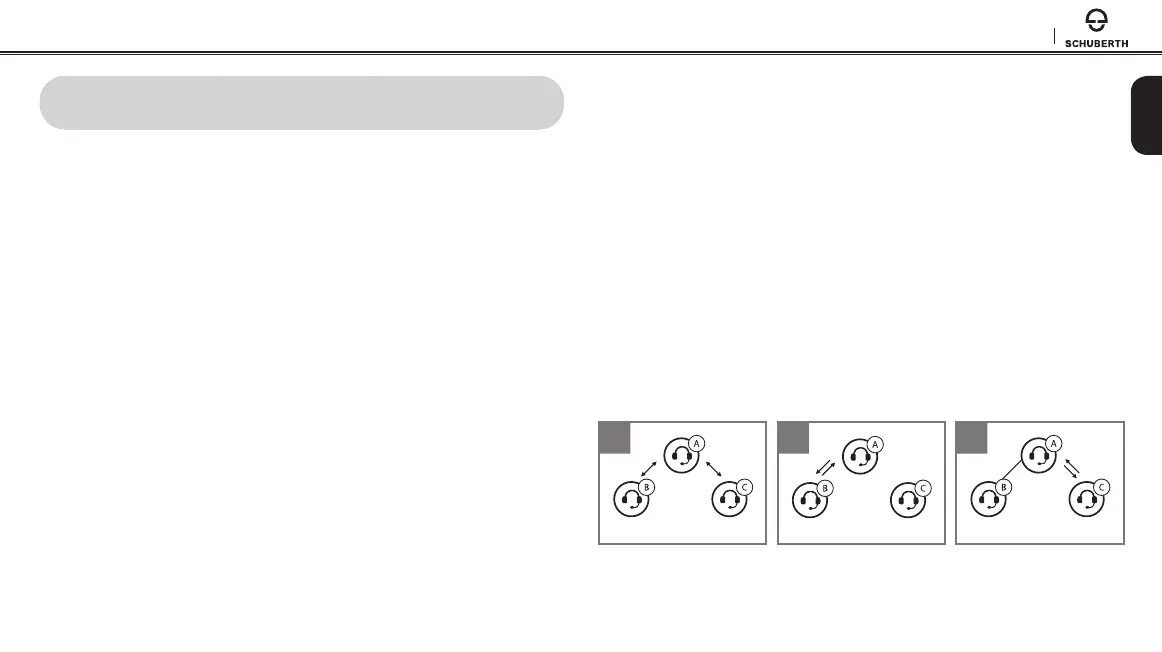
8.2.1 Starting Three-way Intercom
1. You (A) need to be paired with two other friends (B & C) for three way
conference intercom.
2. Start an intercom conversation with one of the two friends in your
intercom group.
3. You (A) can call the second intercom friend (C) by double tapping
the Center Button, or the second intercom friend (C) may join the
intercom by making an intercom call to you (A).
1
Intercom
Friend B
Intercom
Friend C
YOU
2
Intercom
Friend B
Intercom
Friend C
YOU
3
Intercom
Friend B
Intercom
Friend C
YOU



 To Next Page