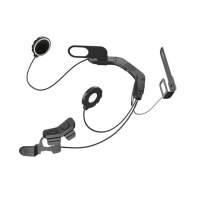
SC1M
14
5.2 Second Mobile Phone Pairing - Second Mobile
Phone, GPS, and SR10
1. To enter the conguration menu, press and hold the Center Button for
10 seconds until you hear the voice prompt, “Conguration menu”.
2. Tap the (+) Button until you hear a voice prompt, “Second mobile
phone pairing”.
3. Search for Bluetooth devices on your mobile phone. Select the SC1M
in the list of the devices detected on the mobile phone.
4. If your mobile phone asks for a PIN, enter 0000.
Note:
1.
If you have two audio (A2DP) devices connected to your headset then the
audio from one device will interrupt the audio from the other device. For
example, if you are playing music from the primary mobile phone, then it can
be interrupted by playing music from the secondary mobile phone and vice
versa.
2.
You have to use a motorcycle specic GPS, which transmits turn-by-turn
voice instructions to the headset by Bluetooth. Most automotive GPS systems
do not have this feature.
3.
The Sena SR10 is a Bluetooth two-way radio adapter for group communication,
and uses Hands-Free Prole. The incoming audio from the two-way radio via
SR10 is heard in the background while having an intercom conversation or a
mobile phone call.
4.
The GPS navigation or a radar detector could be connected to the SR10 by
wire. The GPS voice instruction or the radar detector alarm is also heard in the
background via SR10 while having an intercom conversation or a phone call.
Please refer to the SR10 User’s Guide for details.


 To Next Page