19
Console Features
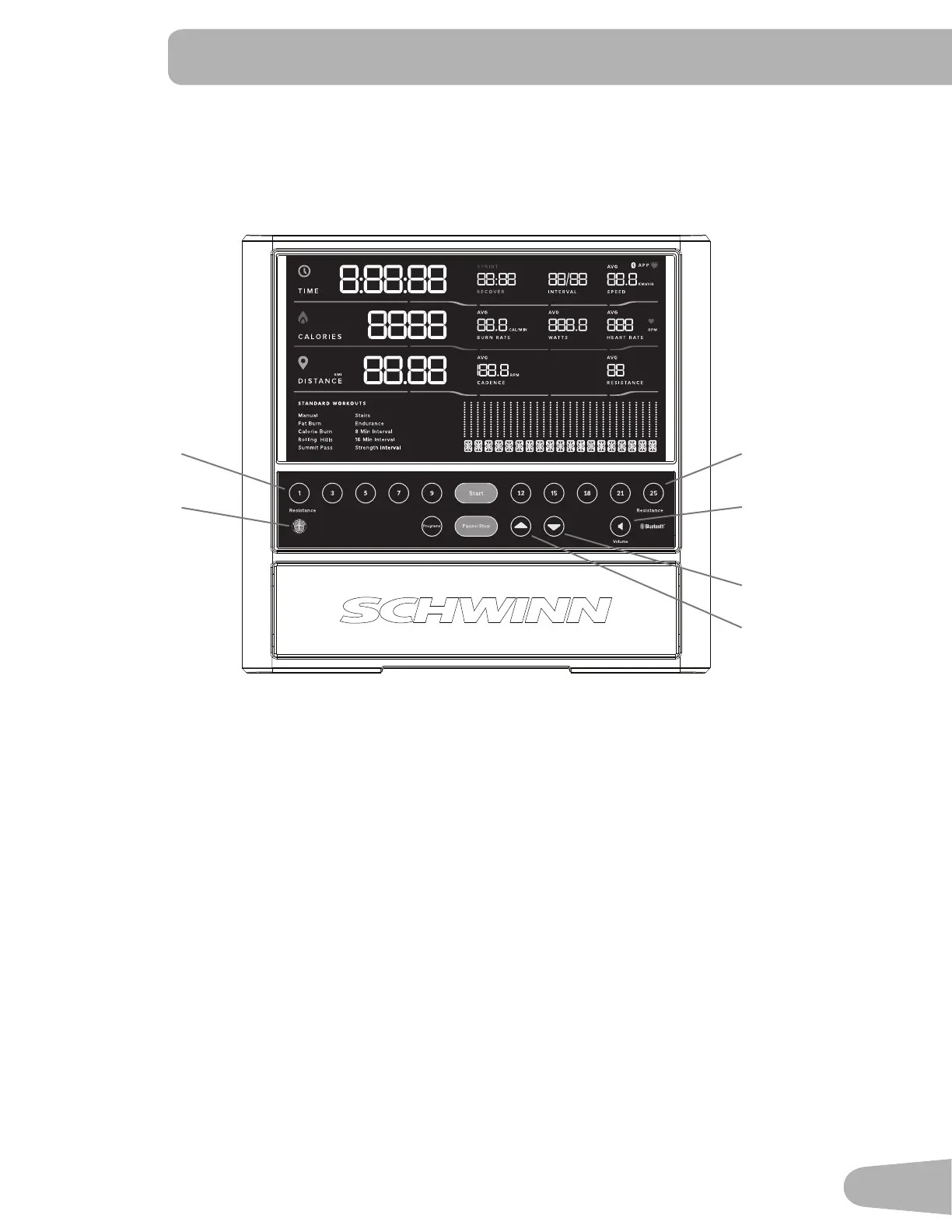
The Console provides important information about your workout and lets you control the resistance levels while you
H[HUFLVH7KH&RQVROHIHDWXUHVWRXFKFRQWUROEXWWRQVWRQDYLJDWH\RXWKURXJKWKHH[HUFLVHSURJUDPV
Keypad Functions
5HVLVWDQFH/HYHO4XLFNEXWWRQV6KLIWVWKHUHVLVWDQFHOHYHOWRWKHVHWWLQJTXLFNO\GXULQJDZRUNRXW
Programs button- Tap to cycle through the menu of workout programs.
6WDUWEXWWRQ6WDUWVD3URJUDPZRUNRXWFRQ¿UPVLQIRUPDWLRQRUUHVXPHVDSDXVHGZRUNRXW
Pause / Stop button- Pauses an active workout or ends a paused workout.
Increase (c) button- Increases the workout resistance level or moves through options.
Decrease (d) button- Decreases the workout resistance level or moves through options.
9ROXPHEXWWRQ6HWVWKHVRXQGOHYHORIWKH&RQVROH7DSWRF\FOHWKURXJKWKHYROXPHOHYHOV2ႇGHIDXOWIt does
QRWDႇHFWWKHRXWSXWIURP\RXUSHUVRQDOGHYLFH
Reset button (Schwinn
™
logo)- for service technician use only. When pushed during power up, the button restores the
&RQVROHVHWWLQJVWRWKHIDFWRU\GHIDXOWVWDWH7KH&RQVROHZLOOUHTXLUHXSGDWHVWREHDSSOLHGLQRUGHUWREHFRPHIXOO\
IXQFWLRQDO:RUNRXWGDWDLVQRWDႇHFWHG
Reset button
Resistance Level
Quick buttons
Resistance Level
Quick buttons
Increase button
Decrease button
Volume button



 To Next Page