26
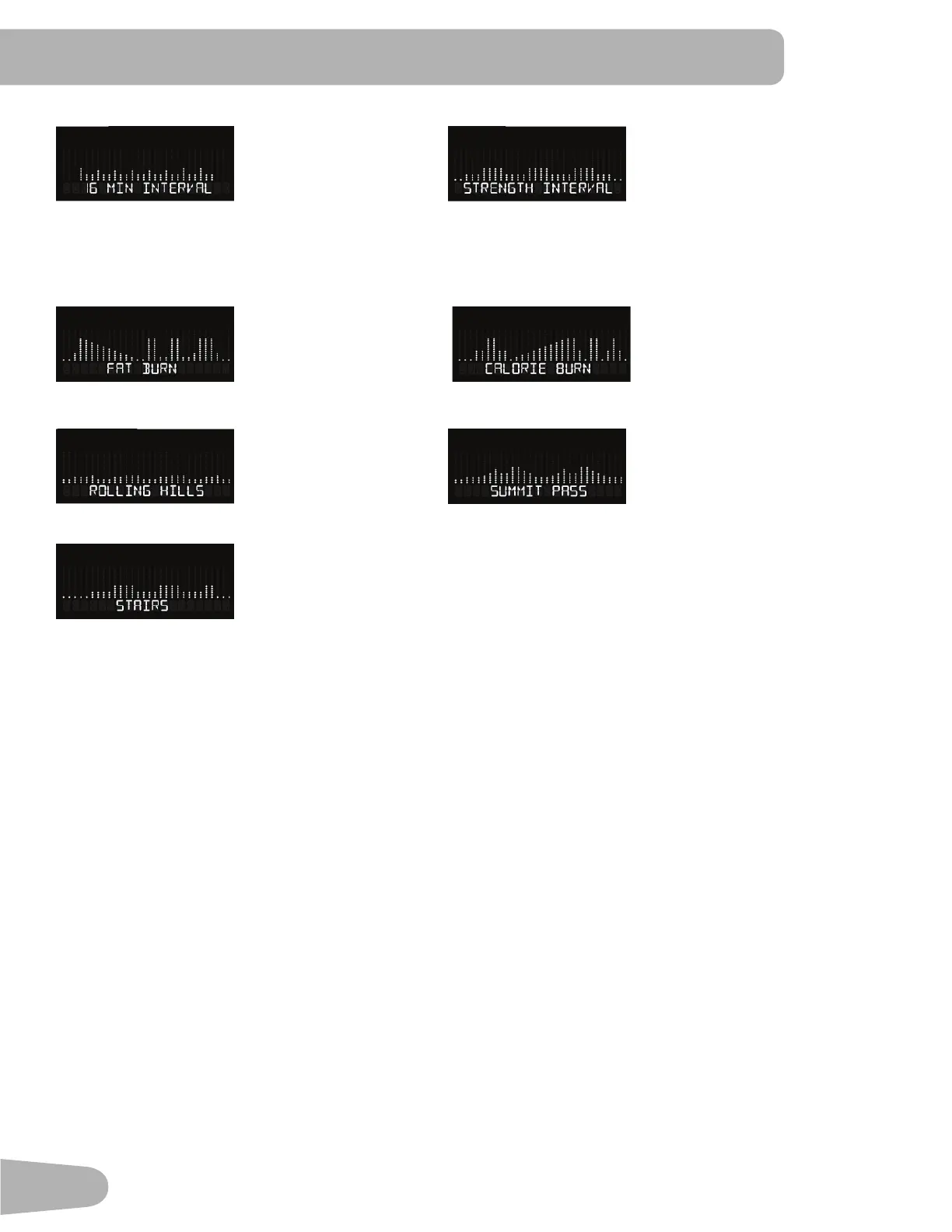
0LQ,QWHUYDO6WUHQJWK ,QWHUYDO
Non-Interval Programs
Fat Burn Calorie Burn
Rolling Hills Summit Pass
Stairs
Modify Display of Workout Values
To switch units between kilometers and miles before a workout, push the Programs button and hold for 3 seconds to enter
the Console Setup Mode. The System Units prompt appears. Push an Increase/Decrease button to change the units (KM/
KG or MI/LB). With the desired unit of measurement displayed, push the Start button to save.
Note: The default system of measurement is MI/LB.
Changing Resistance Levels
Push the Increase(c) or Decrease(d) buttons to change the resistance level at any time in a workout program. To rapidly
change the resistance level, push the desired Resistance Level Quick Button. The Console will adjust to the selected
resistance level of the Quick button.
Pausing or Stopping
1. Push the Pause/Stop button or stop pedaling for 5 seconds to pause your workout.
2. To continue your workout, push Start or begin pedaling.
7R VWRS WKH ZRUNRXW SXVK WKH 3DXVH6WRS EXWWRQ 7KH &RQVROH ZLOO JR LQWR :RUNRXW 6XPPDU\ PRGH 3XVK 3$86(
6723 DJDLQ WR H[LW WR WKH :HOFRPH VFUHHQ



 To Next Page