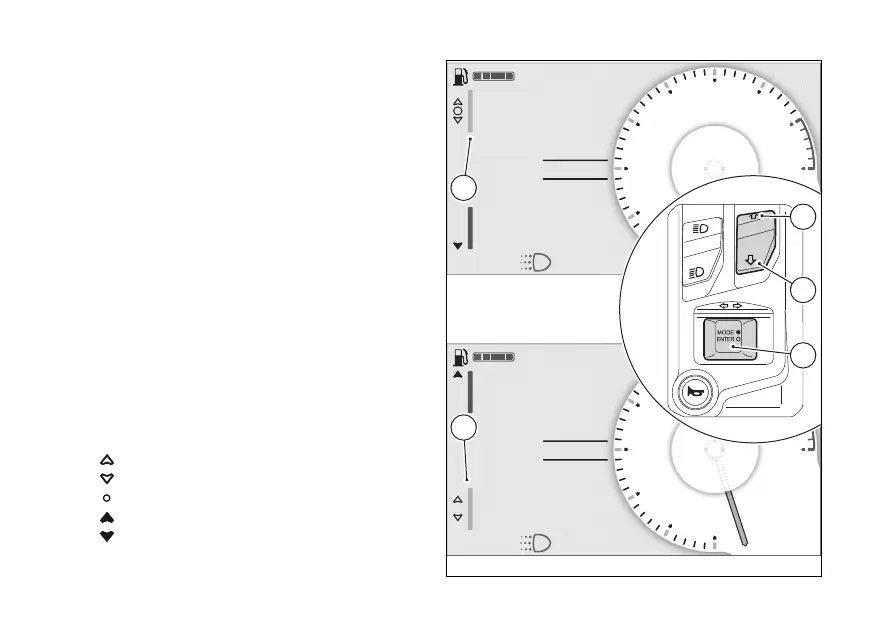
Selection and navigation
When one of the menus is selected, the relevant
window (E) or (F) is highlighted and (1), (2)
and ENTER (3) are used for menu navigation and
interaction.
To toggle the selection between "Interactive Menu"
and "Info display" and vice versa:
●
if "Interactive Menu" is currently selected (E),
long press and hold (2) to move the
selection to “Info display” (F);
●
if "Info display" (F) is currently selected, long
press and hold (1) to move the selection
to "Interactive menu" (E).
(1) and (2) are mainly used to scroll and
select items in the selected menu. (3) is used
to activate and interact with the selected menu item.
The of the menus shows the following
symbols indicating the possible interaction of
(1), (2) and (3):
●
press of (1);
●
press of (2);
●
press of (3);
●
long press of (1);
●
long press of (2);
N
Gear
A
Air 22°C
0
km/h
ROAD
km1229
Total
DTC 3
DQS ON
Setting menu
N
Gear
A
Air 22°C
0
km/h
ROAD
km1229
Total
DTC 3
DQS ON
Setting menu
Fig 76
104



 To Next Page