Changing Riding Mode
●
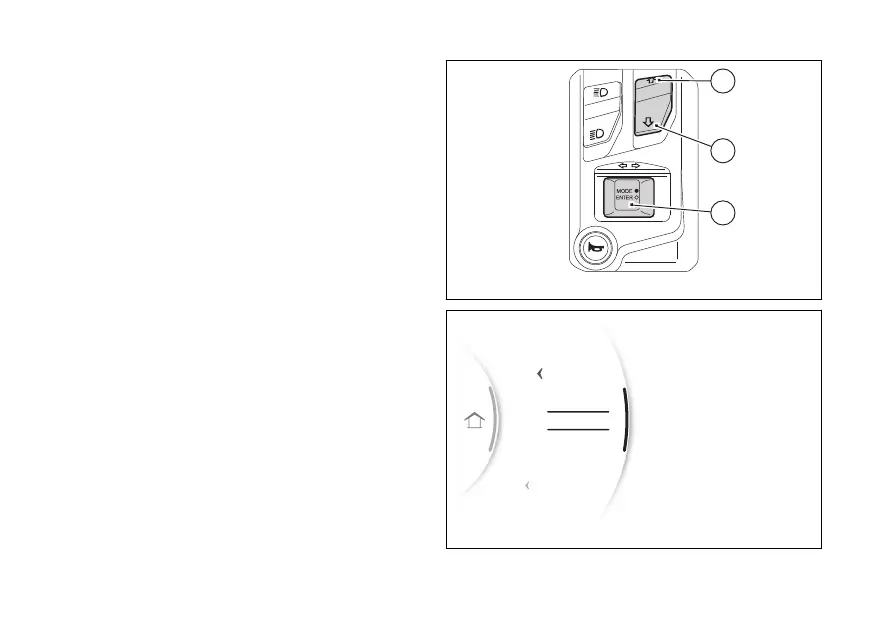
Press and hold the MODE/ENTER (3) for
a long time.
●
The dedicated screen(Fig 79) is displayed where,
using (1) and (2), it is possible to scroll
through the available Riding Modes and display
the parameters with the relevant set values.
●
Press the MODE/ENTER (3) to confirm.
Select "Exit" and press MODE/ENTER (3) to
quit the screen without making any changes.
As soon as the new Riding Mode is confirmed, the
instrument panel checks the following conditions:
●
If speed is lower than or equal to 5 km/h (3 mph)
and control is open, the message “Close
is displayed; the new Riding Mode is
confirmed and stored only when control
is closed and then the main screen is displayed.
●
If speed is lower than or equal to 5 km/h (3 mph),
control is closed but brakes are
actuated, the message “Release brakes” is
displayed. The new Riding Mode is confirmed
and stored only when brakes are released and
then the main screen is displayed.
Fig 78
Exit
Exit
km/h
0
Gear
N
DQS On
DTC 3
Power High
SPORT
SPORT
ROAD
Fig 79
107


 To Next Page