ADVANCED OPERATIONS
23
ENT
ENT
ENT
UP
DN
CHANGING THE NAME TAG OF A BIN
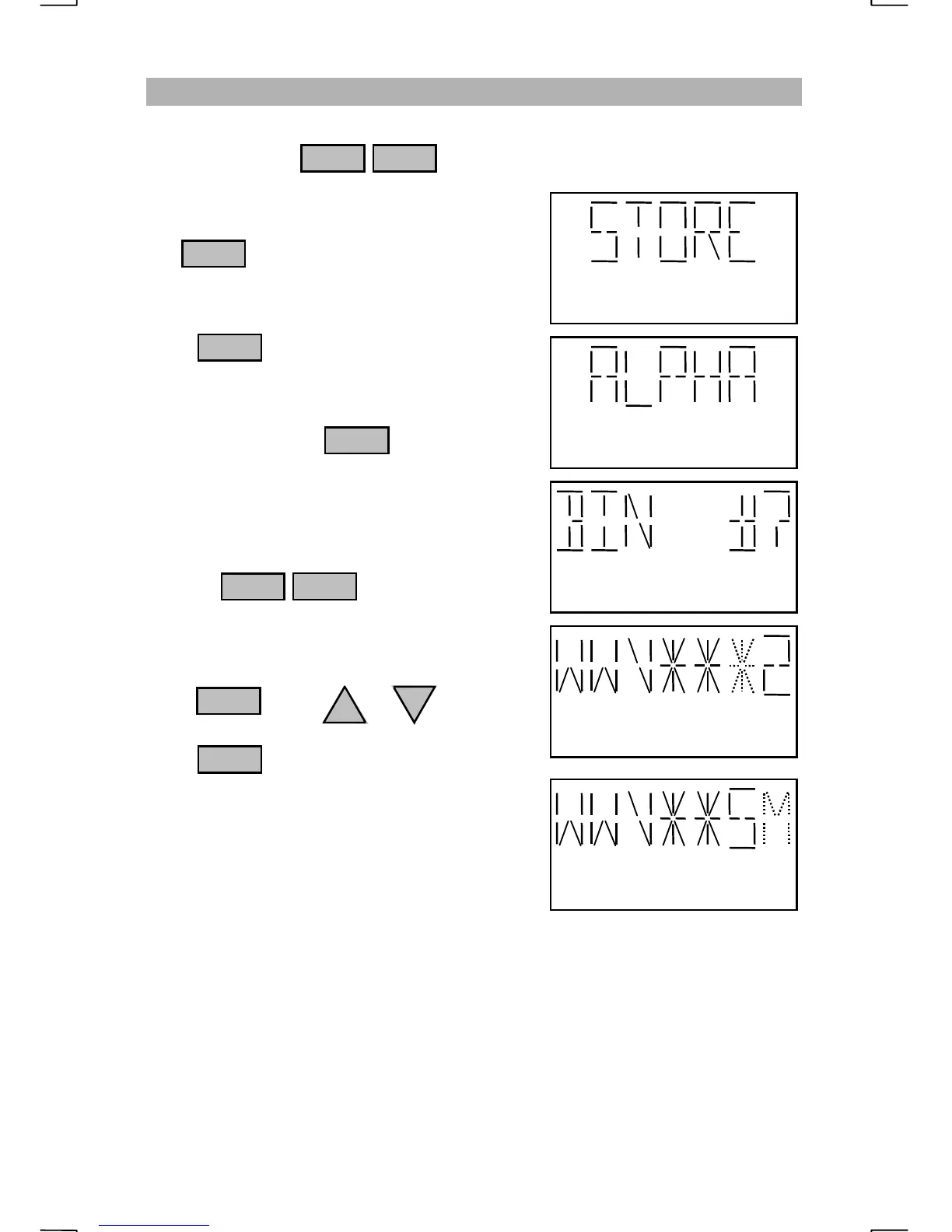
The name tag given to a bin location may be changed at any time. To rename a
bin location, press to enter program mode.
When “STORE” appears on the display, press
the . key until “ALPHA” appears.
Press at the “ALPHA” display.
Enter the bin number that is needed to be
renamed followed by . Bins 196 to
200 are assigned to “NECODE” and can not be
renamed.
e.g. To rename bin number 2 (WWV 2) to
show it is the 5 MHz WWV frequency
press:
The name tag for the selected channel will
appear with the first character blinking.
If you wish to leave the character the same
press . Press or to change
the blinking character.
Press to move to the next character.
The “*” character indicates a space.
After the final character is entered, the display
will show “BIN 2” “STORED” and return to
the beginning of the program mode.
NOTE
:
Care should be given when renaming bins.
When a bin in a scan cell (bins that share the same first three characters in their name tag) is
renamed, the group will be split. For example, bins 13 through 30 have been programmed
with frequencies assigned to the coast station KMI. Since the name tag’s first three
characters are “KMI”, and the bins are consecutively numbered, the bins may be scanned as
a group. If the bins do not have the same first three characters, the scan cell will be split into
two different cells. For instance, if bin 20 is renamed to “SEA 1”, the KMI scan cell will be
split into two cells. One cell will contain bins 13 through 19, while the other cell will contain
bins 21 through 30. Bin 20 will be a single channel scan cell called “SEA”. Scanning
“KMI” could be done by scanning bins 13 through 19
OR
bins 21 through 30 but not both at
the same time.
ENT
ENT
2
1 FNC
FNC
Blinking character may be changed


 To Next Page