FUNCTION MENUS
28
UP
9
UP
UP
UP
DN
DN
DN
FINDING A BIN WITH THE ALPHA MENU
In many cases it is difficult to remember where a frequency is stored by its bin
number. The ALPHA menu along with Memory Browse, is a useful method for
locating a particular bin by name. Locating the 8 MHz weather fax frequency
for NAM in Norfolk, VA will be used as an example.
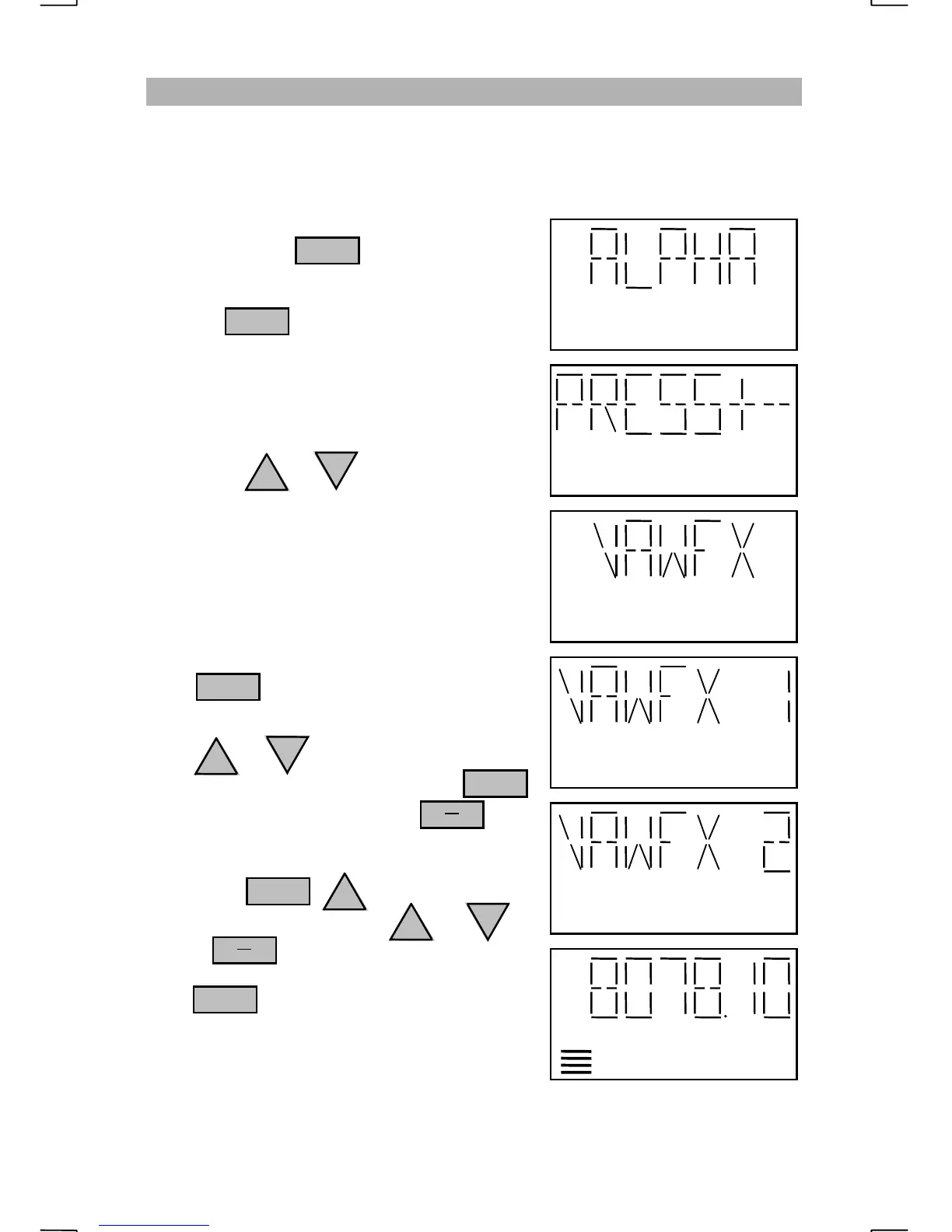
Repeatedly press until “ALPHA” is
displayed.
Pressing with “ALPHA” displayed
will select the Alpha menu. The display will
prompt the operator to “PRESS+-” to cycle
through the scan cells.
The scan cell names that appear with each
press of the or key may appear
cryptic, but should give an indication for each
scan cell’s purpose. The weather fax groups
programmed by SEA have “WFX” as the last
part of their name. The first part may be “CG”
for Coast Guard or “HI” for Hawaii. NAM is
located in Virginia (“VA”) so “VAWFX”
would be the most likely scan cell.
Press at the “VAWFX” display to
select the “VAWFX” scan cell.
Press or to view the different bins
within the “VAWFX” scan cell. Press
to select the displayed bin. Press to
view the frequency. If the bin does not contain
the desired frequency, turn on Memory Browse
by pressing . When browsing
the “VAWFX” channels with or ,
use the key to verify the frequency.
Push to retrieve the selected bin.
Momentarily press the microphone PTT button
to exit the Memory Browse.
ENT
ENT
ENT
ENT
FNC
CH
FX
CH
FX
LOW


 To Next Page