FUNCTION MENUS
27
FUNCTION MENU OVERVIEW
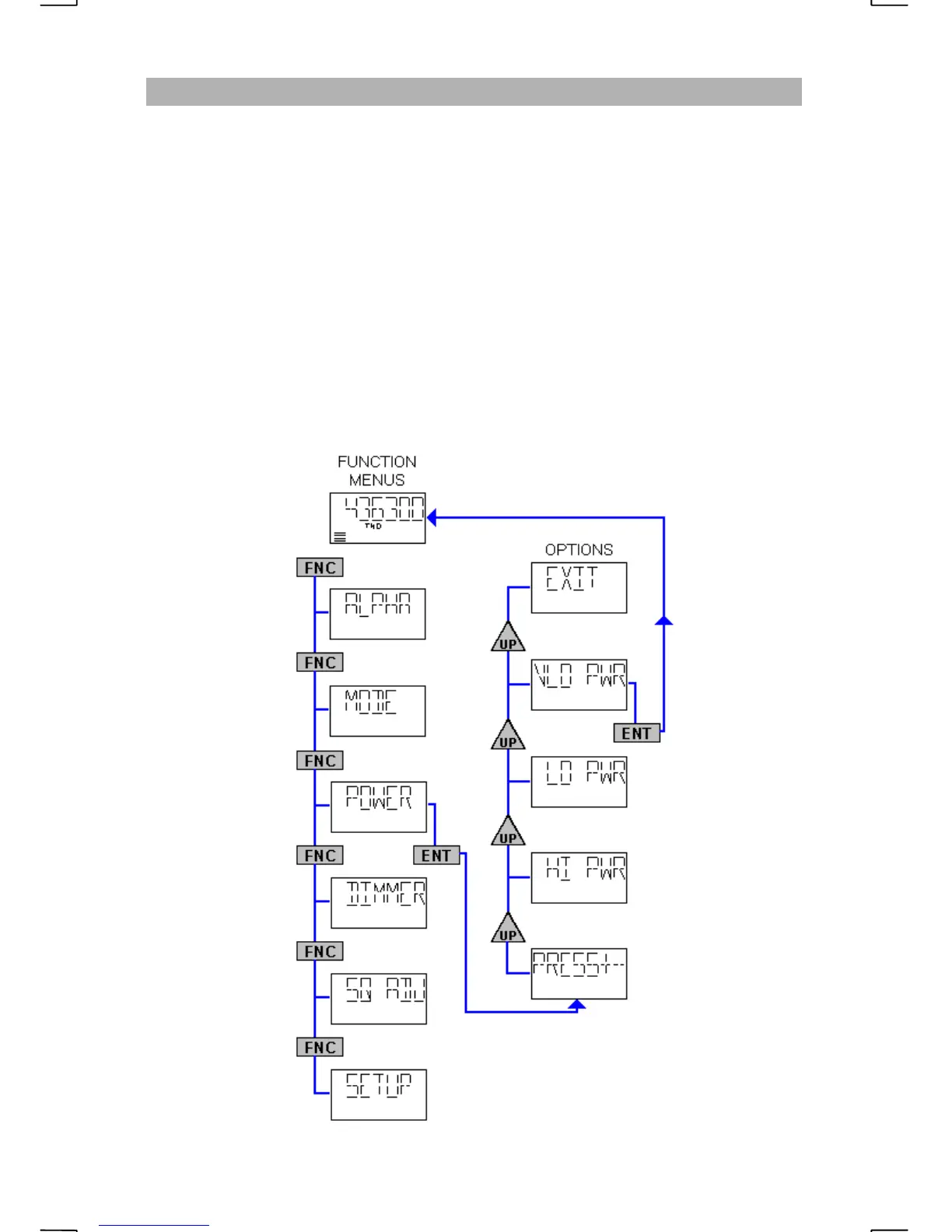
When the FNC key is pressed, the radio displays the first of four function menus.
Each press of the FNC key will display the next function menu. When the last
menu item is displayed, the next press of the FNC key will return the radio to
normal operations. Pressing the ENT key will select the displayed menu. The
menus are “
ALPHA
”, “
MODE
”, “
POWER
”, “
DIMMER
”,
“
SQ ADJ
” and “
SETUP
”.
Each function menu will prompt “PRESS+-”, informing the operator to use the
UP or DN key to cycle through the options for the chosen function menu.
Selecting the displayed option with the ENT key will complete the command or
additional prompts will be displayed if more information is required.
e.g. The following diagram shows the “VLO PWR” option being selected from
the “POWER” function menu.


 To Next Page