FUNCTION MENUS
42
UP
UP
DN
DN
CHANGING THE SSB AUDIO INPUT SOURCE
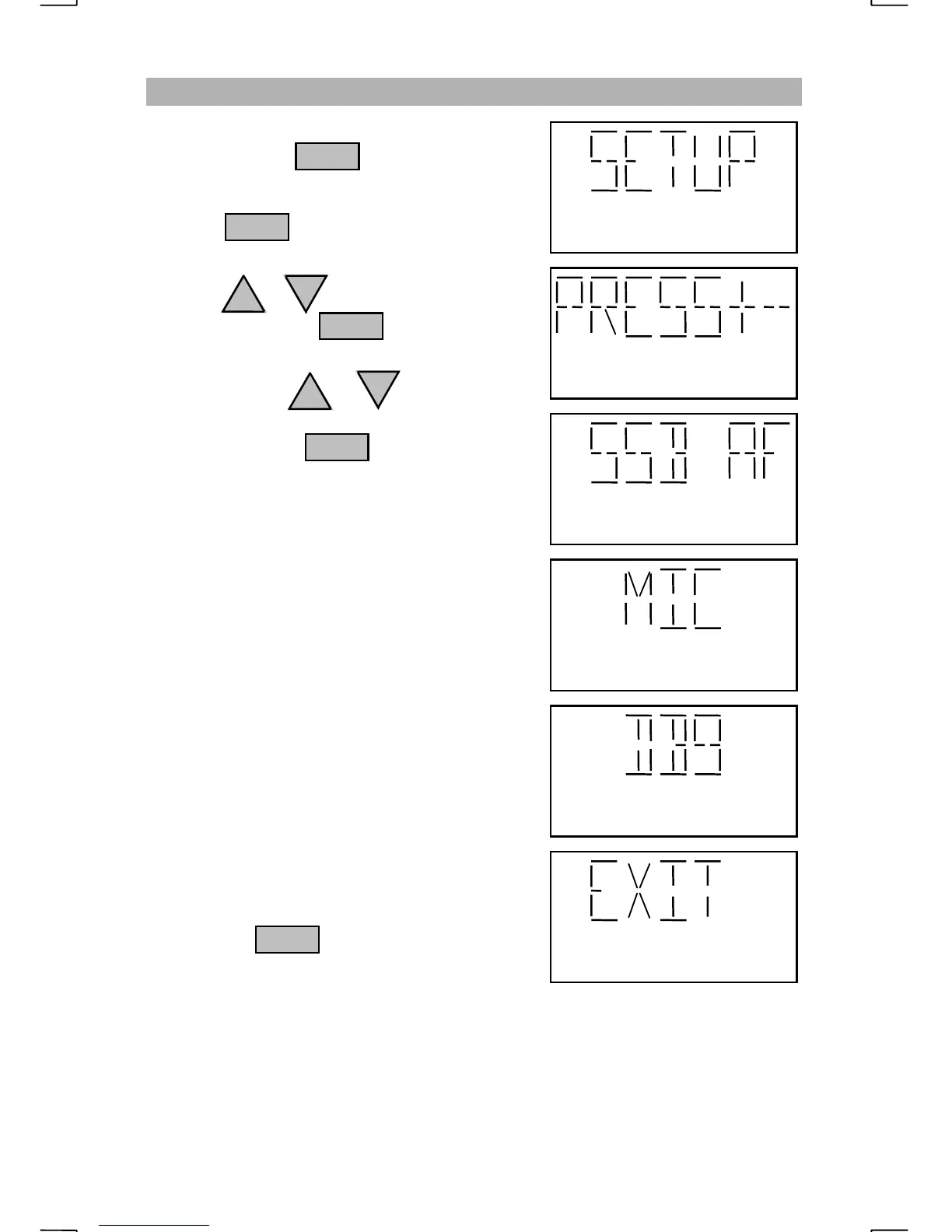
Repeatedly press until “SETUP” is
displayed.
Pressing with “SETUP” displayed
will prompt the operator to “PRESS+-”.
Press the or key until “SSB AF” is
displayed then press
Each press of the or key will change
where the radio will get transmit audio when in
SSB modes. Press to select the
displayed setting.
Under normal conditions, the transmit SSB
audio will come from the microphone. When
set for “MIC”, the rear panel P3 connector pin
12 (TXAF) and DB9 pin 7 are disabled. This
will prevent interference from other equipment
that may be connected to the radio.
Both the DB9 connector pin 7 and the rear
panel P3 connector pin 12 (TXAF), are used
when the “SSB AF” setting is “DB9”. When
set for “DB9”, the internal microphone and rear
panel P3 connector pin 3 (MIC) are disabled.
This will prevent the microphone from causing
interference to the additional equipment.
Pressing the key when “EXIT” is
displayed, will not change the setting.
NOTE
:
Normal voice operations require that the “SSB AF” source is set to “MIC”.
ENT
FNC
ENT
ENT
ENT


 To Next Page