G4K Pro User Guide
3.1.2.3. Daisy chain units with HDMI cables
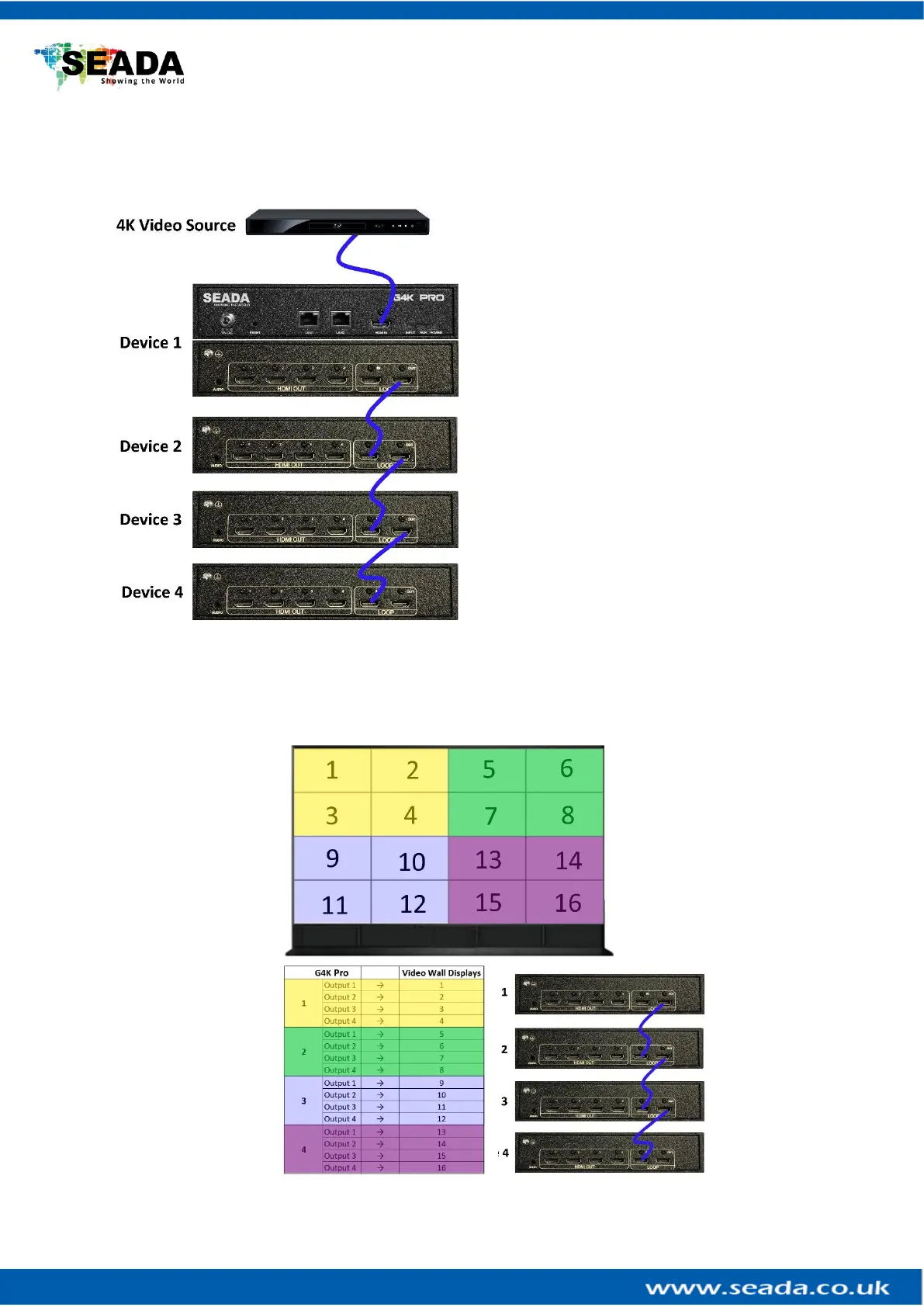
Daisy chain all the G4K Pro units using 4K compatible HDMI cable (if 4K video source is applied) via
LOOP IN and OUT HDMI ports
Note: the daisy chain HDMI ports only takes the
‘processed video source’ + ‘frame lock’ signals
from other G4K Pro. It will not take HDMI video
signal from video device directly. Only the main
HDMI IN port in the front panel is able to take
HDMI video signal from video device directly.
This configuration left is an example for setting up
a 4 units of G4K Pro daisy chain (e.g. for a 4 x 4
video wall) with one video source input to be
displayed across the entire video wall.
For multi video sources input, please see daisy
chain examples below (3.1.2.6)
3.1.2.4. Connect devices to screens
Connect all the HDMI ports in ‘HDMI OUT’ to the screens of video wall. e.g., for a 4x4 video wall with
one video source, see configuration below



 To Next Page