4K 4x1 Seamless Switcher with Multi-view
Website: www.seada.co.uk 7 / 33 E-mail: sales@seada.co.uk
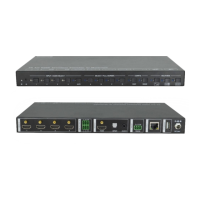
5. Front Panel Control
5.1 Multi-views Selection
Factory default is four quarter views, and factory default input and output corresponding
relation is input1 -> window A, input2 -> window B, input3 -> window C, input 4->
window D. Press one of the other two multi-view buttons to change layout. And its
multi-view mode and corresponding windows LEDs illuminate blue.
Full Screen mode: Press Windows A~D button to select the corresponding window to
display in full-screen. Meanwhile, the corresponding input source button LED and
window button A LED illuminate blue, other window buttons and previous multi-view
mode button LED goes out.
5.2 Video Signal Switching
In the Multi-view mode
Operation: Inputs# + Windows#
Example: Switch Input 1 to Windows B:
Press INPUT 1(The input 1 LED illuminates blue, the windows A-D LEDs flash.)
Press Windows B (The windows A, C and D LEDs go out, then input 1 and windows B
LED flash three times, last, input 1 LED goes out and windows A-D LEDs illuminate
blue.)
In the Full Screen mode
1) Manual Switching
Operation: Inputs# + Windows#
Example: Switch Input 2 to Windows A:
Press INPUT 2 (The input 2 LED illuminates blue.) Press Windows A (The input
2 and windows A LEDs illuminate blue).
2) Auto Switching
Press AUTO button to enter auto-switching mode, and the corresponding LED
illuminate blue.
When in the AUTO mode, signal switching complies with the following principles:
Four input sources priority: HDMI 1 > HDMI 2 > HDMI 3 > HDMI 4. When input
source and output window are connected, the corresponding LEDs illuminate blue.
Once detecting a new input signal, the switcher will switch to this new signal
automatically.
The switcher will memorize last input source when power off
Manual switching is enabled in the auto switching mode and does not exit it.


 To Next Page