(The following information is repeated, for your convenience, on a sticker within the vendor.)
SERVICE MODE
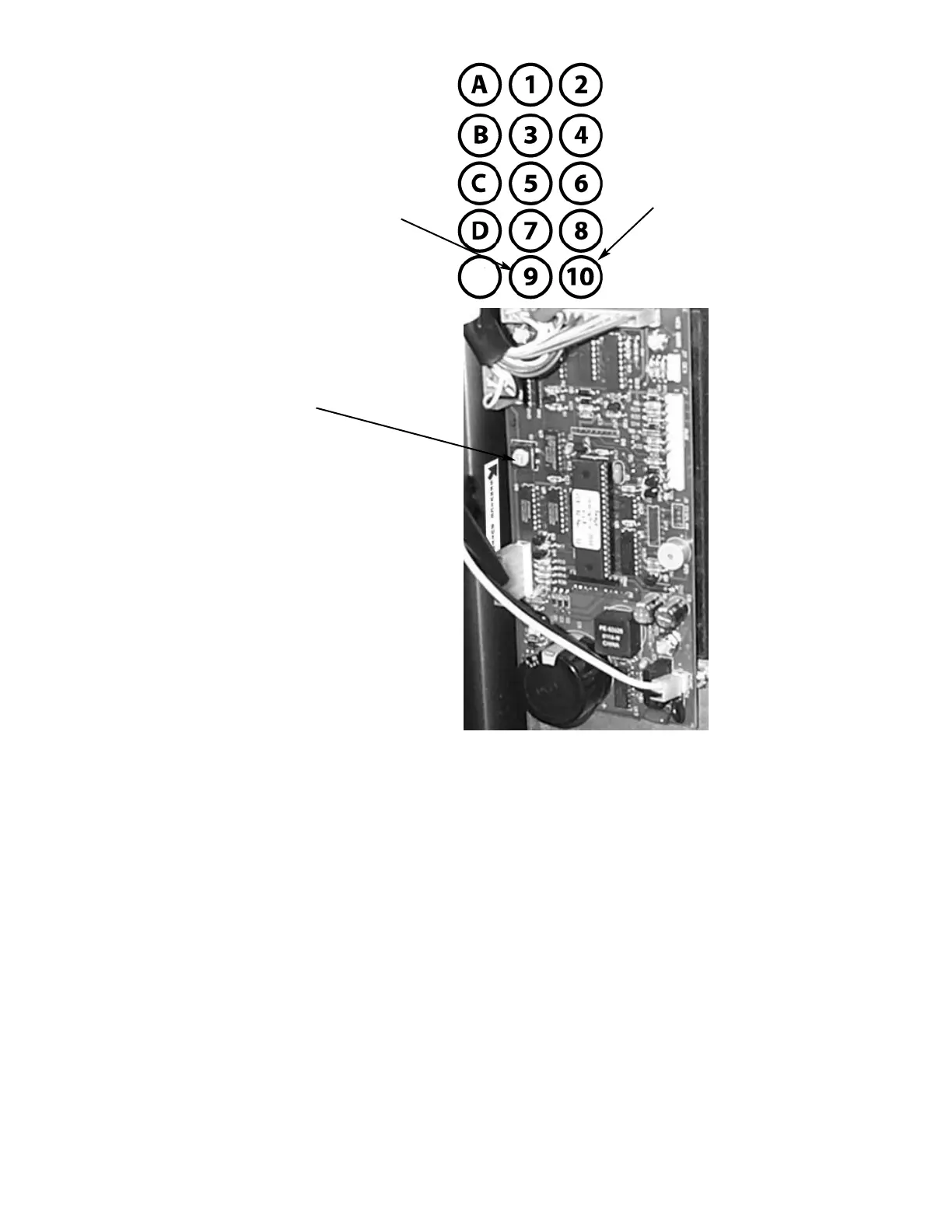
The Service Mode is entered and exited by pressing the Red Service Mode button on the Circuit Board. All Service Mode func-
tions are cycled and selected by pressing the DOWN (9) and UP (10) keys. If no action is taken within 20 seconds the display
will return to Standard Operating Mode.
MOTOR COUNT ("Cnt")-displays the total count of motors available in this vendor.
Enter Service Mode. Cycle through the Service Mode until the display reads "Cnt". Press any keypad character other
than the DOWN (9) or UP (10) key and the controller will display the motors it recognizes. The total number of motors should
equal the total number of selections.
BILL ESCROW ("ES")-optional setting that when ON will return the bill to the customer on demand, when OFF the vendor will
return coins to the customer.
Enter Service Mode. Cycle through the Service Mode until the display reads "ES". Press any keypad character other
than the DOWN (9) or UP (10) key to turn this mode ON ("ES y") or OFF ("ES n").
MULTI-VEND MODE ("UL")-optional setting that when ON allows more than one vend to be performed, provided there is still
credit remaining.
Enter Service Mode. Cycle through the Service Mode until the display reads "UL". Press any keypad character other
than the DOWN (9) or UP (10) key to turn this mode ON ("UL y") or OFF ("UL n").
FORCE-VEND MODE ("FC")-optional setting that when ON requires a purchase once credit has been deposited.
Enter Service Mode. Cycle through the Service Mode until the display reads "FC". Press any keypad character other
than the DOWN (9) or UP (10) key to turn this mode ON ("FC y") or OFF ("FC n").
Figure 2 Keypad Layout
Down (in
Service Mode)
Up (in Service
Mode)
Figure 3 Service Mode Button
Red Service Mode Button
(Circuit Board inside
Front Panel)
E
NOTE: when plugging in wire
harnesses after servicing, be
aware that the side of the wire
harness plug that shows silver
connectors always face the out-
side edge of the circuit board.


 To Next Page