BEVERAGE SOLD-OUT MODE ("Can")-optional setting that when ON operates sold-out function for this vendor, and will flash
“Make Alternate Selection”.
Enter Service Mode. Cycle through the Service Mode until the display reads "Can". Press any keypad character other
than the DOWN (9) or UP (10) key to turn this mode ON ("Can y") or OFF ("Can n").
TEST ALL MOTORS ("Test")-allows user to test all motors in your vendor.
Enter Service Mode. Cycle through the Service Mode until the display reads "Test". Press any keypad character other
than the DOWN (9) or UP (10) key to test all motors. No other function can be accessed during the test. The time this function
requires will vary.
INDIVIDUAL MOTOR TESTING ("Slct")-allows user to individually test each motor in this vendor.
Enter Service Mode. Cycle through the Service Mode until the display reads "Slct". Enter any selection to test it's motor.
(ex. A1)
PRICE SETTING ("Prc")-allows the user to set individual prices for each motor or item loaded in your vendor.
Enter Service Mode. Cycle through the Service Mode until the display reads "Prc". Enter any selection to display current price.
(ex. A1) Press the DOWN (9) or UP (10) key to change the price for that selection. Price settings will change in 5 cent increments. Press
"A" to save the new price.
CASH HISTORY ("Cash")- displays total cash count.
Enter Service Mode. Cycle through the Service Mode until the display reads "Cash". Press any keypad character other than
the DOWN (9) or UP (10) key to display the total cash count the vendor has accumulated. This function cannot be reset to zero.
SALES HISTORY ("Sale")-displays total vend count.
Enter Service Mode. Cycle through the Service Mode until the display reads "Sale". Press any keypad character other than the
DOWN (9) or UP (10) key to display the total vend count that your vendor has performed. This function cannot be reset to zero.
COIN DISPENSING ("Coin")-allows user to manually dispense coins from the Coin Mechanism by coin type.
Enter Service Mode. Cycle through the Service Mode until the display reads "Coin". Pressing keys 1-7 will dispense the low-
est through the highest denomination of coins. For American Coin Mechanisms key 1 will dispense nickels, key 2 will dispense dimes,
and key 3 will dispense quarters.
Special Note: To avoid true customer aggravation, Multi-Vend and Force-Vend should NOT be turned on at the same time.
DELIVER
Y
SYSTEM
The Delivery System of your Elite Snack Vendor consists of the Keypad, LED Display, Driver Motors, Product Trays, Product Chutes,
and Helix Coils. The customer inserts money and enters their selection on the Keypad. The selection's Driver Motor turns the Helix
Coil that vends the product.
LOADING PRODUCT
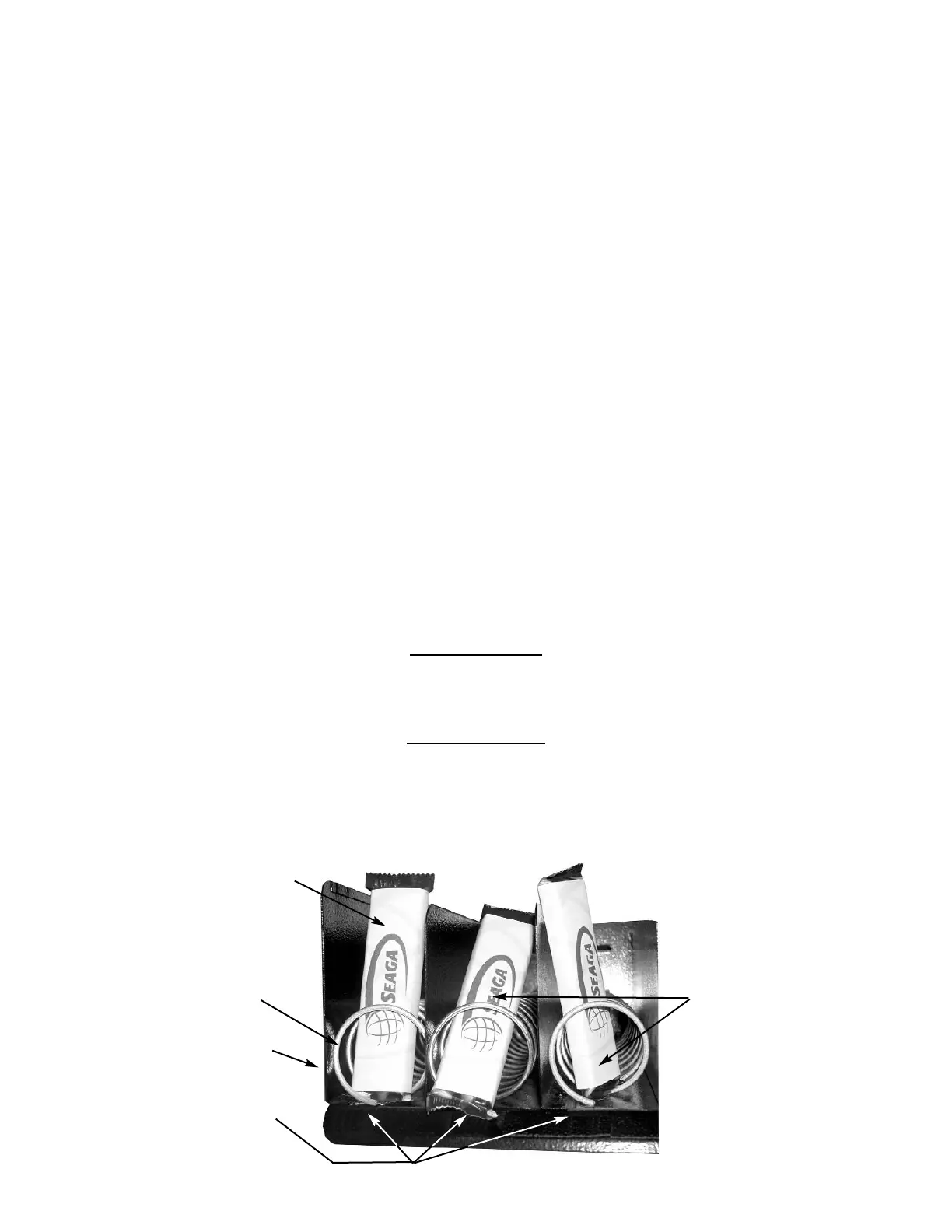
To present your product in as an attractive and professional manner as possible, do not load any damaged items, and make sure items
are facing forward for easy identification by your customer.
Note: The size of the item being vended must be larger than the Helix Coil, but smaller than the Column, to vend correctly. Never force
an oversized item into the Helix Coil or Column, nor attempt to vend an item that is smaller than the Helix Coil as this will create prob-
lems and deter customers. (Fig.4)
Figure 4 Loading Product
Correct - load
product between
Helix Coils,
resting on the
product tray
Incorrect
Product Tray
Columns
Helix Coil
Front view


 To Next Page