either $4.50 or $20 in the Quarter Tube. If you intend to vend high-ticket (over $1) items through your vendor, or the vendor is in
a high traffic area, you may want to set the Coin Validator to maintain a full Quarter Tube. The Bill Validator will not accept $5
bills unless the quarter tube is nearly full. Refer to the manufacturer's manual to adjust option switch settings.
CLEARING JAMS
To clear a jam, remove the Hopper Assembly.
1. To Remove the Hopper Assembly.
A.) Unlock and open the Front Door, unplug vendor.
B.) Remove the Coin Tray, and pull the Vertical Shelf out.
C.) Loosen the two (2) mounting screws that hold the Coin Return Arm
and Coin Chute to the Vertical Shelf, and shift this assembly up.
This assembly does not need to be removed.
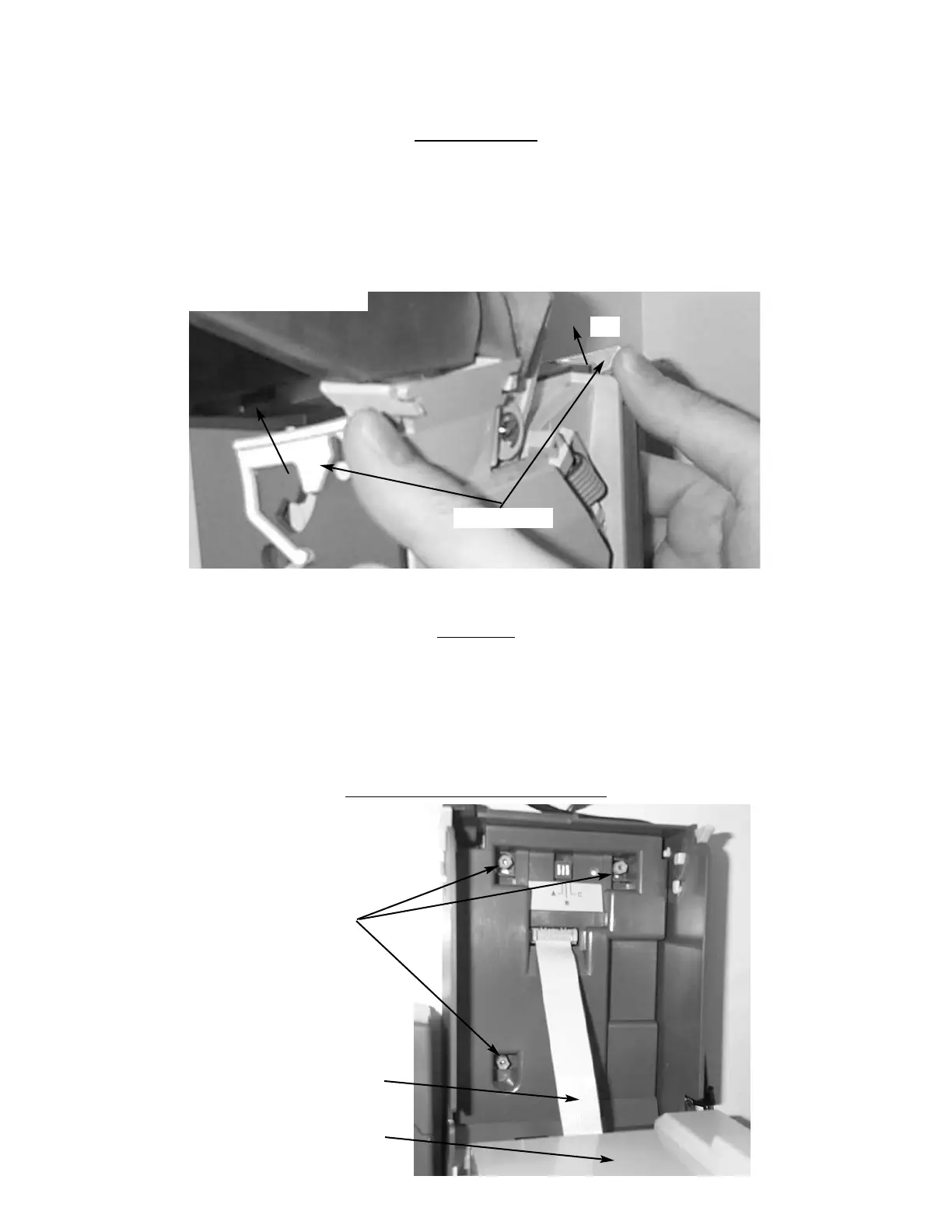
D.) Push the Thumb Tabs up, and tilt the Coin Hopper forward. (Fig. 8)
E.) Lift and remove. Note: The Coin Hopper is still connected to the Coin
Validator by the Ribbon Cable that can be pulled free. (Fig.9)
F.) Clear jam and reassemble.
CLEANING
Your Coin Validator needs to be cleaned only when the Coin Validator will no longer read coins.
1. Cleaning the Optics. You will need cotton swabs (Q-tips), and a mild soap and water solution.
A.) Unlock and open the Front Door.
B.) Remove the Coin Tray, and pull the Vertical Shelf out.
C.) Tilt the Coin Hopper open, there are two (2) Lenses on the Flap and
two (2) Lenses inside the Coin Hopper. (Fig. 10)
D.) Swab the lenses with the solution, and reassemble.
REMOV
AL OF THE COIN VALIDATOR
Figure 8 Thumb Tabs
Thumb Tabs
Tilt
Figure 9 Coin Hopper Removal
Coin Hopper
Ribbon Cable
Mounting Screws (3)


 To Next Page