reComputer R1000
© 2009-2024 Seeed Technology Co.,Ltd. All rights reserved.
The SSD slot on the reComputer R1000 is designed to accommodate NVMe M.2 2280 SSDs for 128GB, 256GB, 512GB and 1TB
in capacity. This slot allows for high-speed storage expansion, enabling users to enhance the performance and capacity of
their system.
There are two main uses for SSD cards:
1. High Capacity Storage: SSD cards can be utilized for high-capacity storage needs.
2.Boot Drive with Image: Another usage involves using the SSD both as a high-
capacity storage and for storing system images, allowing booting directly from the SSD card.
It's important to note that not all SSD cards available in the market support the second usage. Therefore, if you intend
to use it as a boot drive and are unsure about which model to purchase, we recommend opting for our recommende
d 1TB SSD(SKU 112990267). This model has been tested and verified for boot functionality, reducing the risk of compati
bility issues and minimizing trial and error costs.
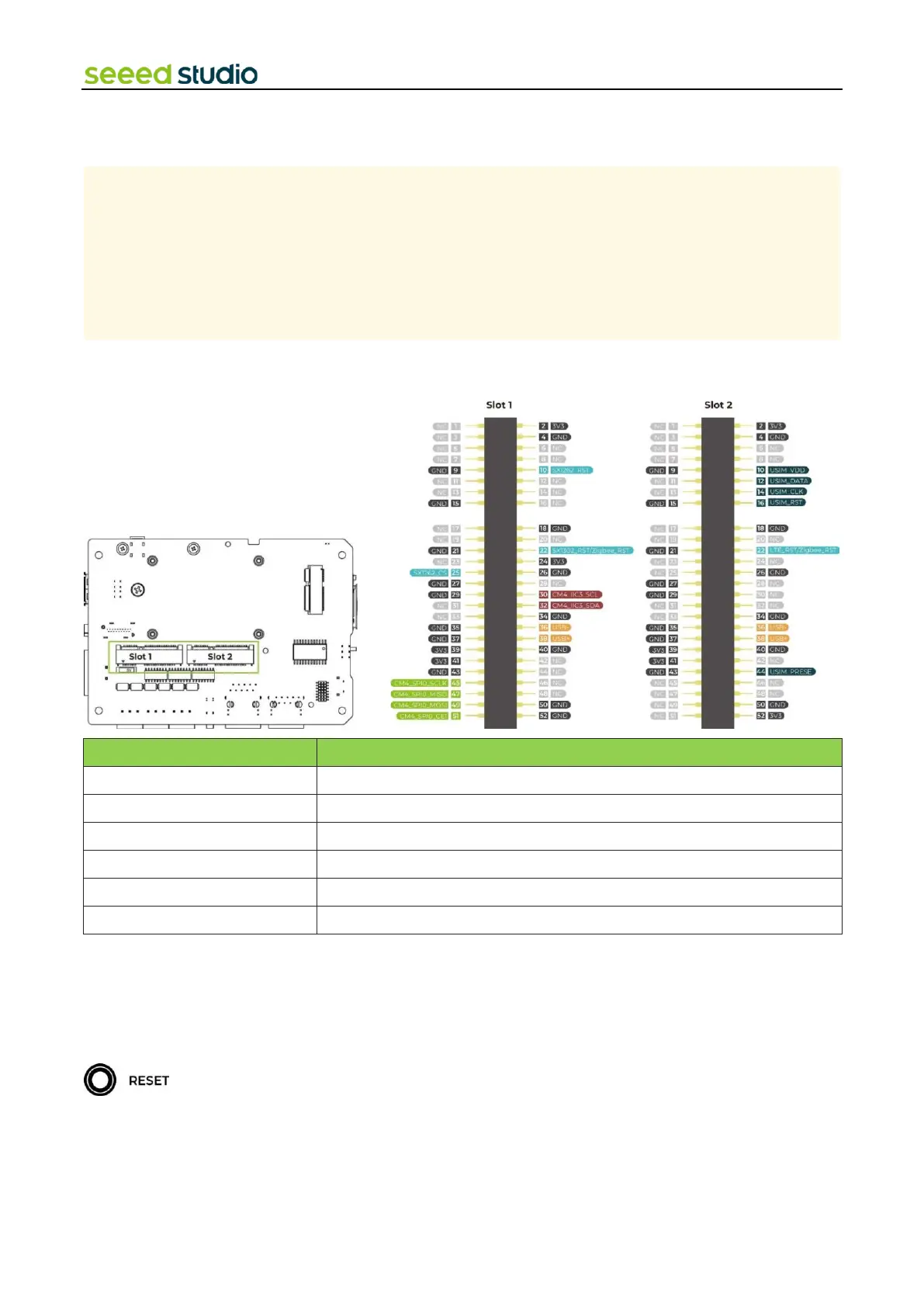
This device features two Mini-PCIe interfaces, namely Mini-PCIe Slot 1 and Mini-PCIe Slot 2. Slot 1 connects to SIM card slot
and supports USB protocols, while Slot 2 supports both USB and SPI protocols but doesn't connect to SIM card slot.
Therefore, devices such as 4G LTE, USB LoRa®, and USB Zigbee can be connected through Slot 1, while SPI LoRa®, USB
LoRa®, and USB Zigbee devices can be connected through Slot 2.
2.2.9 Reset Hole
There is a Mini Push Button Switch located in the reset hole of reComputer R1000. By pressing this button with a thin object,
the CM4 can be reset. This pin when high signals that the CM4 has started. Driving this pin low resets the module.



 To Next Page