21
English
Display Settings
1. TV
Depending on the TV’s aspect ratio, you may want to adjust the screen setting.
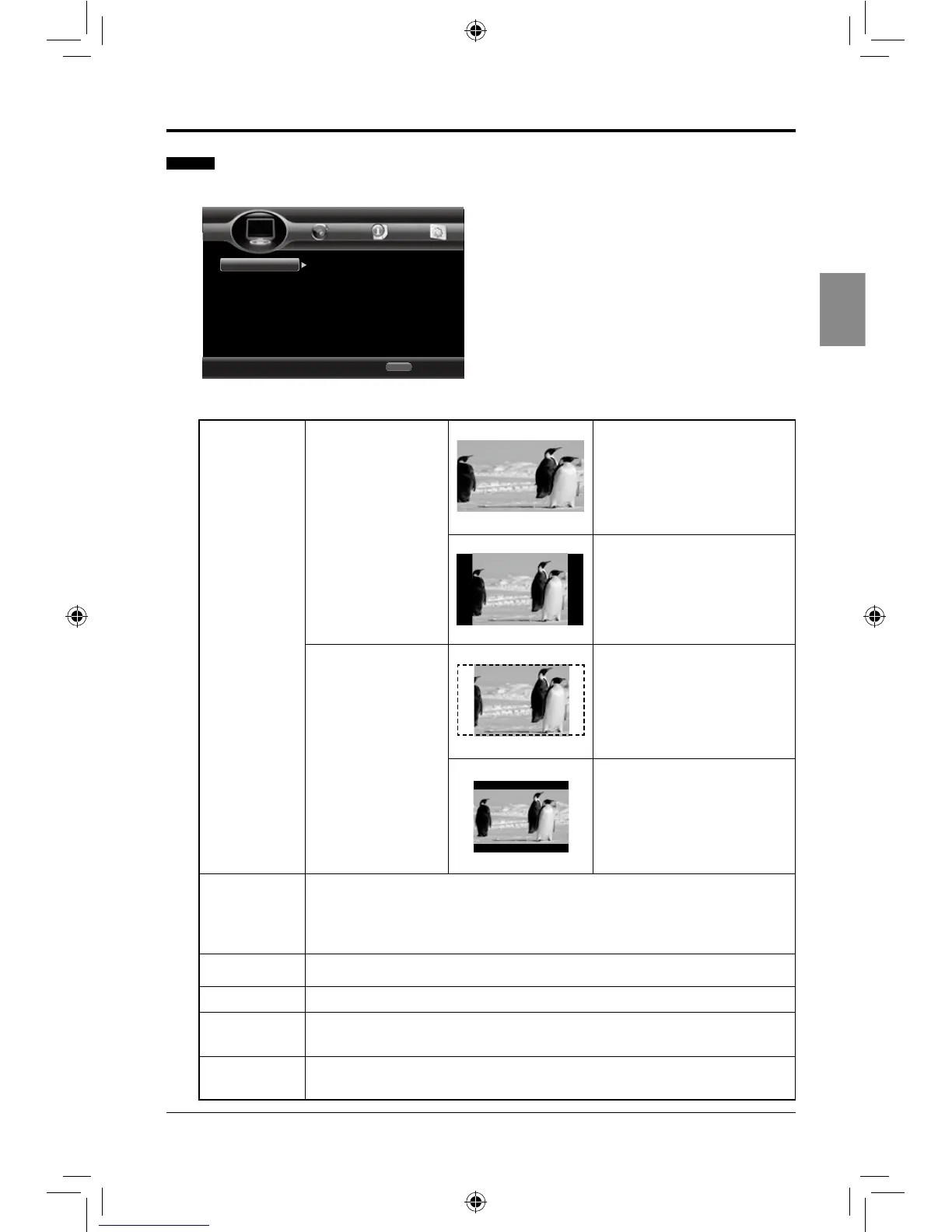
TV Screen
Watch standard
video (4:3) on a
wide-screen TV
(16:9).
16:9 Full: The image lls the
entire screen, but it stretches
horizontally.
16:9 Normal: Full image
shows on the screen with
black bars on both sides.
Watch wide-screen
video (16:9) on a
standard screen
(4:3).
4:3 Pan & Scan: The image
lls the entire screen, but it
cuts off the left and right.
4:3 Letterbox: Wide-screen
image shows on the screen
with black bars on the top
and bottom.
Resolution
Select the output resolution: Auto, 480P/576P, 720P, 1080I, 1080P.
Note: IftheconnectedTVdoesnotsupporttheselectedresolution,
awarningmessagewillbedisplayed.PleasepresstheHDMIbutton
repeatedlytolowerresolutionuntilthepictureappears.
TV System
Select the TV system: NTSC/PAL/AUTO.
Color Space Select the color space: YCbCr/YCbCr422.
HDMI Deep
Color
Output the picture from the HDMI socket with deep color: 30 bits/36 bits/
48 bits/ Off.
HDMI 1080P
24Hz
Select to turn On/Off HDMI 1080P 24Hz.
ADJUSTING THE SETUP ITEMS
Use cursor key to move focus, use
“Enter” key to select
Exit
HOME
TV
Video Process
Motion Video...
TV Screen
Resolution
TV System
Color Space
HDMI Deep Color
16:9 Full
480P/576P
NTSC
YCbCr
Off
Home Menu
--- Display Setting ---
SEIKI Blu-ray Manual V01.indd 21 2012-8-14 15:02:14



 To Next Page