5
English
TIME/CALENDAR SETTING
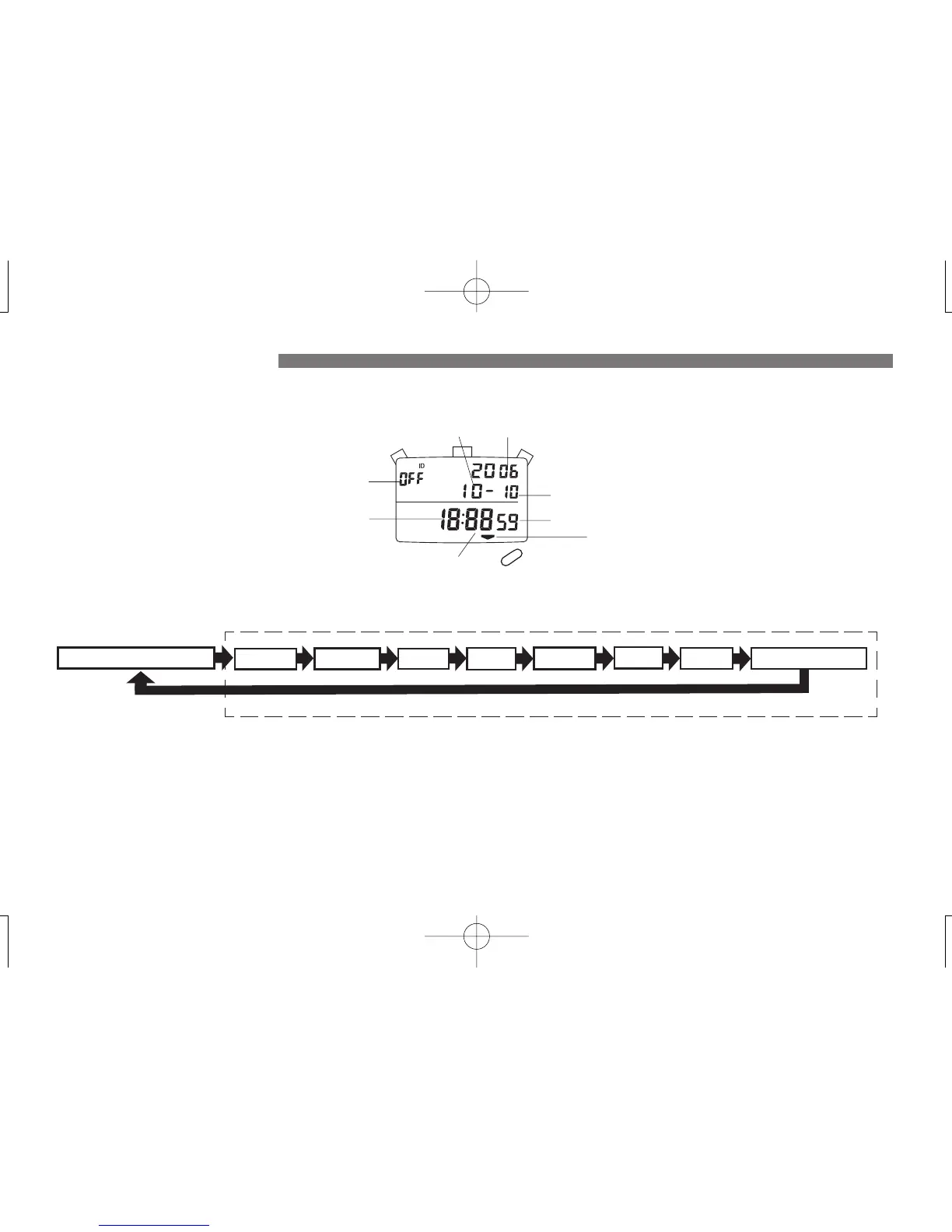
3. Press “A” to set the digits. The digits move quickly if the button is kept pressed.
4. Press “B” to return to the TIME/CALENDAR display.
● Before setting the time/calendar or ID No., be sure to reset the stopwatch to “00.” The time/calendar and ID No. can be set only when the
stopwatch is reset.
1. Press “D” to show the TIME/CALENDAR display, and then press “B.” SECOND digits flash. Press “A” to reset the SECOND to “00.”
2. Press “B” repeatedly to select the digits (flashing) to be adjusted in the following order.
Hour
ID No.
TIME/CALENDAR display indicator
Month Year
Date
Seconds
A
B
D
Minutes
Notes:
1. The calendar automatically adjusts for odd and even months including February of leap years from 2006 to 2055.
2. When the SECOND reads any number from “30” to “59” and “A” is pressed, one minute is added.
3. The time is displayed in the 24-hour indication.
4. The ID No. can be set in two digits from “01” to “99”. When “OFF” is displayed, it indicates that no ID No. is set.
TIME/CALENDAR display
SECOND
MINUTE HOUR YEAR
MONTH
DATE
ID NO.
MEMORY MODE
Setting mode


 To Next Page