6
English
ADJUSTING THE CONTRAST ON THE DISPLAY
● The contrast of the liquid crystal display can be adjusted in 10 steps from level “1” to
“10.”
1. Press “C” in the TIME/CALENDAR display to show the CONTRAST ADJUSTMENT
display.
2. Press “A” or “B” repeatedly to adjust the contrast. The display becomes darker by
pressing “A” and lighter by pressing “B.”
3. Press “C” or “D” to return to the TIME/CALENDAR display.
Contrast
level
B
A
C
D
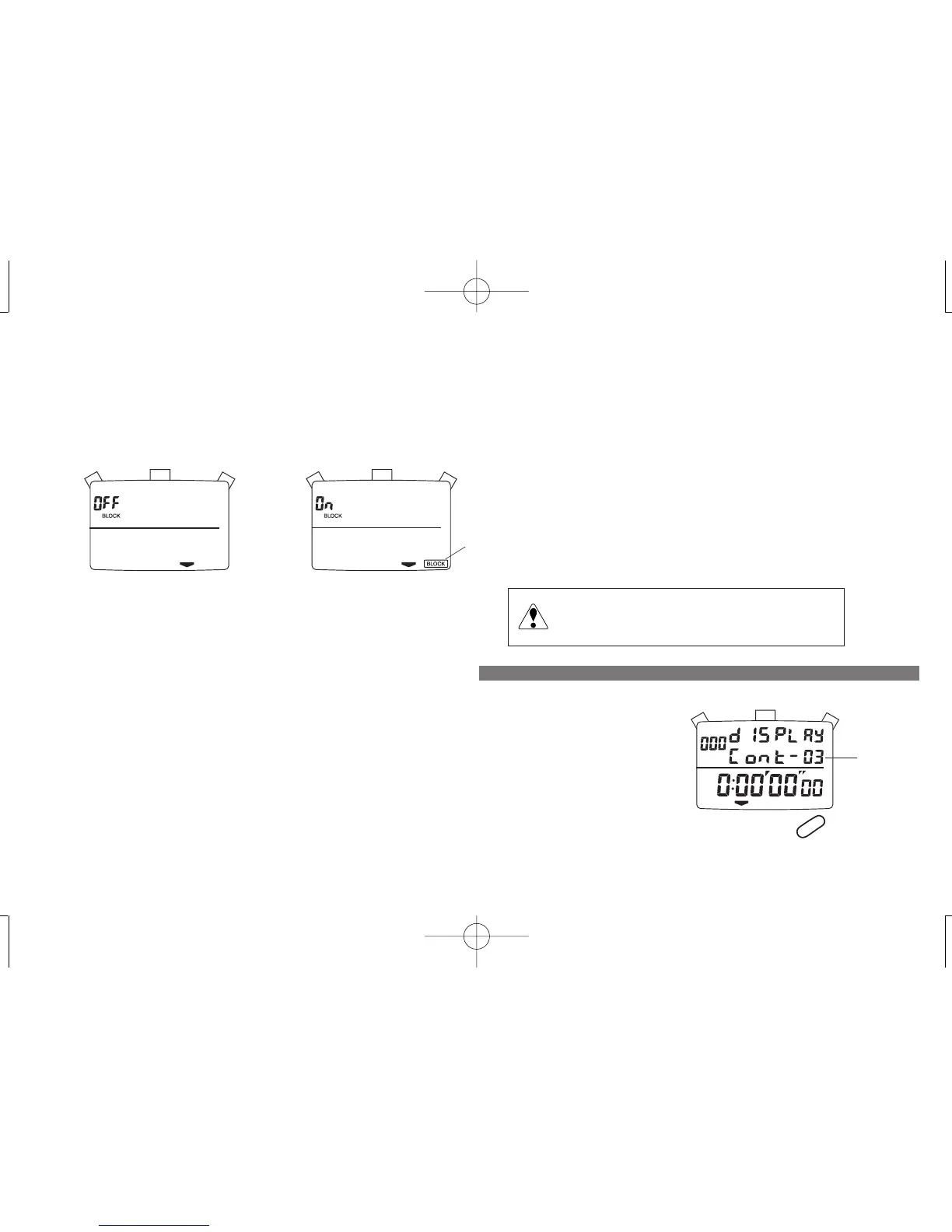
Block memory mode Single memory mode
BLOCK mark
Change of memory mode will delete all the
previously stored data.
CAUTION
5. To change the memory mode, press and hold "A" for 1.5 seconds.
When "OFF" is displayed above "BLOCK," the stopwatch is in the single memory mode, which is the default setting.
When "ON" is displayed above "BLOCK" and the BLOCK mark appears at the bottom right, the stopwatch is in the block memory mode, which is designed for
professional level use.
➔ Refer to MEMORY RECALL FUNCTION---BLOCK MEMORY MODE on page 10.


 To Next Page